
1,到官网下载nginx
http://nginx.org/download/nginx-1.10.3.tar.gz
wget http://nginx.org/download/nginx-1.10.3.tar.gz
2,安装必要的组件
yum -y install make zlib zlib-devel gcc-c++ libtool openssl openssl-devel
3,安装pcre,这里用的是8.42(用于rewrite模块)
到官网下载:https://nchc.dl.sourceforge.net/project/pcre/pcre/8.42/pcre-8.42.zip
wget https://nchc.dl.sourceforge.net/project/pcre/pcre/8.42/pcre-8.42.zip

解压unzip pcre-8.42.zip
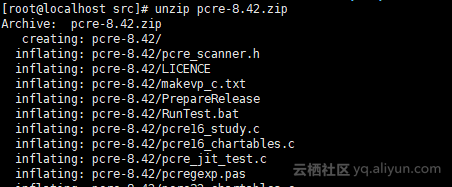
cd pcre-8.42/
./configure && make && make install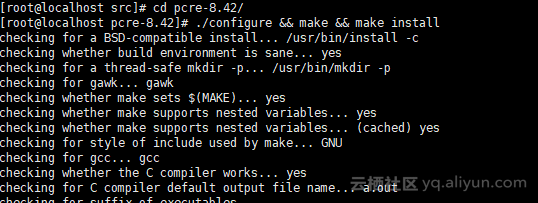
pcre-8.42安装完毕。
4 安装nginx
解压nginx,切到nginx源码目录
tar xf nginx-1.10.3.tar.gz && cd nginx-1.10.3
编译安装nginx
./configure --prefix=/usr/local/nginx --with-http_stub_status_module --with-http_ssl_module --with-pcre=/usr/local/src/pcre-8.42 && make && make install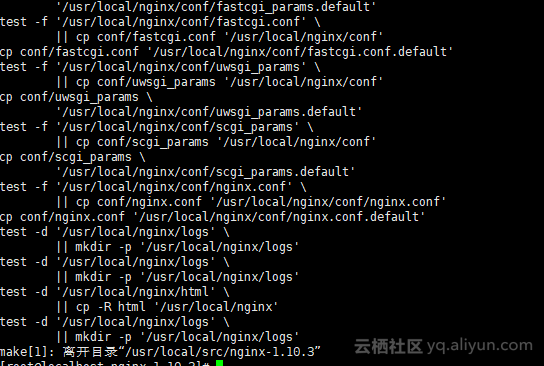
安装完毕!
5,开启和配置nginx(现在安装的nginx是软件自带的配置)
我这里有配置好的nginx.conf
user www;worker_processes auto;error_log /usr/local/nginx/logs/error.log warn;pid /usr/local/nginx/nginx.pid;events { use epoll ; worker_connections 1024;}http { include mime.types; default_type application/octet-stream; log_format main '$remote_addr - $remote_user [$time_local] "$request" ' '$status $body_bytes_sent "$http_referer" ' '"$http_user_agent" "$http_x_forwarded_for"'; server_tokens off; sendfile on; keepalive_timeout 65; gzip on; client_max_body_size 20m; add_header X- -Options SAMEORIGIN ; fastcgi_buffers 2 256k; fastcgi_busy_buffers_size 256k; fastcgi_temp_file_write_size 512k; server { listen 80 default_server; server_name _; return 444; } include vhost/*.conf ;}
替换原始的nginx.conf,添加www用户
6,启动nginx
/usr/local/nginx/sbin/nginx -t(测试语法)
/usr/local/nginx/sbin/nginx(启动)
ps -ef|grep nginx(查看进程)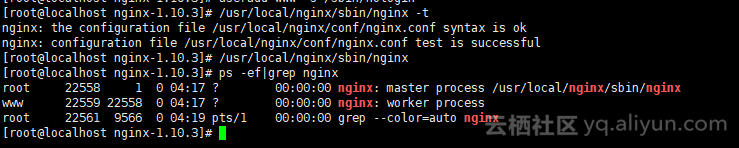
7,加入系统变量
[root@localhost nginx-1.10.3]# echo "export PATH=$PATH:/usr/local/nginx/sbin" >> /etc/profile
[root@localhost nginx-1.10.3]# . /etc/profile
8,设置开机启动
启动脚本如下
#! /bin/sh# chkconfig: 2345 55 25# De ion: Startup for nginx webserver on Debian. Place in /etc/init.d and# run 'update-rc.d -f nginx defaults', or use the appropriate command on your# distro. For CentOS/Redhat run: 'chkconfig --add nginx'### BEGIN INIT INFO# Provides: nginx# Required-Start: $all# Required-Stop: $all# Default-Start: 2 3 4 5# Default-Stop: 0 1 6# Short-De ion: starts the nginx web server# De ion: starts nginx using start-stop-daemon### END INIT INFO# Author: licess# website: http://lnmp.orgPATH=/usr/local/sbin:/usr/local/bin:/sbin:/bin:/usr/sbin:/usr/binNAME=nginxNGINX_BIN=/usr/local/nginx/sbin/$NAMECONFIGFILE=/usr/local/nginx/conf/$NAME.confPIDFILE=/usr/local/nginx/logs/$NAME.pidcase "$1" in start) echo -n "Starting $NAME... " if netstat -tnpl | grep -q nginx;then echo "$NAME (pid `pidof $NAME`) already running." exit 1 fi $NGINX_BIN -c $CONFIGFILE if [ "$?" != 0 ] ; then echo " failed" exit 1 else echo " done" fi ;; stop) echo -n "Stoping $NAME... " if ! netstat -tnpl | grep -q nginx; then echo "$NAME is not running." exit 1 fi $NGINX_BIN -s stop if [ "$?" != 0 ] ; then echo " failed. Use force-quit" exit 1 else echo " done" fi ;; status) if netstat -tnpl | grep -q nginx; then PID=`pidof nginx` echo "$NAME (pid $PID) is running..." else echo "$NAME is stopped" exit 0 fi ;; force-quit) echo -n "Terminating $NAME... " if ! netstat -tnpl | grep -q nginx; then echo "$NAME is not running." exit 1 fi kill `pidof $NAME` if [ "$?" != 0 ] ; then echo " failed" exit 1 else echo " done" fi ;; restart) $0 stop sleep 1 $0 start ;; reload) echo -n "Reload service $NAME... " if netstat -tnpl | grep -q nginx; then $NGINX_BIN -s reload echo " done" else echo "$NAME is not running, can't reload." exit 1 fi ;; configtest) echo -n "Test $NAME configure files... " $NGINX_BIN -t ;; *) echo "Usage: $0 {start|stop|force-quit|restart|reload|status|configtest}" exit 1 ;;esac保存为nginx,加入系统服务
nginx安装完毕!
我的阿里云1000元代金券地址:
https://promotion.aliyun.com/ntms/yunparter/invite.html?userCode=3ow2kbko
继续阅读与本文标签相同的文章
【基础】固定列宽的表格及示例演示
-
0723-6.2.0-如何在RedHat7.2使用rpm安装CDH(有CM)
2026-05-25栏目: 教程
-
0724-6.2.0-CM接管rpm方式安装的无CM的CDH集群
2026-05-25栏目: 教程
-
golang插件化方案
2026-05-25栏目: 教程
-
Apache Submarine
2026-05-25栏目: 教程
-
Impala查询卡顿分析案例
2026-05-25栏目: 教程