
概述
目前阿里云提供了关于人脸识别的调用接口,提供的接口包括人脸检测定位、人脸属性识别及人脸对比三个API,用户可以基于Rest API的调用说明完成调用操作。下面给出使用Java语言分别使用网络图片和本地图片调用人脸属性API的示例。
准备工作
1、拥有阿里云账号并开通了人脸识别服务,具体参考官方链接;
2、获取阿里云账户的AccessKey ID和Access Key Secret;
3、获取服务调用的地址,如果不清楚,可以直接到人脸识别API调试部分获取,也可以使用其完成快速测试。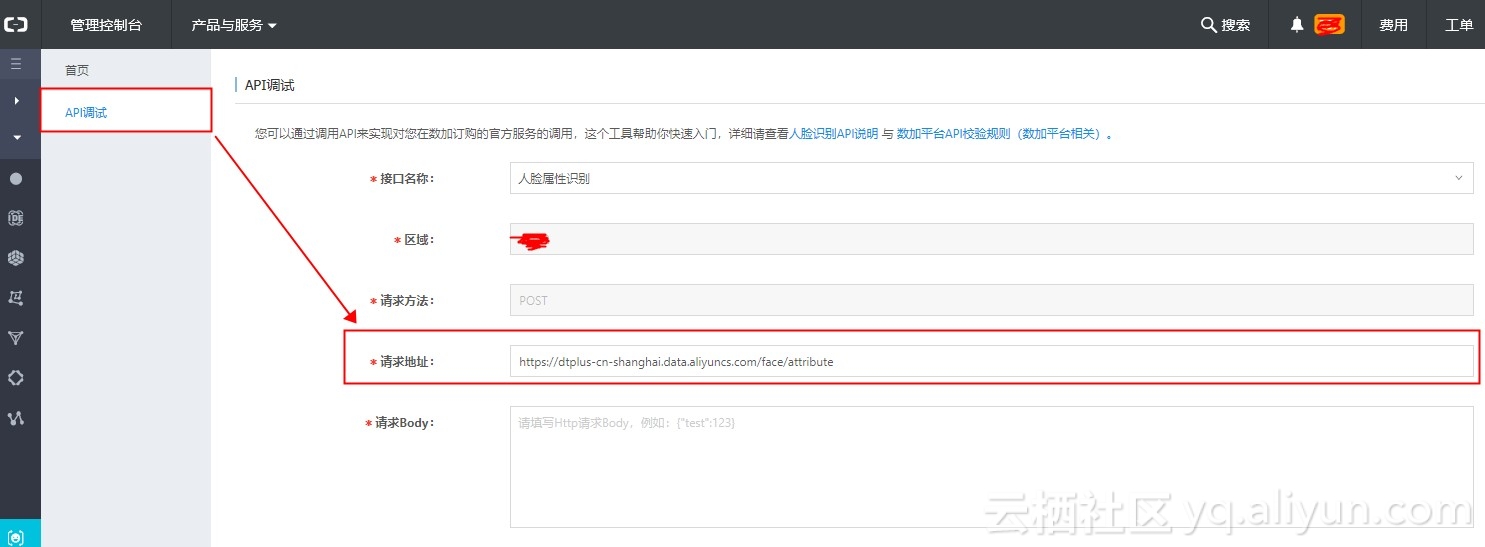
Java Code Sample
使用网络图片Code
import java.io.BufferedReader;import java.io.IOException;import java.io.InputStreamReader;import java.io.PrintWriter;import java.net.HttpURLConnection;import java.net.URL;import java.net.URLConnection;import java.security.MessageDigest;import java.text.SimpleDateFormat;import java.util.Date;import java.util.Locale;import javax.crypto.spec.SecretKeySpec;import sun.misc. 64Encoder;import javax.crypto.Mac;//@SuppressWarnings("restriction")public class FaceDemo1 {    /*     * 计算MD5+ 64     */    public static String MD5 64(String s) {        if (s == null)            return null;        String encodeStr = "";        byte[] utfBytes = s.getBytes();        MessageDigest mdTemp;        try {            mdTemp = MessageDigest.getInstance("MD5");            mdTemp.update(utfBytes);            byte[] md5Bytes = mdTemp.digest();             64Encoder b64Encoder = new  64Encoder();            encodeStr = b64Encoder.encode(md5Bytes);        } catch (Exception e) {            throw new Error("Failed to generate MD5 : " + e.getMessage());        }        return encodeStr;    }    /*     * 计算 HMAC-SHA1     */    public static String HMACSha1(String data, String key) {        String result;        try {            SecretKeySpec signingKey = new SecretKeySpec(key.getBytes(), "HmacSHA1");            Mac mac = Mac.getInstance("HmacSHA1");            mac.init(signingKey);            byte[] rawHmac = mac.doFinal(data.getBytes());            result = (new  64Encoder()).encode(rawHmac);        } catch (Exception e) {            throw new Error("Failed to generate HMAC : " + e.getMessage());        }        return result;    }    /*     * 等同于 中的 new Date().toUTCString();     */    public static String toGMTString(Date date) {        SimpleDateFormat df = new SimpleDateFormat("E, dd MMM yyyy HH:mm:ss z", Locale.UK);        df.setTimeZone(new java.util.SimpleTimeZone(0, "GMT"));        return df.format(date);    }    /*     * 发送POST请求     */    public static String sendPost(String url, String body, String ak_id, String ak_secret) throws Exception {        PrintWriter out = null;        BufferedReader in = null;        String result = "";        int statusCode = 200;        try {            URL realUrl = new URL(url);            /*             * http header 参数             */            String method = "POST";            String accept = "application/json";            String content_type = "application/json";            String path = realUrl.getFile();            String date = toGMTString(new Date());            // 1.对body做MD5+ 64加密            String bodyMd5 = MD5 64(body);            String stringToSign = method + "
" + accept + "
" + bodyMd5 + "
" + content_type + "
" + date + "
"                    + path;            // 2.计算 HMAC-SHA1            String signature = HMACSha1(stringToSign, ak_secret);            // 3.得到 authorization header            String authHeader = "Dataplus " + ak_id + ":" + signature;            // 打开和URL之间的连接            URLConnection conn = realUrl.openConnection();            // 设置通用的请求属性            conn.setRequestProperty("accept", accept);            conn.setRequestProperty("content-type", content_type);            conn.setRequestProperty("date", date);            conn.setRequestProperty("Authorization", authHeader);            // 发送POST请求必须设置如下两行            conn.setDoOutput(true);            conn.setDoInput(true);            // 获取URLConnection对象对应的输出流            out = new PrintWriter(conn.getOutputStream());            // 发送请求参数            out.print(body);            // flush输出流的缓冲            out.flush();            // 定义BufferedReader输入流来读取URL的响应            statusCode = ((HttpURLConnection)conn).getResponseCode();            if(statusCode != 200) {                in = new BufferedReader(new InputStreamReader(((HttpURLConnection)conn).getErrorStream()));            } else {                in = new BufferedReader(new InputStreamReader(conn.getInputStream()));            }            String line;            while ((line = in.readLine()) != null) {                result += line;            }        } catch (Exception e) {            e.printStackTrace();        } finally {            try {                if (out != null) {                    out.close();                }                if (in != null) {                    in.close();                }            } catch (IOException ex) {                ex.printStackTrace();            }        }        if (statusCode != 200) {            throw new IOException("
Http StatusCode: "+ statusCode + "
ErrorMessage: " + result);        }        return result;    }    /*     * GET请求     */    public static String sendGet(String url, String ak_id, String ak_secret) throws Exception {        String result = "";        BufferedReader in = null;        int statusCode = 200;        try {            URL realUrl = new URL(url);            /*             * http header 参数             */            String method = "GET";            String accept = "application/json";            String content_type = "application/json";            String path = realUrl.getFile();            String date = toGMTString(new Date());            // 1.对body做MD5+ 64加密            // String bodyMd5 = MD5 64(body);            String stringToSign = method + "
" + accept + "
" + "" + "
" + content_type + "
" + date + "
" + path;            // 2.计算 HMAC-SHA1            String signature = HMACSha1(stringToSign, ak_secret);            // 3.得到 authorization header            String authHeader = "Dataplus " + ak_id + ":" + signature;            // 打开和URL之间的连接            URLConnection connection = realUrl.openConnection();            // 设置通用的请求属性            connection.setRequestProperty("accept", accept);            connection.setRequestProperty("content-type", content_type);            connection.setRequestProperty("date", date);            connection.setRequestProperty("Authorization", authHeader);            connection.setRequestProperty("Connection", "keep-alive");            // 建立实际的连接            connection.connect();            // 定义 BufferedReader输入流来读取URL的响应            statusCode = ((HttpURLConnection)connection).getResponseCode();            if(statusCode != 200) {                in = new BufferedReader(new InputStreamReader(((HttpURLConnection)connection).getErrorStream()));            } else {                in = new BufferedReader(new InputStreamReader(connection.getInputStream()));            }            String line;            while ((line = in.readLine()) != null) {                result += line;            }        } catch (Exception e) {            e.printStackTrace();        } finally {            try {                if (in != null) {                    in.close();                }            } catch (Exception e) {                e.printStackTrace();            }        }        if (statusCode != 200) {            throw new IOException("
Http StatusCode: "+ statusCode + "
ErrorMessage: " + result);        }        return result;    }    public static void main(String[] args) throws Exception {        // 发送POST请求示例            System.out.println(i);            String ak_id = "******"; //用户ak            String ak_secret = "******"; // 用户ak_secret            String url = "https://dtplus-cn-shanghai.data.aliyuncs.com/face/attribute";            String body = "{"type": "0", "image_url":"https://ss0.bdstatic.com/94oJfD_bAAcT8t7mm9GUKT-xh_/timg?image&quality=100&size=b4000_4000&sec=1544608444&di=54513735567736d0eaeba7a13aa0421c&src=http://img5q.duitang.com/uploads/item/201411/23/20141123205812_Bircn.jpeg"}";            System.out.println("response body:" + sendPost(url, body, ak_id, ak_secret));    }}
使用本地图片Code
import java.io.*;import java.net.HttpURLConnection;import java.net.URL;import java.net.URLConnection;import java.security.MessageDigest;import java.text.SimpleDateFormat;import java.util.Date;import java.util.Locale;import javax.crypto.spec.SecretKeySpec;import sun.misc. 64Encoder;import javax.crypto.Mac;//@SuppressWarnings("restriction")public class FaceDemo2 {    /*     * 计算MD5+ 64     */    public static String MD5 64(String s) {        if (s == null)            return null;        String encodeStr = "";        byte[] utfBytes = s.getBytes();        MessageDigest mdTemp;        try {            mdTemp = MessageDigest.getInstance("MD5");            mdTemp.update(utfBytes);            byte[] md5Bytes = mdTemp.digest();             64Encoder b64Encoder = new  64Encoder();            encodeStr = b64Encoder.encode(md5Bytes);        } catch (Exception e) {            throw new Error("Failed to generate MD5 : " + e.getMessage());        }        return encodeStr;    }    /*     * 计算 HMAC-SHA1     */    public static String HMACSha1(String data, String key) {        String result;        try {            SecretKeySpec signingKey = new SecretKeySpec(key.getBytes(), "HmacSHA1");            Mac mac = Mac.getInstance("HmacSHA1");            mac.init(signingKey);            byte[] rawHmac = mac.doFinal(data.getBytes());            result = (new  64Encoder()).encode(rawHmac);        } catch (Exception e) {            throw new Error("Failed to generate HMAC : " + e.getMessage());        }        return result;    }    /*     * 等同于 中的 new Date().toUTCString();     */    public static String toGMTString(Date date) {        SimpleDateFormat df = new SimpleDateFormat("E, dd MMM yyyy HH:mm:ss z", Locale.UK);        df.setTimeZone(new java.util.SimpleTimeZone(0, "GMT"));        return df.format(date);    }    /*     * 发送POST请求     */    public static String sendPost(String url, String body, String ak_id, String ak_secret) throws Exception {        PrintWriter out = null;        BufferedReader in = null;        String result = "";        int statusCode = 200;        try {            URL realUrl = new URL(url);            /*             * http header 参数             */            String method = "POST";            String accept = "application/json";            String content_type = "application/json";//            String content_type = "application/octet-stream";            String path = realUrl.getFile();            String date = toGMTString(new Date());            // 1.对body做MD5+ 64加密            String bodyMd5 = MD5 64(body);            String stringToSign = method + "
" + accept + "
" + bodyMd5 + "
" + content_type + "
" + date + "
"                    + path;            // 2.计算 HMAC-SHA1            String signature = HMACSha1(stringToSign, ak_secret);            // 3.得到 authorization header            String authHeader = "Dataplus " + ak_id + ":" + signature;            // 打开和URL之间的连接            URLConnection conn = realUrl.openConnection();            // 设置通用的请求属性            conn.setRequestProperty("accept", accept);            conn.setRequestProperty("content-type", content_type);            conn.setRequestProperty("date", date);            conn.setRequestProperty("Authorization", authHeader);            // 发送POST请求必须设置如下两行            conn.setDoOutput(true);            conn.setDoInput(true);            // 获取URLConnection对象对应的输出流            out = new PrintWriter(conn.getOutputStream());            // 发送请求参数            out.print(body);            // flush输出流的缓冲            out.flush();            // 定义BufferedReader输入流来读取URL的响应            statusCode = ((HttpURLConnection)conn).getResponseCode();            if(statusCode != 200) {                in = new BufferedReader(new InputStreamReader(((HttpURLConnection)conn).getErrorStream()));            } else {                in = new BufferedReader(new InputStreamReader(conn.getInputStream()));            }            String line;            while ((line = in.readLine()) != null) {                result += line;            }        } catch (Exception e) {            e.printStackTrace();        } finally {            try {                if (out != null) {                    out.close();                }                if (in != null) {                    in.close();                }            } catch (IOException ex) {                ex.printStackTrace();            }        }        if (statusCode != 200) {            throw new IOException("
Http StatusCode: "+ statusCode + "
ErrorMessage: " + result);        }        return result;    }    /*     * GET请求     */    public static String sendGet(String url, String ak_id, String ak_secret) throws Exception {        String result = "";        BufferedReader in = null;        int statusCode = 200;        try {            URL realUrl = new URL(url);            /*             * http header 参数             */            String method = "GET";            String accept = "application/json";            String content_type = "application/json";//            String content_type = "application/octet-stream";            String path = realUrl.getFile();            String date = toGMTString(new Date());            // 1.对body做MD5+ 64加密            // String bodyMd5 = MD5 64(body);            String stringToSign = method + "
" + accept + "
" + "" + "
" + content_type + "
" + date + "
" + path;            // 2.计算 HMAC-SHA1            String signature = HMACSha1(stringToSign, ak_secret);            // 3.得到 authorization header            String authHeader = "Dataplus " + ak_id + ":" + signature;            // 打开和URL之间的连接            URLConnection connection = realUrl.openConnection();            // 设置通用的请求属性            connection.setRequestProperty("accept", accept);            connection.setRequestProperty("content-type", content_type);            connection.setRequestProperty("date", date);            connection.setRequestProperty("Authorization", authHeader);            connection.setRequestProperty("Connection", "keep-alive");            // 建立实际的连接            connection.connect();            // 定义 BufferedReader输入流来读取URL的响应            statusCode = ((HttpURLConnection)connection).getResponseCode();            if(statusCode != 200) {                in = new BufferedReader(new InputStreamReader(((HttpURLConnection)connection).getErrorStream()));            } else {                in = new BufferedReader(new InputStreamReader(connection.getInputStream()));            }            String line;            while ((line = in.readLine()) != null) {                result += line;            }        } catch (Exception e) {            e.printStackTrace();        } finally {            try {                if (in != null) {                    in.close();                }            } catch (Exception e) {                e.printStackTrace();            }        }        if (statusCode != 200) {            throw new IOException("
Http StatusCode: "+ statusCode + "
ErrorMessage: " + result);        }        return result;    }    public static void main(String[] args) throws Exception {        // 发送POST请求示例        String ak_id = "******"; //用户ak        String ak_secret = "******"; // 用户ak_secret        String url = "https://dtplus-cn-shanghai.data.aliyuncs.com/face/attribute";        //上传本地图片        // Request body        String pic_path = "C:Users****Desktop	img.jpg";//本地图片的路径        File pic 64 = new File(pic_path);        String pic = encodeImageTo 64(pic 64);        //提出 64编码的换行符问题        String data = pic.replaceAll("[s*

]", "");        data = " + data + ";        String body = "{"type": "+1+", "content": "+data+"}";        System.out.println("response body:" + sendPost(url, body, ak_id, ak_secret));    }    /**     * 将本地图片编码为 64     *     * @param file     * @return     * @throws Exception     */    public static String encodeImageTo 64(File file) throws Exception {        //将图片文件转化为字节数组字符串,并对其进行 64编码处理//        loggerger.info("图片的路径为:" + file.getAbsolutePath());        InputStream in = null;        byte[] data = null;        //读取图片字节数组        try {            in = new FileInputStream(file);            data = new byte[in.available()];            in.read(data);            in.close();        } catch (IOException e) {            e.printStackTrace();            throw new Exception("图片上传失败,请联系客服!");        }        //对字节数组 64编码         64Encoder encoder = new  64Encoder();        String  64 = encoder.encode(data);        return  64;//返回 64编码过的字节数组字符串    }}
人脸比对示例使用本地图片Code
import sun.misc. 64Encoder;import javax.crypto.Mac;import javax.crypto.spec.SecretKeySpec;import java.io.*;import java.net.HttpURLConnection;import java.net.URL;import java.net.URLConnection;import java.security.MessageDigest;import java.text.SimpleDateFormat;import java.util.Date;import java.util.Locale;//@SuppressWarnings("restriction")public class FaceDemoVerify {    /*     * 计算MD5+ 64     */    public static String MD5 64(String s) {        if (s == null)            return null;        String encodeStr = "";        byte[] utfBytes = s.getBytes();        MessageDigest mdTemp;        try {            mdTemp = MessageDigest.getInstance("MD5");            mdTemp.update(utfBytes);            byte[] md5Bytes = mdTemp.digest();             64Encoder b64Encoder = new  64Encoder();            encodeStr = b64Encoder.encode(md5Bytes);        } catch (Exception e) {            throw new Error("Failed to generate MD5 : " + e.getMessage());        }        return encodeStr;    }    /*     * 计算 HMAC-SHA1     */    public static String HMACSha1(String data, String key) {        String result;        try {            SecretKeySpec signingKey = new SecretKeySpec(key.getBytes(), "HmacSHA1");            Mac mac = Mac.getInstance("HmacSHA1");            mac.init(signingKey);            byte[] rawHmac = mac.doFinal(data.getBytes());            result = (new  64Encoder()).encode(rawHmac);        } catch (Exception e) {            throw new Error("Failed to generate HMAC : " + e.getMessage());        }        return result;    }    /*     * 等同于 中的 new Date().toUTCString();     */    public static String toGMTString(Date date) {        SimpleDateFormat df = new SimpleDateFormat("E, dd MMM yyyy HH:mm:ss z", Locale.UK);        df.setTimeZone(new java.util.SimpleTimeZone(0, "GMT"));        return df.format(date);    }    /*     * 发送POST请求     */    public static String sendPost(String url, String body, String ak_id, String ak_secret) throws Exception {        PrintWriter out = null;        BufferedReader in = null;        String result = "";        int statusCode = 200;        try {            URL realUrl = new URL(url);            /*             * http header 参数             */            String method = "POST";            String accept = "application/json";            String content_type = "application/json";//            String content_type = "application/octet-stream";            String path = realUrl.getFile();            String date = toGMTString(new Date());            // 1.对body做MD5+ 64加密            String bodyMd5 = MD5 64(body);            String stringToSign = method + "
" + accept + "
" + bodyMd5 + "
" + content_type + "
" + date + "
"                    + path;            // 2.计算 HMAC-SHA1            String signature = HMACSha1(stringToSign, ak_secret);            // 3.得到 authorization header            String authHeader = "Dataplus " + ak_id + ":" + signature;            // 打开和URL之间的连接            URLConnection conn = realUrl.openConnection();            // 设置通用的请求属性            conn.setRequestProperty("accept", accept);            conn.setRequestProperty("content-type", content_type);            conn.setRequestProperty("date", date);            conn.setRequestProperty("Authorization", authHeader);            // 发送POST请求必须设置如下两行            conn.setDoOutput(true);            conn.setDoInput(true);            // 获取URLConnection对象对应的输出流            out = new PrintWriter(conn.getOutputStream());            // 发送请求参数            out.print(body);            // flush输出流的缓冲            out.flush();            // 定义BufferedReader输入流来读取URL的响应            statusCode = ((HttpURLConnection)conn).getResponseCode();            if(statusCode != 200) {                in = new BufferedReader(new InputStreamReader(((HttpURLConnection)conn).getErrorStream()));            } else {                in = new BufferedReader(new InputStreamReader(conn.getInputStream()));            }            String line;            while ((line = in.readLine()) != null) {                result += line;            }        } catch (Exception e) {            e.printStackTrace();        } finally {            try {                if (out != null) {                    out.close();                }                if (in != null) {                    in.close();                }            } catch (IOException ex) {                ex.printStackTrace();            }        }        if (statusCode != 200) {            throw new IOException("
Http StatusCode: "+ statusCode + "
ErrorMessage: " + result);        }        return result;    }    /*     * GET请求     */    public static String sendGet(String url, String ak_id, String ak_secret) throws Exception {        String result = "";        BufferedReader in = null;        int statusCode = 200;        try {            URL realUrl = new URL(url);            /*             * http header 参数             */            String method = "GET";            String accept = "application/json";            String content_type = "application/json";//            String content_type = "application/octet-stream";            String path = realUrl.getFile();            String date = toGMTString(new Date());            // 1.对body做MD5+ 64加密            // String bodyMd5 = MD5 64(body);            String stringToSign = method + "
" + accept + "
" + "" + "
" + content_type + "
" + date + "
" + path;            // 2.计算 HMAC-SHA1            String signature = HMACSha1(stringToSign, ak_secret);            // 3.得到 authorization header            String authHeader = "Dataplus " + ak_id + ":" + signature;            // 打开和URL之间的连接            URLConnection connection = realUrl.openConnection();            // 设置通用的请求属性            connection.setRequestProperty("accept", accept);            connection.setRequestProperty("content-type", content_type);            connection.setRequestProperty("date", date);            connection.setRequestProperty("Authorization", authHeader);            connection.setRequestProperty("Connection", "keep-alive");            // 建立实际的连接            connection.connect();            // 定义 BufferedReader输入流来读取URL的响应            statusCode = ((HttpURLConnection)connection).getResponseCode();            if(statusCode != 200) {                in = new BufferedReader(new InputStreamReader(((HttpURLConnection)connection).getErrorStream()));            } else {                in = new BufferedReader(new InputStreamReader(connection.getInputStream()));            }            String line;            while ((line = in.readLine()) != null) {                result += line;            }        } catch (Exception e) {            e.printStackTrace();        } finally {            try {                if (in != null) {                    in.close();                }            } catch (Exception e) {                e.printStackTrace();            }        }        if (statusCode != 200) {            throw new IOException("
Http StatusCode: "+ statusCode + "
ErrorMessage: " + result);        }        return result;    }    public static void main(String[] args) throws Exception {        // 发送POST请求示例        String ak_id = "********"; //用户ak        String ak_secret = "********"; // 用户ak_secret        String url = "https://dtplus-cn-shanghai.data.aliyuncs.com/face/verify";        //上传本地图片        // Request body        String pic_path = "D:picturetest	img.jpg";//本地图片的路径        File pic 64 = new File(pic_path);        String pic = encodeImageTo 64(pic 64);        //提出 64编码的换行符问题        String data = pic.replaceAll("[s*

]", "");        data = " + data + ";        String body = "{"type":1,
" +                ""content_1":"+data+",
" +                ""content_2":"+data+"
" +                "}";        System.out.println("response body:" + sendPost(url, body, ak_id, ak_secret));    }    /**     * 将本地图片编码为 64     *     * @param file     * @return     * @throws Exception     */    public static String encodeImageTo 64(File file) throws Exception {        //将图片文件转化为字节数组字符串,并对其进行 64编码处理//        loggerger.info("图片的路径为:" + file.getAbsolutePath());        InputStream in = null;        byte[] data = null;        //读取图片字节数组        try {            in = new FileInputStream(file);            data = new byte[in.available()];            in.read(data);            in.close();        } catch (IOException e) {            e.printStackTrace();            throw new Exception("图片上传失败,请联系客服!");        }        //对字节数组 64编码         64Encoder encoder = new  64Encoder();        String  64 = encoder.encode(data);        return  64;//返回 64编码过的字节数组字符串    }}
注意事项
关于调用本地图片的问题,特别需要注意关于 64编码默认添加了换行符的问题,需要剔除,请求body的具体格式也需要注意,具体参考示例代码。
参考链接
继续阅读与本文标签相同的文章
-
甘孜州歌舞数据库:弦子拉动千年悠扬
2026-05-18栏目: 教程
-
越来越“聪明”的人工智能可能会取代人类!是否属实?
2026-05-18栏目: 教程
-
全球重磅数据周来袭,这些大事将影响本周市场
2026-05-18栏目: 教程
-
阿里云Hi拼团优惠活动全新升级,活动变化亮点总结
2026-05-18栏目: 教程
-
CNC加工中心G41/G42指令是什么意思?怎么使用?
2026-05-18栏目: 教程