
案例:
传入的截图时间无效,无论传多少值,都只截取视频的第一帧
排查:
如果选则是关键帧截图,需要看好关键帧的间隔设置,。可以参考下官网的 java 代码,测试是过是可以生成多张的。
package com.aliyun.mts;import java.io.UnsupportedEncodingException;import java.net.URLEncoder;import com.alibaba.fastjson.JSONArray;import com.alibaba.fastjson.JSON ;import com.aliyuncs.profile.DefaultProfile;import com.aliyuncs.DefaultAcsClient;import com.aliyuncs.IAcsClient;import com.aliyuncs.exceptions.ClientException;import com.aliyuncs.exceptions.ServerException;import com.aliyuncs.mts.model.v20140618.*;public class Snapshot { private static String accessKeyId = "xxx"; private static String accessKeySecret = "xxx"; private static String mpsRegionId = "cn-hangzhou"; private static String pipelineId = "xxx"; private static String ossLocation = "oss-cn-hangzhou"; private static String ossBucket = "xxx"; private static String ossInput = "input.mp4"; private static String ossOutput = "output_{Count}.jpg"; public static void main(String[] args) { // DefaultAcsClient DefaultProfile profile = DefaultProfile.getProfile( mpsRegionId, // Region ID accessKeyId, // AccessKey ID accessKeySecret); // Access Key Secret IAcsClient client = new DefaultAcsClient(profile); // request SubmitSnapshotJobRequest request = new SubmitSnapshotJobRequest(); // Input JSON input = new JSON (); input.put("Location", ossLocation); input.put("Bucket", ossBucket); try { input.put(" ", URLEncoder.encode(ossInput , "utf-8")); } catch (UnsupportedEncodingException e) { throw new RuntimeException("input URL encode failed"); } request.setInput(input.toJSONString()); // SnapshotConfig JSON snapshotConfig = new JSON (); // SnapshotConfig->OutputFile JSON output = new JSON (); output.put("Location", ossLocation); output.put("Bucket", ossBucket); try { output.put(" ", URLEncoder.encode(ossOutput , "utf-8")); } catch (UnsupportedEncodingException e) { throw new RuntimeException("output URL encode failed"); } snapshotConfig.put("OutputFile", output.toJSONString()); // SnapshotConfig->Time snapshotConfig.put("Time", "2"); // SnapshotConfig->Interval/Num snapshotConfig.put("Interval", "2"); snapshotConfig.put("Num", "3"); // SnapshotConfig->Width/Height snapshotConfig.put("Height", "360"); // SnapshotConfig request.setSnapshotConfig(snapshotConfig.toJSONString()); // PipelineId request.setPipelineId(pipelineId); // call api SubmitSnapshotJobResponse response; try { response = client.getAcsResponse(request); System.out.println("RequestId is:"+response.getRequestId()); System.out.println("JobId is:" + response.getSnapshotJob().getId()); System.out.println(String.format( "http://%s.%s.aliyuncs.com/output_00001.jpg", ossBucket, ossLocation)); System.out.println(String.format( "http://%s.%s.aliyuncs.com/output_00002.jpg", ossBucket, ossLocation)); System.out.println(String.format( "http://%s.%s.aliyuncs.com/output_00003.jpg", ossBucket, ossLocation)); } catch (ServerException e) { e.printStackTrace(); } catch (ClientException e) { e.printStackTrace(); } }}案例:
媒体处理设置 CBR 转码后均失败
排查:
媒体处理提供了转码转码模式的转码
- CBR 模式下,如果设置了固定码率需要结合 maxrate minrate vbv 三个参数才能用,CBR 要求保持的码率是恒定的,不能有波动,比如运动比较大的画面。
- ONEPASS 模式下,用户可以设置客户端设置的固定码率,允许码率有波动。
- TWO PASS 模式下,在第一次其实是检测收集运动啊亮度等相关数据,这样在第二次编码的时候就会针对不同的场景来进行动态的压缩编码。二次编码比一次编码质量要好一些的。但是编码时间也会增加不少。使用二次编码可以把变化不大的画面转换时码率低一些(如静态画面),而变化大的码率高一些(如打斗动作部分),这样码率是变化的,可以使整部影片的清晰度比较均匀,只有在转换高清影片时二次编码才能发挥最大做用。
结论:
更改 ONEPASS 模式后问题解决。
案例:
MTS 转码首帧总是黑屏
排查:
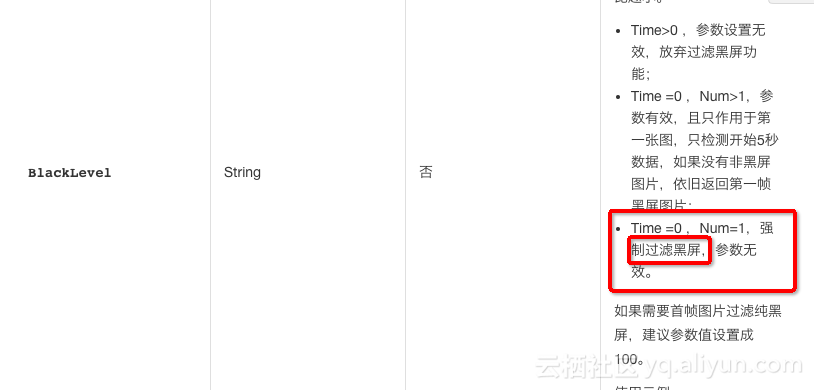
当提交的截图是。" Type":"intra" 时,并且视频的黑色元素占比较高时截图出来的可能会是黑屏,可以通过如下参数组合尝试重新截图。
time=0 num=1. blacklevel=90。
案例:
客户端请求 MTS 提交转码任务并设置截图,并按照 1s 的 interval 截图,视频很长但是只截取到几张图。
排查:
遇到问题可以按照以下思路排查:
- 优先看下客户端提交的截图参数 format_type 截图类型,是 intrl 关键帧截图还是 normal 普通截图。如果是 intrl 截图设置了 interval 也是没用的。
- 如果是关键帧截图,看下视频的关键帧有多少,和截图的数量是不是一致的,如果一致就对了。
- 如果是普通截图的话就会按照 interval 的间隔来截图。
继续阅读与本文标签相同的文章
上一篇 :
vue使用rem实现 移动端屏幕适配
下一篇 :
详解将Django部署到Centos7全攻略
-
阿里云数据库RDS通用型和独享型区别在哪?如何选择?
2026-05-18栏目: 教程
-
如何选购配置云数据库RDS MySQL 的流程 新手必看
2026-05-18栏目: 教程
-
跨境电商女装开发风向标
2026-05-18栏目: 教程
-
线上线下场景全方面打通,小程序成为家居行业的新卖点!
2026-05-18栏目: 教程
-
下载一款手机软件后,为何总是要让我们授权一些,看似毫无关联的权限?
2026-05-18栏目: 教程