
初学机器学习,安装Tensorflow时遇到了点问题,环境是WIN10+CONDA,简单做个笔记记录一下。
正常通过CONDA INSTALL是无法安装TF2.0的,所以只能通过PIP安装,如果你安装后没有任何问题,那么恭喜你,因为我没这么幸运。安装后我遇到了下面的问题,这个问题我花了1个多小时才得以解决,因众所周知的原因,只能BAIDU+BING,尝试了好些方案后找到如下亲测靠谱方案,供大家参考。
简言之,其实就是环境变量没设对的问题,把CONDA的一些路径加入到PATH当中去就行了。
ImportError: DLL load failed: The specified module could not be found.Since there is no tensorflow 2.0 in Conda, you will have to resort to install it from pip command, following are steps to install tensorflow 2.0.
make sure you have pip command on your environment
conda list pip
if not, please install it first
conda install pip
- Step 1: install tensorflow from pip, it will install the latest tensorflow which is 2.0 as of now @2019-10-19
pip install tensorflow- Step 2: open cmd to test tesorflow
import tensorflow as tfThe result should be as below: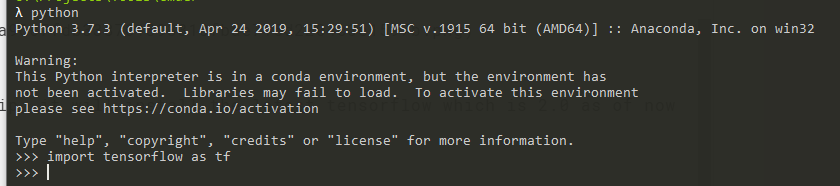
- Step 3 (additional): in case you have the following error message, please config your PATH environment
ImportError: DLL load failed: The specified module could not be found.Open your Anaconda Prompt to check %PATH% configuration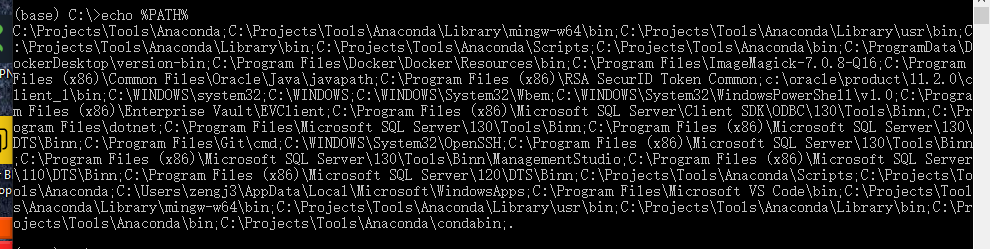
Compare the %PATH% from your cmd
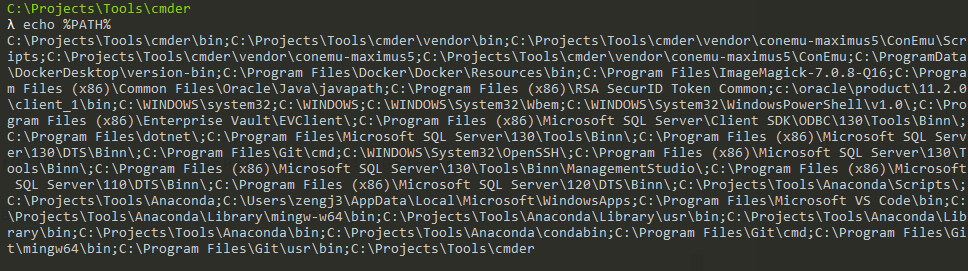
Add those missing path about Anacona to your account path or system path,below path is only for reference purpose which may vary from yours.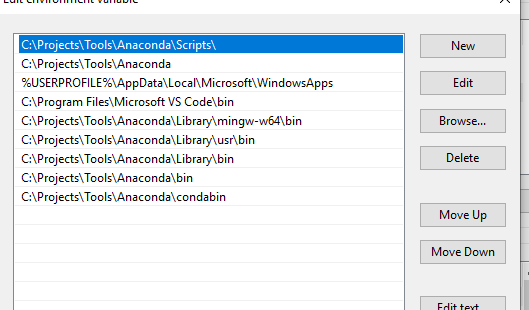
Test it again from python command, it should be resolved
继续阅读与本文标签相同的文章
linux 软raid实现,lvm管理
阿里云网站备案申请被驳回的问题解答汇总
-
Joomla 4具有可自定义的HTML电子邮件模板
2026-05-17栏目: 教程
-
新能力 | “商户会员卡”上线,又一个会员经营利器!
2026-05-17栏目: 教程
-
《哪吒》的制作公司上云啦!大千阳光全面拥抱阿里云
2026-05-17栏目: 教程
-
阿里巴巴创业者基金/汇丰JUMPSTARTER环球创业比赛
2026-05-17栏目: 教程
-
西安社区 | Apache RocketMQ开发者沙龙
2026-05-17栏目: 教程