

前言
Sentinel 原生版本的规则管理通过API 将规则推送至客户端并直接更新到内存中,并不能直接用于生产环境。不过官方也提供了一种 Push模式,扩展读数据源ReadableDataSource,规则中心统一推送,客户端通过注册监听器的方式时刻监听变化,比如使用 Nacos、Zookeeper 等配置中心。这种方式有更好的实时性和一致性保证。这里我们通过配置 Nacos 来实现流控规则的统一存储配置。
架构
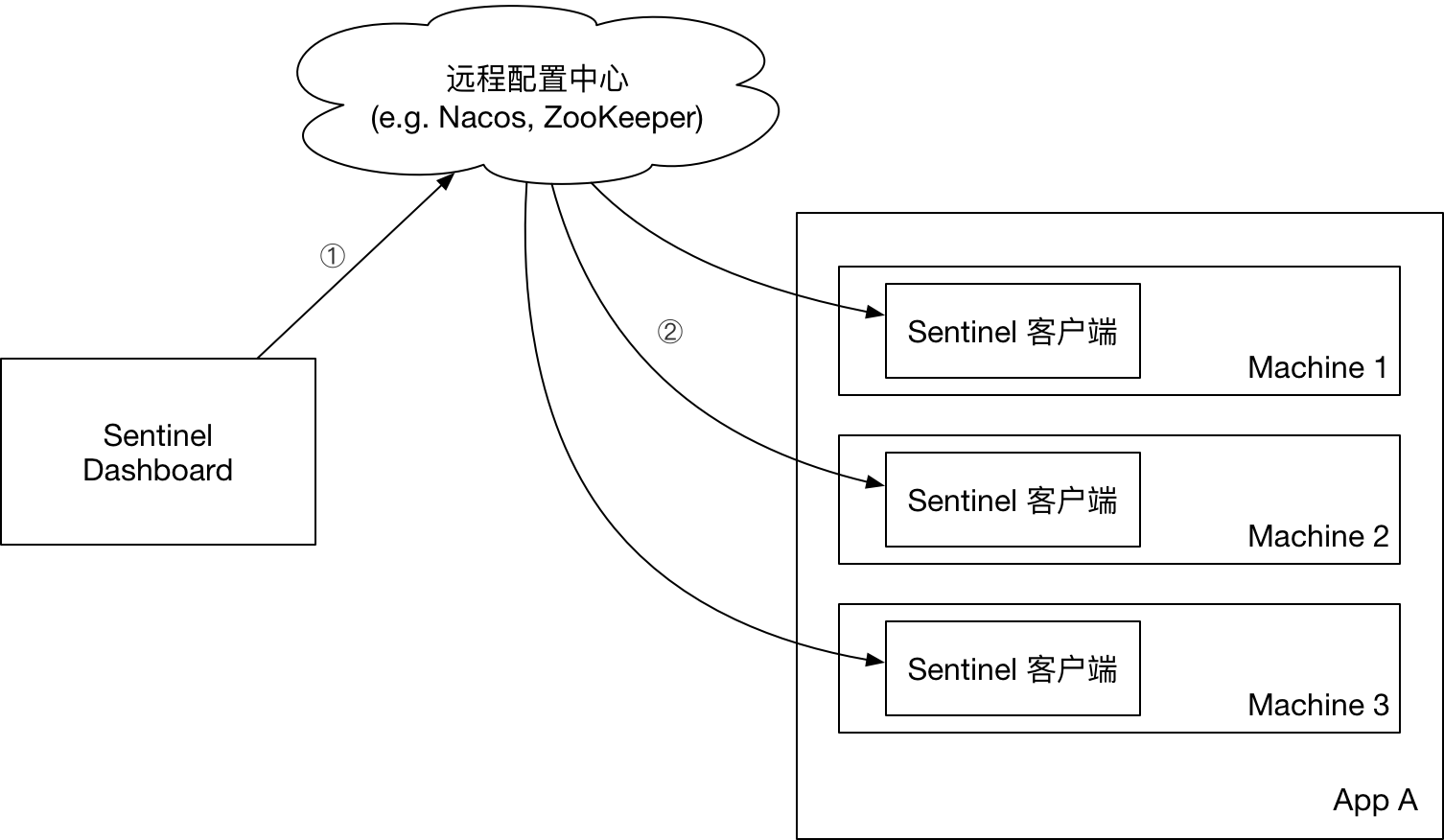
控制台推送规则至配置中心,客户端通过监听事件从配置中心获取流控规则。
客户端配置
pom. 引入:
<dependency> <groupId>com.alibaba.csp</groupId> <artifactId>sentinel-datasource-nacos</artifactId> <version>1.6.3</version> </dependency>配置文件:
# nacos的访问地址,配置参考 https://blog.52itstyle.vip/archives/4174/ spring.cloud.sentinel.datasource.ds.nacos.server-addr=47.104.187.19:8848#nacos中存储规则的dataId,对于dataId使用了${spring.application.name}变量,这样可以根据应用名来区分不同的规则配置spring.cloud.sentinel.datasource.ds.nacos.dataId=${spring.application.name}-flow-rules#nacos中存储规则的groupIdspring.cloud.sentinel.datasource.ds.nacos.groupId=SENTINEL_GROUP#定义存储的规则类型spring.cloud.sentinel.datasource.ds.nacos.rule-type=flow控制台配置
修改 pom. ,原来的<scope>test</scope>去掉:
<dependency> <groupId>com.alibaba.csp</groupId> <artifactId>sentinel-datasource-nacos</artifactId></dependency>把 src/test 下面的包 com.alibaba.csp.sentinel.dashboard.rule.nacos 拷贝到 src/main/java 下面。
修改 NacosConfig:
/** * @author Eric Zhao * @since 1.4.0 */@Configurationpublic class NacosConfig { @Value("${nacos.address}") private String address; @Bean public Converter<List<FlowRuleEntity>, String> flowRuleEntityEncoder() { return JSON::toJSONString; } @Bean public Converter<String, List<FlowRuleEntity>> flowRuleEntityDecoder() { return s -> JSON.parseArray(s, FlowRuleEntity.class); } @Bean public ConfigService nacosConfigService() throws Exception { Properties properties = new Properties(); properties.put("serverAddr",address); return ConfigFactory.createConfigService(properties); }}application.properties 配置引入 Nacos:
# nacos的访问地址,配置参考 https://blog.52itstyle.vip/archives/4174/ nacos.address=47.104.197.19:8848FlowControllerV2 指定对应的 Bean 开启 Nacos 适配。
@Autowired@Qualifier("flowRuleNacosProvider")private DynamicRuleProvider<List<FlowRuleEntity>> ruleProvider;@Autowired@Qualifier("flowRuleNacosPublisher")private DynamicRulePublisher<List<FlowRuleEntity>> rulePublisher;修改sidebar.html页面, 流控规则路由从 dashboard.flowV1 改成 dashboard.flow
<-- nacos 动态规则配置--><li ui-sref-active="active" ng-if="!entry.isGateway"> <a ui-sref="dashboard.flow({app: entry.app})"> <i class="glyphicon glyphicon-filter"></i> 流控规则</a></li>如图所示,界面会多了一个回到单机页面的按钮,这里我们新增一个流控规则。
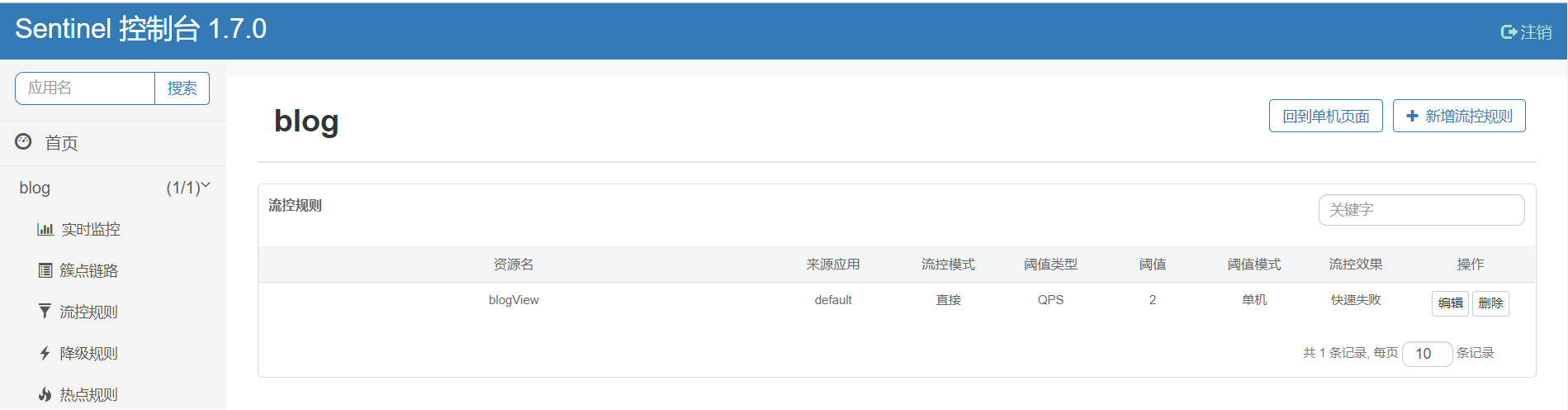
登录 Nacos 后台,配置管理->配置列表:
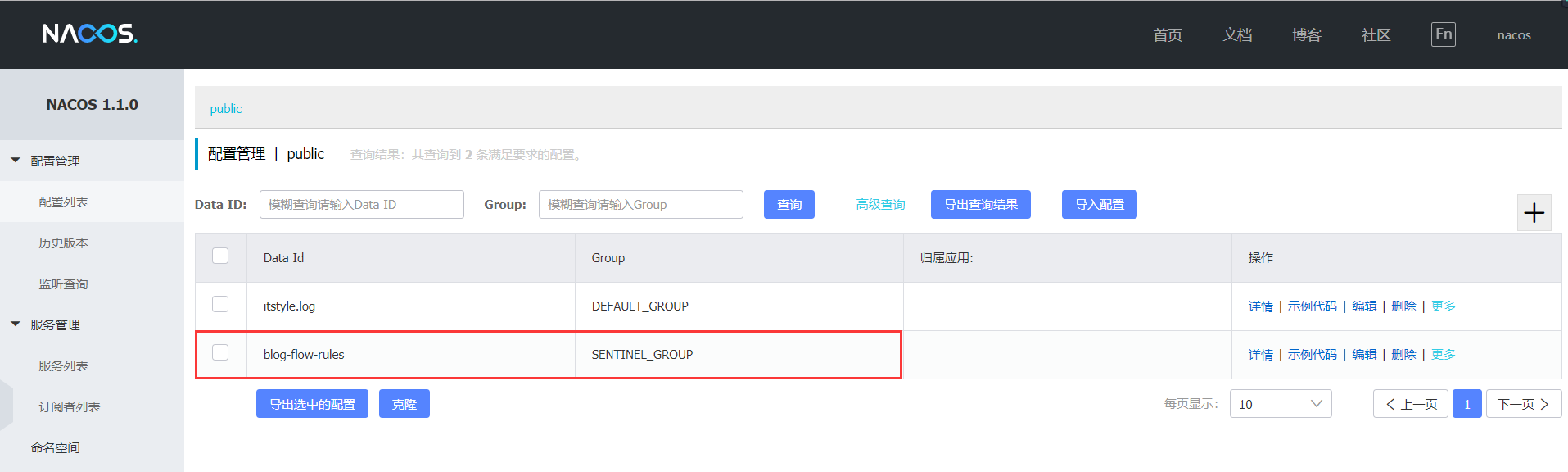
点击进入配置详情,配置内容如下:
[{ "app": "blog", "clusterConfig": { "fallbackToLocalWhenFail": true, "sampleCount": 10, "strategy": 0, "thresholdType": 0, "windowIntervalMs": 1000 }, "clusterMode": false, "controlBehavior": 0, "count": 2.0, "gmtCreate": 1568617671812, "gmtModified": 1568622253889, "grade": 1, "id": 6, "ip": "10.136.168.88", "limitApp": "default", "port": 8720, "resource": "blogView", "strategy": 0}]小结
生产环境下,推送规则正确做法应该是 配置中心控制台/Sentinel 控制台 → 配置中心 → Sentinel 数据源 → Sentinel。
案例
https://gitee.com/52itstyle/spring-boot-blog
参考
https://github.com/alibaba/Sentinel
https://github.com/alibaba/Sentinel/tree/master/sentinel-dashboard
继续阅读与本文标签相同的文章
-
Dremio扩展达梦数据库连接
2026-05-17栏目: 教程
-
应用程序的架构演变,微服务不是终点
2026-05-17栏目: 教程
-
数据库OceanBase创始人阳振坤:通关TPC-C到底有多难? | 10月8号栖夜读
2026-05-17栏目: 教程
-
精彩看点:2019云栖大会,阿里云MVP发生了哪些大事?
2026-05-17栏目: 教程
-
每一页都是干货,这10本Python新书,我必须推荐给你
2026-05-17栏目: 教程