
Siege
web服务器性能测试的工具有很多,比如ab,siege等,小组使用siege测试工具进行性能测试。
介绍
Siege是一个http/https回归测试和基准测试工具。它旨在让Web开发人员在压力下测试其代码的性能,以了解它部署在互联网上的表现。它允许用户使用可配置数量的并发模拟用户访问Web服务器。这些用户将网络服务器置于“围攻下”。围攻的持续时间是在传输中测量,模拟用户的总和以及每个模拟用户重复点击服务器的次数。因此20个并发用户请求50次就是1000次传输。整个性能测量包括测试总耗时时长,传输的数据量(包括handlers),服务器的响应时间,事务速率,吞吐量,并发性以及返回的正常次数。这些指标会在每次运行结束时进行量化和报告,各个指标代表什么含义会在下面介绍。
Siege基本上有三种操作模式,回归,互联网模拟和暴力。它可以从配置文件中读取大量URL,并逐个(回归)或随机(互联网模拟)运行它们,或者用户可以在命令行中使用命令行简单地敲击单个URL;
安装
- 安装包安装
wget http://download.joedog.org/siege/siege-latest.tar.gz$ tar zxf siege-latest.tar.gz$ cd siege-4.0.2/$ ./configure$ sudo make$ sudo make install- 命令行
yum install siege查看是否安装成功:
查看siege安装路径:$ which siege/usr/local/bin/siege查看siege版本:$ siege -VSIEGE 4.0.2参数介绍
SIEGE 4.0.2Usage: siege [options] siege [options] URL siege -g URLOptions: -V, --version VERSION, prints the version number. -h, --help HELP, prints this section. -C, --config CONFIGURATION, show the current config. -v, --verbose VERBOSE, prints notification to screen. -q, --quiet QUIET turns verbose off and suppresses output. -g, --get GET, pull down HTTP headers and display the transaction. Great for application debugging. -c, --concurrent=NUM CONCURRENT users, default is 10 -r, --reps=NUM REPS, number of times to run the test. -t, --time=NUMm TIMED testing where "m" is modifier S, M, or H ex: --time=1H, one hour test. -d, --delay=NUM Time DELAY, random delay before each requst -b, --benchmark BENCHMARK: no delays between requests. -i, --internet INTERNET user simulation, hits URLs randomly. -f, --file=FILE FILE, select a specific URLS FILE. -R, --rc=FILE RC, specify an siegerc file -l, --log[=FILE] LOG to FILE. If FILE is not specified, the default is used: PREFIX/var/siege.log -m, --mark="text" MARK, mark the log file with a string. between .001 and NUM. (NOT COUNTED IN STATS) -H, --header="text" Add a header to request (can be many) -A, --user-agent="text" Sets User-Agent in request -T, --content-type="text" Sets Content-Type in request调用
当服务启动后,就可以测试调用了:
单条地址 重复测试:
siege -r 10 -c 25 http://0.0.0.0:5000/reco_user_fit?uid=10文件测试:文件里面准备好的多条访问地址,可以通过蚕食控制选择是逐条测试或者随机测试:
siege -c 15 -r 5000 -b -f test_file &> log.press.$RANDOM &
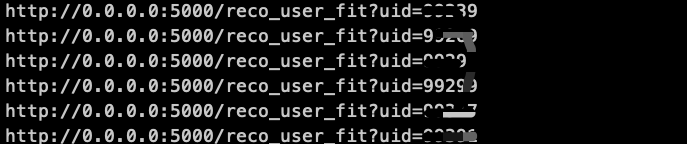
test_file文件格式如下所示:
结果参数介绍
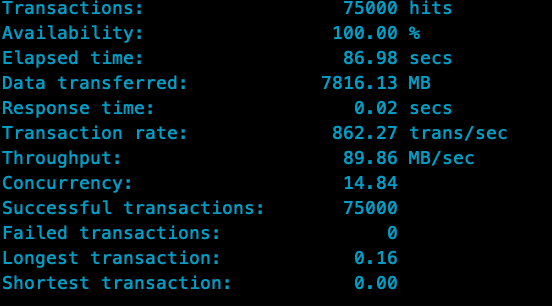
-c 25: 25 个仿真用户,-r 10: 每个用户请求的次数;Transactions:服务器受到的请求次数;Elapsed time: 整个测试阶段总耗时;Data transferred:每个仿真用户传输数据大小的总和;Response time:每次请求耗时的平均时间;Transaction rate: 服务器每秒能够处理的请求数量;Throughput: 服务器每秒传输的字节数;Concurrency: 平均同时连接数;Successful transactions: 成功连接次数;Failed transactions: 失败连接次数;Longest transactions:最长的一次请求时间;Shortest transactions:最短的一次请求时间;
本地测试效果还行,具体上线效果还未知,需要上线实验才知。
参考
继续阅读与本文标签相同的文章
-
异步社区又更新,这些你常用的功能变化一定要知道!
2026-05-20栏目: 教程
-
编码方法论,赋能你我他 | 8月16号云栖夜读
2026-05-20栏目: 教程
-
Knative 基本功能深入剖析:Knative Serving 之服务路由管理
2026-05-20栏目: 教程
-
如何在Linux上挂载OSS Bucket
2026-05-20栏目: 教程
-
公司系统太多,项目如何管?
2026-05-20栏目: 教程