
粘包和拆包是什么?
TCP协议是一种字节流协议,没有记录边界,我们在接收消息的时候,不能人为接收到的数据包就是一个整包消息
当客户端向服务器端发送多个消息数据的时候,TCP协议可能将多个消息数据合并成一个数据包进行发送,这就是粘包
当客户端向服务器端发送的消息过大的时候,tcp协议可能将一个数据包拆成多个数据包来进行发送,这就是拆包
以下一netty为例,展示一下tcp粘包和拆包的例子:
ServerBusinessHanler:
import io.netty.buffer.ByteBuf;import io.netty.buffer.Unpooled;import io.netty.channel.ChannelHandlerContext;import io.netty.channel.SimpleChannelInboundHandler;import java.nio.charset.Charset;import java.util.UUID;public class ServerBusinessHanler extends SimpleChannelInboundHandler<ByteBuf> { int count = 0; @Override protected void channelRead0(ChannelHandlerContext ctx, ByteBuf msg) throws Exception { byte[] bytes = new byte[msg.readableBytes()]; msg.readBytes(bytes); String message = new String(bytes, Charset.forName("UTF-8")); System.out.println("从客户端收到的字符串:" + message); System.out.println("服务端接收到的请求数:" + (++count)); ctx.writeAndFlush(Unpooled.copiedBuffer(UUID.randomUUID().toString(),Charset.forName("UTF-8")) ); } @Override public void exceptionCaught(ChannelHandlerContext ctx, Throwable cause) throws Exception { System.out.println(cause.getStackTrace()); ctx.channel().close(); }}Server:
import io.netty.bootstrap.ServerBootstrap;import io.netty.channel.ChannelInitializer;import io.netty.channel.EventLoopGroup;import io.netty.channel.nio.NioEventLoopGroup;import io.netty.channel.socket.SocketChannel;import io.netty.channel.socket.nio.NioServerSocketChannel;import java.net.InetSocketAddress;public class Server { public static void main(String[] args) throws InterruptedException { EventLoopGroup bossGroup = new NioEventLoopGroup(1); EventLoopGroup workerGroup = new NioEventLoopGroup(); try { ServerBootstrap serverBootstrap = new ServerBootstrap(); serverBootstrap.group(bossGroup, workerGroup) .channel(NioServerSocketChannel.class) .childHandler(new ChannelInitializer<SocketChannel>() { @Override protected void initChannel(SocketChannel ch) throws Exception { ch.pipeline().addLast(new ServerBusinessHanler()); } }); serverBootstrap.bind(new InetSocketAddress(8899)).sync().channel().closeFuture().sync(); } finally { bossGroup.shutdownGracefully(); workerGroup.shutdownGracefully(); } }} ClientBusinessHandler:
import io.netty.buffer.ByteBuf;import io.netty.buffer.Unpooled;import io.netty.channel.ChannelHandlerContext;import io.netty.channel.SimpleChannelInboundHandler; import java.nio.charset.Charset;public class ClientBusinessHandler extends SimpleChannelInboundHandler<ByteBuf> { int count = 1; @Override protected void channelRead0(ChannelHandlerContext ctx, ByteBuf msg) throws Exception { byte[] bytes = new byte[msg.readableBytes()]; msg.readBytes(bytes); System.out.println("从服务器端接收到的信息: " + new String(bytes, Charset.forName("UTF-8"))); System.out.println("从服务器端读到的请求的个数: " + count++); } @Override public void channelActive(ChannelHandlerContext ctx) throws Exception { for (int i = 0; i < 10; i++) { ctx.writeAndFlush(Unpooled.copiedBuffer("中国移动".getBytes())); } ctx.writeAndFlush(Unpooled.copiedBuffer("jiaoyipingjiaoyipingjiaoyipingjiaoyipingjiaoyipingjiaoyipingjiaoyipingjiaoyipingjiaoyipingjiaoyipingjiaoyipingjiaoyipingjiaoyipingjiaoyipingjiaoyipingjiaoyipingjiaoyipingjiaoyipingjiaoyipingjiaoyipingjiaoyipingjiaoyipingjiaoyipingjiaoyipingjiaoyipingjiaoyipingjiaoyipingjiaoyipingjiaoyipingjiaoyipingjiaoyipingjiaoyipingjiaoyipingjiaoyipingjiaoyipingjiaoyipingjiaoyipingjiaoyipingjiaoyipingjiaoyipingjiaoyipingjiaoyipingjiaoyipingjiaoyipingjiaoyipingjiaoyipingjiaoyipingjiaoyipingjiaoyipingjiaoyipingjiaoyipingjiaoyipingjiaoyipingjiaoyipingjiaoyipingjiaoyipingjiaoyipingjiaoyipingjiaoyipingjiaoyipingjiaoyipingjiaoyipingjiaoyipingjiaoyipingjiaoyipingjiaoyipingjiaoyipingjiaoyipingjiaoyipingjiaoyipingjiaoyipingjiaoyipingjiaoyipingjiaoyipingjiaoyipingjiaoyipingjiaoyipingjiaoyipingjiaoyipingjiaoyipingjiaoyipingjiaoyipingjiaoyipingjiaoyipingjiaoyipingjiaoyipingjiaoyipingjiaoyipingjiaoyipingjiaoyipingjiaoyipingjiaoyipingjiaoyipingjiaoyipingjiaoyipingjiaoyipingjiaoyipingjiaoyipingjiaoyipingjiaoyipingjiaoyipingjiaoyipingjiaoyipingjiaoyipingjiaoyipingjiaoyipingjiaoyipingjiaoyipingjiaoyipingjiaoyipingjiaoyipingjiaoyipingjiaoyipingjiaoyipingjiaoyipingjiaoyipingjiaoyipingjiaoyipingjiaoyipingjiaoyipingjiaoyipingjiaoyipingjiaoyipingjiaoyipingjiaoyipingjiaoyipingjiaoyipingjiaoyipingjiaoyipingjiaoyipingjiaoyipingjiaoyipingjiaoyipingjiaoyipingjiaoyipingjiaoyipingjiaoyipingjiaoyipingjiaoyipingjiaoyipingjiaoyipingjiaoyipingjiaoyipingjiaoyipingjiaoyipingjiaoyipingjiaoyipingjiaoyipingjiaoyipingjiaoyipingjiaoyipingjiaoyipingjiaoyipingjiaoyipingjiaoyipingjiaoyipingjiaoyipingjiaoyipingjiaoyipingjiaoyipingjiaoyipingjiaoyipingjiaoyipingjiaoyiping".getBytes())); }}Client:
import io.netty.bootstrap.Bootstrap;import io.netty.channel.Channel;import io.netty.channel.ChannelInitializer;import io.netty.channel.EventLoopGroup;import io.netty.channel.nio.NioEventLoopGroup;import io.netty.channel.socket.SocketChannel;import io.netty.channel.socket.nio.NioSocketChannel;public class Client { public static void main(String[] args) throws InterruptedException { EventLoopGroup eventExecutors = new NioEventLoopGroup(); Bootstrap bootstrap = new Bootstrap(); bootstrap.group(eventExecutors) .channel(NioSocketChannel.class) .handler(new ChannelInitializer<SocketChannel>() { @Override protected void initChannel(SocketChannel ch) throws Exception { ch.pipeline().addLast(new ClientBusinessHandler()); } }); Channel channel = bootstrap.connect("127.0.0.1", 8899).channel(); channel.closeFuture().sync(); }} 分别运行服务器端和客户端,我们看到服务器端的输出:
相应的,服务器端也只给客户端了两个返回,而不是我们期待的11个
我们从客户端传入的十个 "中国移动"和第二次发送的长的字符串的前一部分发生了粘包,而第二个长字符串的后一部分则被拆分到第二个数据包里了
粘包和拆包的情况都出现了
那怎么解决粘包和拆包的问题呢? 一种方法是在字符串中使用特定的分隔符来分隔,另外一种方法是,我们在发送数据包的时候在前边附加上数据包的长度
netty为我们提供了多种的解码器,比如定长解码器和基于分隔符的解码器等,这里,我么使用 LengthField d Decoder这个解码器来解决粘包和拆包的问题,关于这个解码器的详细信息,可以参考这个类的java doc文档,上边讲述的很详细,简单来说,就是我们需要在请求中添加一些关于数据字段长度的信息(以下简称length),LengthField d Decoder的构造方法中,设置一下关于length所占的字节数和要跳过的字节数等信息(我们只需要读取数据内容的话,可以跳过length的信息) 这样的话,我们从客户端发送的每个数据包,都可以正确地解析
首先,我们增加一个编码器,为数据包附件上lenght:
import io.netty.buffer.ByteBuf;import io.netty.channel.ChannelHandlerContext;import io.netty.handler.codec.MessageToByteEncoder;//本类作用,加上四个字节的消息头(int类型),表示数据包长度public class LengthEncoder extends MessageToByteEncoder<ByteBuf> { @Override protected void encode(ChannelHandlerContext ctx, ByteBuf msg, ByteBuf out) throws Exception { int length = msg.readableBytes(); byte[] bytes = new byte[length]; msg.readBytes(bytes); out.writeInt(length); out.writeBytes(bytes); }}然后,将我们的编码器和对应的 LengthField d Decoder添加到服务器端和客户端的ChannelInitializer里边去
修改之后的服务器端代码:
import io.netty.bootstrap.ServerBootstrap;import io.netty.channel.ChannelInitializer;import io.netty.channel.EventLoopGroup;import io.netty.channel.nio.NioEventLoopGroup;import io.netty.channel.socket.SocketChannel;import io.netty.channel.socket.nio.NioServerSocketChannel;import io.netty.handler.codec.LengthField d Decoder;import java.net.InetSocketAddress;public class Server { public static void main(String[] args) throws InterruptedException { EventLoopGroup bossGroup = new NioEventLoopGroup(1); EventLoopGroup workerGroup = new NioEventLoopGroup(); try { ServerBootstrap serverBootstrap = new ServerBootstrap(); serverBootstrap.group(bossGroup, workerGroup) .channel(NioServerSocketChannel.class) .childHandler(new ChannelInitializer<SocketChannel>() { @Override protected void initChannel(SocketChannel ch) throws Exception { ch.pipeline().addLast(new LengthField d Decoder(4096,0,4,0,4)); ch.pipeline().addLast(new LengthEncoder()); ch.pipeline().addLast(new ServerBusinessHanler()); } }); serverBootstrap.bind(new InetSocketAddress(8899)).sync().channel().closeFuture().sync(); } finally { bossGroup.shutdownGracefully(); workerGroup.shutdownGracefully(); } }} new LengthField d Decoder(4096,0,4,0,4));的意思是:使用LengthField d Decoder的最大的数据包大小是4096个,其中length占四个字节,读取的时候跳过4个字节(也就是最终解码的时候,忽略掉length字段,只返回真正的数据内容)
修改之后的客户端代码:
import io.netty.bootstrap.Bootstrap;import io.netty.channel.Channel;import io.netty.channel.ChannelInitializer;import io.netty.channel.EventLoopGroup;import io.netty.channel.nio.NioEventLoopGroup;import io.netty.channel.socket.SocketChannel;import io.netty.channel.socket.nio.NioSocketChannel;import io.netty.handler.codec.LengthField d Decoder;public class Client { public static void main(String[] args) throws InterruptedException { EventLoopGroup eventExecutors = new NioEventLoopGroup(); Bootstrap bootstrap = new Bootstrap(); bootstrap.group(eventExecutors) .channel(NioSocketChannel.class) .handler(new ChannelInitializer<SocketChannel>() { @Override protected void initChannel(SocketChannel ch) throws Exception { ch.pipeline().addLast(new LengthField d Decoder(4096,0,4,0,4)); ch.pipeline().addLast(new LengthEncoder()); ch.pipeline().addLast(new ClientBusinessHandler()); } }); Channel channel = bootstrap.connect("127.0.0.1", 8899).channel(); channel.closeFuture().sync(); }} 分别运行服务器端和客户端之后我们得到的结果:
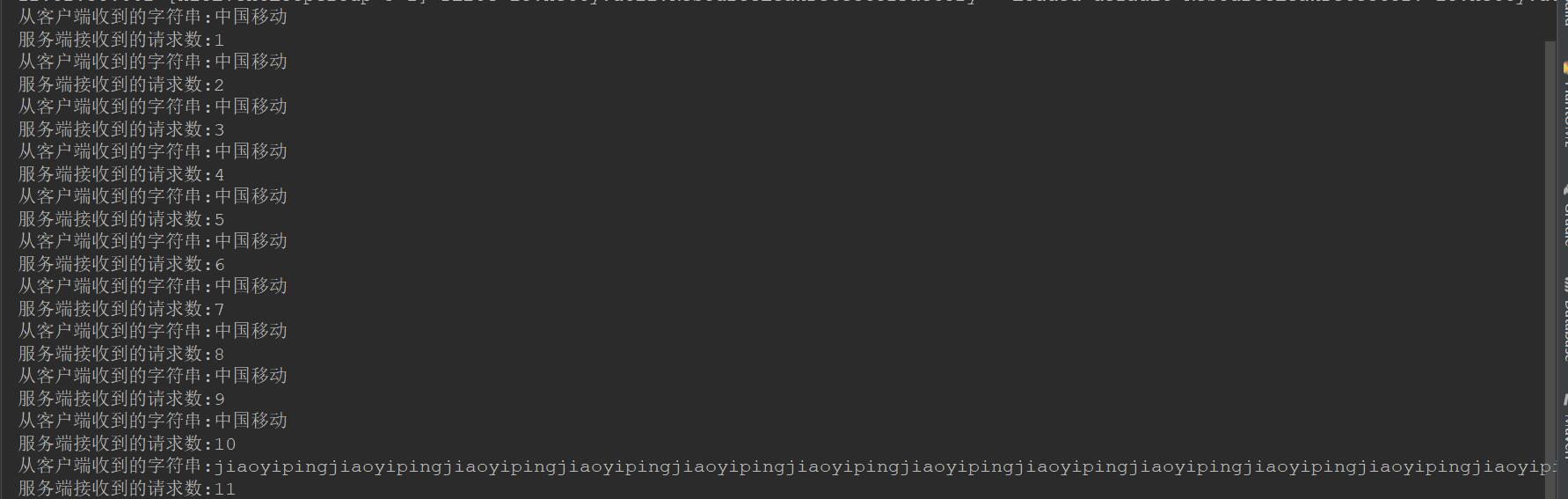
服务器端输出:
客户端输出: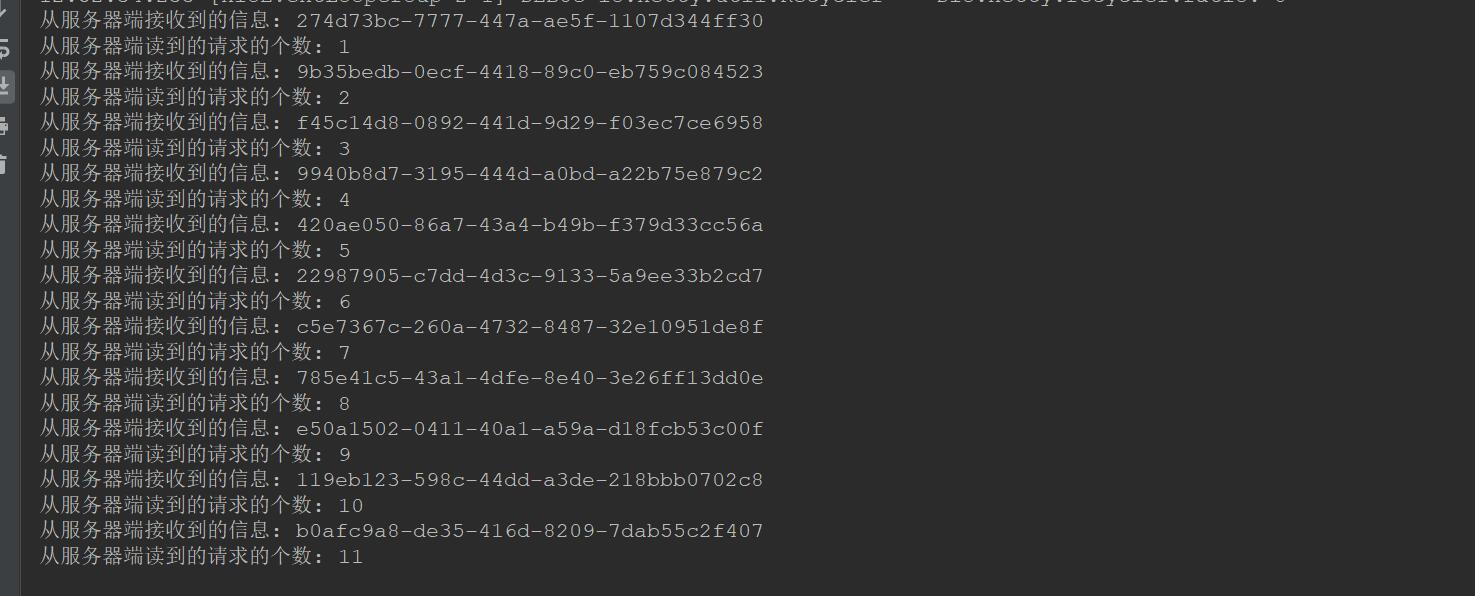
这样就解决了粘包和拆包导致的问题
继续阅读与本文标签相同的文章
-
HTML和CSS
2026-05-21栏目: 教程
-
C#并发实战Parallel.ForEach使用
2026-05-21栏目: 教程
-
ASP.NET Core MVC 之视图组件(View Component)
2026-05-21栏目: 教程
-
.Net异步编程详解入门
2026-05-21栏目: 教程
-
APP/公众号/小程序这三种开发形式有何不同?
2026-05-21栏目: 教程