
一.Apache Druid简述
Apache Druid是 Market公司研发,专门为做海量数据集上的高性能OLAP(OnLine Analysis Processing)而设计的数据存储和分析系统,目前在Apache基金会下孵化。
Apache Druid采用Lambda架构,分为实时层(Overlad、MiddleManager)和批处理层(Coordinator、Historical),通过Broker节点客户端提供查询服务,Router节点Overlad、Coordinator和Broker提供统一的API网关服务,系统架构如下:

二.主要角色简述
Ⅰ).Overload
Overload进程负责监控MiddleManager进程,它负责将摄取任务分配给MiddleManager并协调segment的发布;它就是数据摄入到Dirid的控制器
Ⅱ).Coordinator
Coordinator进程负责监控Historical进程,它负责将segment分配到指定的Historical服务上,确保所有Historical节点的数据均衡
Ⅲ).MiddleManager
MiddleManager进程负责将新的数据摄入到集群中,将外部数据源数据转换为Druid所识别的segment
Ⅳ).Broker
Broker进程负责接受Client的查询请求,并将查询转发到Historical和MiddleManager中;Broker会接受所有的子查询的结果,并将数据进行合并然后返回给Client
Ⅴ).Historical
Historical是用于处理存储和查询历史数据的进程,它会从Deep Storage中下载查询区间数据,然后响应该段数据的查询
Ⅵ).Router
Router进程是一个可选的进程,它为Broker、Overload和Coordinator提供统一的API网关服务。如果不启动该进程,也可以直接连接Broker、Overload和Coordinator服务
三.安装部署
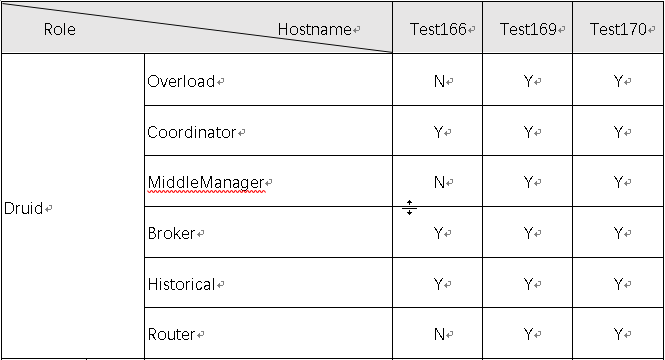
Ⅰ).角色分布
Ⅱ).下载
下载地址:https://druid.apache.org/downloads.html
apache-druid-0.15.0
Ⅲ).解压
tar -zxvf apache-druid-0.15.0-incubating-bin.tar.gzⅣ).目录
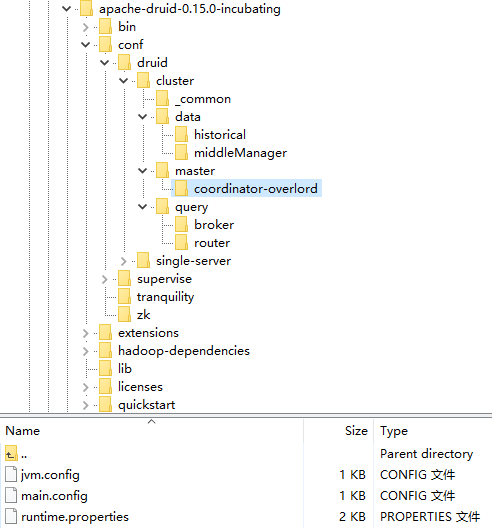
| PATH | DE ION |
|---|---|
| bin | 执行脚本 |
| conf | 角色配置 |
| extensions | 扩展插件 |
| lib | 依赖jar包 |
| log | 日志 |
| quickstart | 测试样例数据 |
| hadoop-dependencies | hadoop集群依赖 |
Ⅴ).配置
a)../_common/common.runtime.properties
## Extensions## This is not the full list of Druid extensions, but common ones that people often use. You may need to change this list# d on your particular setup.druid.extensions.loadList=[ "druid-datasketches", "druid-hdfs-storage","druid-kafka-eight", "mysql- data-storage","druid-kafka-indexing-service"]# If you have a different version of Hadoop, place your Hadoop client jar files in your hadoop-dependencies directory# and uncomment the line below to point to your directory.druid.extensions.hadoopDependenciesDir=/druid/druid/hadoop-dependencies/## Logging## Log all runtime properties on startup. Disable to avoid logging properties on startup:druid.startup.logging.logProperties=true## Zookeeper#druid.zk.service.host=hostname1:2181,hostname2:2181,hostname3:2181druid.zk.paths. =/druid## data storage## For Derby server on your Druid Coordinator (only viable in a cluster with a single Coordinator, no fail-over):#druid. data.storage.type=derby#druid. data.storage.connector.connectURI=jdbc:derby:// data.store.ip:1527/var/druid/ data.db;create=true#druid. data.storage.connector.host= data.store.ip#druid. data.storage.connector.port=1527# For MySQL:druid. data.storage.type=mysqldruid. data.storage.connector.connectURI=jdbc:mysql://hostname1:3306/druiddruid. data.storage.connector.user=usernamedruid. data.storage.connector.password=password# For PostgreSQL (make sure to additionally include the Postgres extension):#druid. data.storage.type=postgresql#druid. data.storage.connector.connectURI=jdbc:postgresql://db.example.com:5432/druid#druid. data.storage.connector.user=...#druid. data.storage.connector.password=...## Deep storage## For local disk (only viable in a cluster if this is a network mount):#druid.storage.type=local#druid.storage.storageDirectory=var/druid/segments# For HDFS (make sure to include the HDFS extension and that your Hadoop config files in the cp):druid.storage.type=hdfsdruid.storage.storageDirectory=/druid/segments# For S3:#druid.storage.type=s3#druid.storage.bucket=your-bucket#druid.storage. Key=druid/segments#druid.s3.accessKey=...#druid.s3.secretKey=...## Indexing service logs## For local disk (only viable in a cluster if this is a network mount):#druid.indexer.logs.type=file#druid.indexer.logs.directory=var/druid/indexing-logs# For HDFS (make sure to include the HDFS extension and that your Hadoop config files in the cp):druid.indexer.logs.type=hdfsdruid.indexer.logs.directory=/druid/indexing-logs# For S3:#druid.indexer.logs.type=s3#druid.indexer.logs.s3Bucket=your-bucket#druid.indexer.logs.s3Prefix=druid/indexing-logs## Service discovery#druid.selectors.indexing.serviceName=druid/overlorddruid.selectors.coordinator.serviceName=druid/coordinator## Monitoring#druid.monitoring.monitors=["io.druid.java.util.metrics.JvmMonitor"]druid.emitter=loggingdruid.emitter.logging.logLevel=info# Storage type of double columns# ommiting this will lead to index double as float at the storage druid.indexing.doubleStorage=doubleb)../overlord/runtime.properties
druid.service=druid/overlorddruid.port=8065druid.indexer.queue.startDelay=PT30Sdruid.indexer.runner.type=remotedruid.indexer.storage.type= datac)../coordinator/runtime.properties
druid.service=druid/coordinatordruid.port=8062druid.coordinator.startDelay=PT30Sdruid.coordinator.period=PT30Sd)../broker/runtime.properties
druid.service=druid/brokerdruid.port=8061# HTTP server threadsdruid.broker.http.numConnections=5druid.server.http.numThreads=25# Processing threads and buffersdruid.processing.buffer.sizeBytes=536870912druid.processing.numThreads=7# Query cachedruid.broker.cache.useCache=truedruid.broker.cache.populateCache=truedruid.cache.type=localdruid.cache.sizeInBytes=2000000000e)../middleManager/runtime.properties
druid.service=druid/middleManagerdruid.port=8064# Number of tasks per middleManagerdruid.worker.capacity=100# Task launch parametersdruid.indexer.runner.javaOpts=-server -Xmx8g -Duser.timezone=UTC+0800 -Dfile.encoding=UTF-8 -Djava.util.logging.manager=org.apache.logging.log4j.jul.LogManagerdruid.indexer.task. TaskDir=var/druid/task# HTTP server threadsdruid.server.http.numThreads=25# Processing threads and buffers on Peonsdruid.indexer.fork.property.druid.processing.buffer.sizeBytes=536870912druid.indexer.fork.property.druid.processing.numThreads=5# Hadoop indexingdruid.indexer.task.hadoopWorkingPath=var/druid/hadoop-tmpdruid.indexer.task.defaultHadoopCoordinates=["org.apache.hadoop:hadoop-client:2.6.0"]f)../historical/runtime.properties
druid.service=druid/historicaldruid.port=8063# HTTP server threadsdruid.server.http.numThreads=25# Processing threads and buffersdruid.processing.buffer.sizeBytes=536870912druid.processing.numThreads=7# Segment storagedruid.segmentCache.locations=[{"path":"var/druid/segment-cache","maxSize":130000000000}]druid.server.maxSize=130000000000g)../router/runtime.properties
druid.service=druid/routerdruid.plaintextPort=8888# HTTP proxydruid.router.http.numConnections=50druid.router.http.readTimeout=PT5Mdruid.router.http.numMaxThreads=100druid.server.http.numThreads=100# Service discoverydruid.router.defaultBrokerServiceName=druid/brokerdruid.router.coordinatorServiceName=druid/coordinator# Management proxy to coordinator / overlord: required for unified web console.druid.router.managementProxy.enabled=trueⅥ).启动服务
## start broker./bin/broker.sh start## start coordinator./bin/coordinator.sh start## start historical./bin/historical.sh start## start middleManager./bin/middleManager.sh start## start overlord./bin/overlord.sh startⅦ).验证
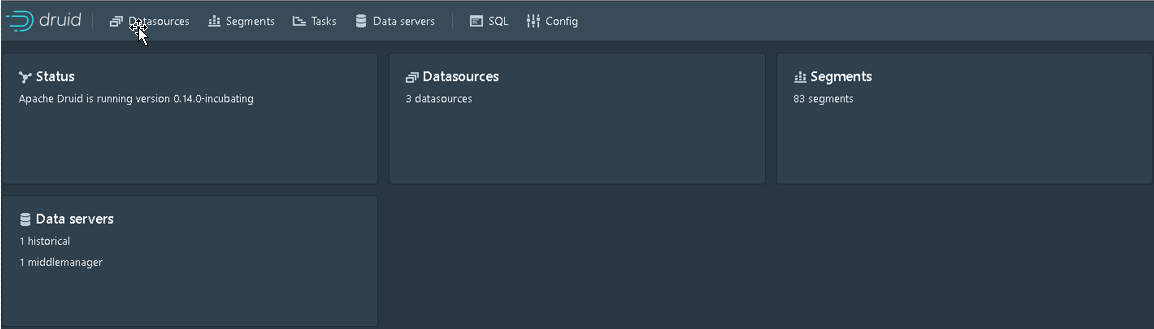
Coordinator URL: http://hostname:8062
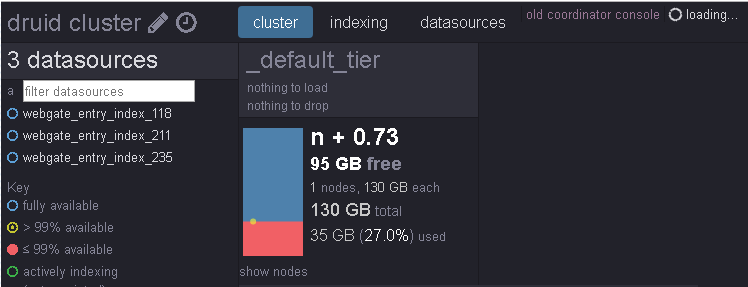
Overload URL: http://hostname:8065

Router URL: http://hostname:8888
四.hadoop依赖
如果使用hadoop集群做为结果集数据存储时,需与hadoop建立关联
ln -s /etc/hadoop/core-site. ./conf/druid/_common/core-site. ln -s /etc/hadoop/hdfs-site. ./conf/druid/_common/hdfs-site. ln -s /etc/hadoop/mapred-site. ./conf/druid/_common/mapred-site. ln -s /etc/hadoop/yarn-site. ./conf/druid/_common/yarn-site. 继续阅读与本文标签相同的文章
-
Qt编写自定义控件40-导航进度条
2026-05-21栏目: 教程
-
KBase #10: Aliyun Linux 2 大量创建进程后,最终创建进程失败
2026-05-21栏目: 教程
-
阿里云全新活动来了:8月主机爆款限时抢,3年2折起限量抢
2026-05-21栏目: 教程
-
KBase #11: TCP 拥塞控制算法对网络性能的影响
2026-05-21栏目: 教程
-
广东创云科技有限公司
2026-05-21栏目: 教程