
一、不用写dao层实现的方式
1、导入依赖包,我的pom. 文件配置如下:
<project ns="http://maven.apache.org/POM/4.0.0" ns:xsi="http://www.w3.org/2001/ Schema-instance" xsi:schemaLocation="http://maven.apache.org/POM/4.0.0 http://maven.apache.org/xsd/maven-4.0.0.xsd"> <modelVersion>4.0.0</modelVersion> <groupId>com.troy</groupId> <artifactId>spring-mvc</artifactId> <version>0.0.1-SNAPSHOT</version> <packaging>war</packaging> <dependencies> <dependency> <groupId>org.spring work</groupId> <artifactId>spring-webmvc</artifactId> <version>3.2.8.RELEASE</version> </dependency> <dependency> <groupId>org.spring work</groupId> <artifactId>spring-jdbc</artifactId> <version>3.2.8.RELEASE</version> </dependency> <dependency> <groupId>org.mybatis</groupId> <artifactId>mybatis-spring</artifactId> <version>1.2.3</version> </dependency> <dependency> <groupId>commons-dbcp</groupId> <artifactId>commons-dbcp</artifactId> <version>1.4</version> </dependency> <dependency> <groupId>org.mybatis</groupId> <artifactId>mybatis</artifactId> <version>3.3.0</version> </dependency> <dependency> <groupId>mysql</groupId> <artifactId>mysql-connector-java</artifactId> <version>5.1.37</version> </dependency> <dependency> <groupId>com.faster .jackson.core</groupId> <artifactId>jackson-core</artifactId> <version>2.2.3</version> </dependency> <dependency> <groupId>com.faster .jackson.core</groupId> <artifactId>jackson-annotations</artifactId> <version>2.2.3</version> </dependency> <dependency> <groupId>com.faster .jackson.core</groupId> <artifactId>jackson-databind</artifactId> <version>2.2.3</version> </dependency> </dependencies></project>

2、web. 的配置
<? version="1.0" encoding="UTF-8"?><web-app ns:xsi="http://www.w3.org/2001/ Schema-instance" ns="http://java.sun.com/ /ns/javaee" xsi:schemaLocation="http://java.sun.com/ /ns/javaee http://java.sun.com/ /ns/javaee/web-app_2_5.xsd" version="2.5"> <display-name>spring-mvc</display-name> <welcome-file-list> <welcome-file>index.html</welcome-file> <welcome-file>index.htm</welcome-file> <welcome-file>index.jsp</welcome-file> <welcome-file>default.html</welcome-file> <welcome-file>default.htm</welcome-file> <welcome-file>default.jsp</welcome-file> </welcome-file-list> <servlet> <servlet-name>springmvc</servlet-name> <servlet-class>org.spring work.web.servlet.DispatcherServlet</servlet-class> <init-param> <param-name>contextConfigLocation</param-name> <param-value>classpath:spring/spring-mvc. </param-value> </init-param> <load-on-startup>1</load-on-startup> </servlet> <servlet-mapping> <servlet-name>springmvc</servlet-name> <url-pattern>/</url-pattern> </servlet-mapping> <filter> <filter-name>encodingFilter</filter-name> <filter-class>org.spring work.web.filter.CharacterEncodingFilter</filter-class> <init-param> <param-name>encoding</param-name> <param-value>UTF-8</param-value> </init-param> <init-param> <param-name>forceEncoding</param-name> <param-value>true</param-value> </init-param> </filter> <filter-mapping> <filter-name>encodingFilter</filter-name> <url-pattern>/</url-pattern> </filter-mapping></web-app>
3、springmvc容器的相关配置(spring-mvc. )
<? version="1.0" encoding="UTF-8"?><beans ns="http://www.spring work.org/schema/beans" ns:xsi="http://www.w3.org/2001/ Schema-instance" ns:context="http://www.spring work.org/schema/context" ns:jdbc="http://www.spring work.org/schema/jdbc" ns:jee="http://www.spring work.org/schema/jee" ns:tx="http://www.spring work.org/schema/tx" ns:aop="http://www.spring work.org/schema/aop" ns:mvc="http://www.spring work.org/schema/mvc" ns:util="http://www.spring work.org/schema/util" ns:jpa="http://www.spring work.org/schema/data/jpa" xsi:schemaLocation=" http://www.spring work.org/schema/beans http://www.spring work.org/schema/beans/spring-beans-3.2.xsd http://www.spring work.org/schema/context http://www.spring work.org/schema/context/spring-context-3.2.xsd http://www.spring work.org/schema/jdbc http://www.spring work.org/schema/jdbc/spring-jdbc-3.2.xsd http://www.spring work.org/schema/jee http://www.spring work.org/schema/jee/spring-jee-3.2.xsd http://www.spring work.org/schema/tx http://www.spring work.org/schema/tx/spring-tx-3.2.xsd http://www.spring work.org/schema/data/jpa http://www.spring work.org/schema/data/jpa/spring-jpa-1.3.xsd http://www.spring work.org/schema/aop http://www.spring work.org/schema/aop/spring-aop-3.2.xsd http://www.spring work.org/schema/mvc http://www.spring work.org/schema/mvc/spring-mvc-3.2.xsd http://www.spring work.org/schema/util http://www.spring work.org/schema/util/spring-util-3.2.xsd"> <mvc:annotation-driven/> <context:component-scan -package="com.troy"/> <bean class="org.spring work.web.servlet.view.InternalResourceViewResolver"> <property name="prefix" value="/WEB-INF/page/"/> <property name="suffix" value=".jsp"/> </bean> <import resource="spring-mybatis. "/></beans>
4、spring-mybatis的相关配置(spring-mybatis. )
<? version="1.0" encoding="UTF-8"?><beans ns="http://www.spring work.org/schema/beans" ns:xsi="http://www.w3.org/2001/ Schema-instance" ns:context="http://www.spring work.org/schema/context" ns:jdbc="http://www.spring work.org/schema/jdbc" ns:jee="http://www.spring work.org/schema/jee" ns:tx="http://www.spring work.org/schema/tx" ns:aop="http://www.spring work.org/schema/aop" ns:mvc="http://www.spring work.org/schema/mvc" ns:util="http://www.spring work.org/schema/util" ns:jpa="http://www.spring work.org/schema/data/jpa" xsi:schemaLocation=" http://www.spring work.org/schema/beans http://www.spring work.org/schema/beans/spring-beans-3.2.xsd http://www.spring work.org/schema/context http://www.spring work.org/schema/context/spring-context-3.2.xsd http://www.spring work.org/schema/jdbc http://www.spring work.org/schema/jdbc/spring-jdbc-3.2.xsd http://www.spring work.org/schema/jee http://www.spring work.org/schema/jee/spring-jee-3.2.xsd http://www.spring work.org/schema/tx http://www.spring work.org/schema/tx/spring-tx-3.2.xsd http://www.spring work.org/schema/data/jpa http://www.spring work.org/schema/data/jpa/spring-jpa-1.3.xsd http://www.spring work.org/schema/aop http://www.spring work.org/schema/aop/spring-aop-3.2.xsd http://www.spring work.org/schema/mvc http://www.spring work.org/schema/mvc/spring-mvc-3.2.xsd http://www.spring work.org/schema/util http://www.spring work.org/schema/util/spring-util-3.2.xsd"> <util:properties id="config" location="classpath:conf/spring-config.properties"/> <bean id="dataSource" class="org.spring work.jdbc.datasource.DriverManagerDataSource"> //这里可以替换成线程池的方式连接,参数根据自己需要设置 <property name="driverClassName" value="#{config.driver}"/> <property name="url" value="#{config.url}"/> <property name="username" value="#{config.username}"/> <property name="password" value="#{config.password}"/> </bean> <bean id="sqlSessionFactory" class="org.mybatis.spring.SqlSessionFactoryBean"> <property name="dataSource" ref="dataSource"/> <property name="mapperLocations" value="classpath:mapper/*. "/> </bean> <bean id="sqlSessionTemplate" class="org.mybatis.spring.SqlSessionTemplate"> <constructor-arg index="0"> <ref bean="sqlSessionFactory"/> </constructor-arg> </bean> <bean id="mapperScannerConfigurer" class="org.mybatis.spring.mapper.MapperScannerConfigurer"> <property name=" Package" value="com.troy.dao"/> <property name="sqlSessionTemplate" ref="sqlSessionTemplate"/> </bean> <bean id="transactionManager" class="org.spring work.jdbc.datasource.DataSourceTransactionManager"> <property name="dataSource" ref="dataSource"/> </bean> <tx:annotation-driven transaction-manager="transactionManager"/></beans>
5、spring-config.properties的配置
driver=com.mysql.jdbc.Driverurl=jdbc:mysql://localhost:3306/m_model?useUnicode=true&characterEncoding=utf8username=rootpassword=root
6、mapper文件的相关配置(modelSalMap. )
<? version="1.0" encoding="UTF-8" ?> <!DOCTYPE mapper PUBLIC "-//ibatis.apache.org//DTD Mapper 3.0//EN" "http://ibatis.apache.org/dtd/ibatis-3-mapper.dtd"><mapper namespace="com.troy.dao.ModelDao"> <select id="findAll" resultType="java.util.Map"> select * from model </select> </mapper>
7、代码实现过程
1)dao层ModelDao
@Repository(value="modelDao")public interface ModelDao { public List<Map<String, >> findAll();}
2)service层
(1)接口ModelService
public interface ModelService { public List<Map<String, >> findAll();}
(2)实现ModelServiceImpl
@Service(value="modelService")public class ModelServiceImpl implements ModelService{ @Resource(name="modelDao") private ModelDao modelDao; public List<Map<String, >> findAll() { return modelDao.findAll(); }}
3)控制层ModelController
@RequestMapping(value="/model")@Controllerpublic class ModelController { @Resource(name="modelService") private ModelService modelService; @RequestMapping(value="/init") public String init(){ return "model"; } @RequestMapping(value="/find") @ResponseBody public List<Map<String, >> find(){ return modelService.findAll(); }}
8、结构目录如下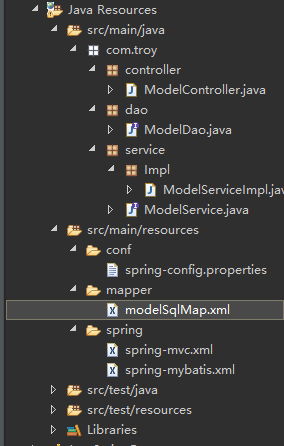
二、需要实现dao层接口(推荐使用)
1、导入依赖包pom. 文件相同
2、web. 、spring-mvc. 、spring-config.properties配置一样
3、spring-mybatis的配置如下:
<? version="1.0" encoding="UTF-8"?><beans ns="http://www.spring work.org/schema/beans" ns:xsi="http://www.w3.org/2001/ Schema-instance" ns:context="http://www.spring work.org/schema/context" ns:jdbc="http://www.spring work.org/schema/jdbc" ns:jee="http://www.spring work.org/schema/jee" ns:tx="http://www.spring work.org/schema/tx" ns:aop="http://www.spring work.org/schema/aop" ns:mvc="http://www.spring work.org/schema/mvc" ns:util="http://www.spring work.org/schema/util" ns:jpa="http://www.spring work.org/schema/data/jpa" xsi:schemaLocation=" http://www.spring work.org/schema/beans http://www.spring work.org/schema/beans/spring-beans-3.2.xsd http://www.spring work.org/schema/context http://www.spring work.org/schema/context/spring-context-3.2.xsd http://www.spring work.org/schema/jdbc http://www.spring work.org/schema/jdbc/spring-jdbc-3.2.xsd http://www.spring work.org/schema/jee http://www.spring work.org/schema/jee/spring-jee-3.2.xsd http://www.spring work.org/schema/tx http://www.spring work.org/schema/tx/spring-tx-3.2.xsd http://www.spring work.org/schema/data/jpa http://www.spring work.org/schema/data/jpa/spring-jpa-1.3.xsd http://www.spring work.org/schema/aop http://www.spring work.org/schema/aop/spring-aop-3.2.xsd http://www.spring work.org/schema/mvc http://www.spring work.org/schema/mvc/spring-mvc-3.2.xsd http://www.spring work.org/schema/util http://www.spring work.org/schema/util/spring-util-3.2.xsd"> <util:properties id="config" location="classpath:conf/spring-config.properties"/> <bean id="dataSource" class="org.apache.commons.dbcp.BasicDataSource"> <property name="driverClassName" value="#{config.driver}"/> <property name="url" value="#{config.url}"/> <property name="username" value="#{config.username}"/> <property name="password" value="#{config.password}"/> </bean> <bean id="sqlSessionFactory" class="org.mybatis.spring.SqlSessionFactoryBean"> <property name="dataSource" ref="dataSource"/> <property name="mapperLocations" value="classpath:mapper/*. "/> </bean> <bean id="sqlSessionTemplate" class="org.mybatis.spring.SqlSessionTemplate"> <constructor-arg index="0"> <ref bean="sqlSessionFactory"/> </constructor-arg> </bean> <bean id="transactionManager" class="org.spring work.jdbc.datasource.DataSourceTransactionManager"> <property name="dataSource" ref="dataSource"/> </bean> <tx:annotation-driven transaction-manager="transactionManager"/></beans>
说明:这里和上面不一样的地方就是没有加入mapper的管理,不用映射到具体的dao接口。mapperScannerConfigurer在不写实现的时候是可以通过映射到具体的dao层接口
4、mapper文件的相关配置(userSalMap. )
<? version="1.0" encoding="UTF-8" ?> <!DOCTYPE mapper PUBLIC "-//ibatis.apache.org//DTD Mapper 3.0//EN" "http://ibatis.apache.org/dtd/ibatis-3-mapper.dtd"><mapper namespace="user"> <select id="findAll" parameterType="java.util.Map" resultType="java.util.Map"> select * from model where modelId=#{modelId} </select> </mapper>
说明:这里的namespace的名称可以随便取,尽量符合逻辑和命名规范
5、代码实现过程
1)dao层
(1)userDao接口
public interface UserDao { public Map<String, > findAll();}
(2)userDao接口实现(userDaoImpl)
@Repository(value="userDao")public class UserDaoImpl implements UserDao{ @Resource(name="sqlSessionTemplate") private SqlSession sqlSession; public Map<String, > findAll() { Map<String, > map = new HashMap<String, >(); map.put("modelId", "09cd318807294ba4bd098e2f95f82ac5"); Map<String, > result = sqlSession.selectOne("user.findAll", map); return result; } }
2)service层
1)userService接口
public interface UserService { public Map<String, > find();}
2)userServiceImpl实现
@Service(value="userService")public class UserServiceImpl implements UserService{ @Resource(name="userDao") private UserDao userDao; public Map<String, > find() { return userDao.findAll(); } }
3)控制层userController
@RequestMapping(value="/user")@Controllerpublic class UserController { @Resource(name="userService") private UserService userService; @RequestMapping(value="/init") public String init(){ return "user"; } @RequestMapping(value="/find") @ResponseBody public Map<String, > find(){ Map<String, > list = userService.find(); System.out.println(list); System.out.println(list.size()); return list; }}
4)注意:注意userDao里面的sqlSession,这里是直接采用spring容器中的bean(sqlSessionTemplate)注入,因为sqlSession是一个接口,可以放心使用,dao层和sqlmap的连接,用空间名加方法的名称来实现。建议写一个 dao作为sqlSession的基础注入,这样就不用频繁注入bean。
6、目录结构
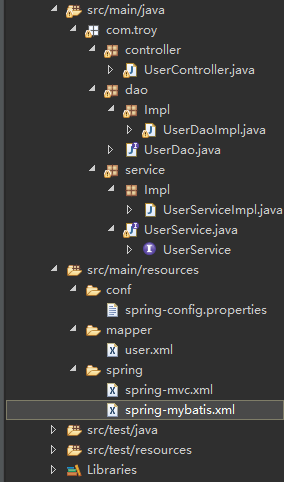
7、写入dao层实现的方式虽然看起来多了一步,但是在使用过程中是非常建议使用的,写入逻辑和实现都比较清晰
三、二种方式各有各的好处,不实现dao层接口的方式上面让我们思路更清晰,接口也简单有效。但是我们在开发过程中经常使用到factroyBean来实现与数据库之间的交互,所以在配置和实现过程中,建议使用dao层实现的方式来做,不建议采用映射入接口的方式来实现效果
继续阅读与本文标签相同的文章
-
一个.git引发的惨案
2026-05-26栏目: 教程
-
Python之面向对象简介
2026-05-26栏目: 教程
-
Python之面向对象
2026-05-26栏目: 教程
-
MySQL的一些小tip
2026-05-26栏目: 教程
-
springboot中filter的用法
2026-05-26栏目: 教程