
一、Redis是一个开源的使用ANSI C语言编写、支持网络、可基于内存亦可持久化的日志型、Key-Value数据库,并提供多种语言的API。
从2010年3月15日起,Redis的开发工作由VMware主持。从2013年5月开始,Redis的开发由Pivotal赞助。
目前:相信很多人都知道redis的应用和普遍性吧,因为它的灵活性,让我们在使用的时候就更加得心应手了。
这里介绍spring-data-redis的基本用法,这里需要依赖包jedis的支持
二、redis的部署
1、具体的部署配置查看:http://www.cnblogs.com/ll409546297/p/6993778.html
2、这里需要注意几个地方(主要是配置redis.conf)
1)因为我是守护线程启动,后台自启。需要修改daemonize 为yes
daemonize yes
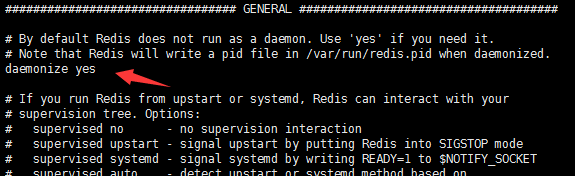
2)因为缓存服务器,一般都是外部服务器,在使用的时候需要设置密码和注释掉bind 127.0.0.1。不然在使用的时候会抛出pool 和 password异常
密码设置:requirepass 123456 (找到相关注解解除,并修改密码)
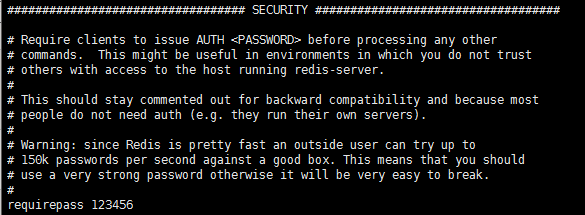
注释掉bind 127.0.0.1

3、基本测试一下就可以了(可以重启测试一下)

4、这里redis的部署基本完成了。
三、pom. (导包)
<dependency> <groupId>org.spring work.data</groupId> <artifactId>spring-data-redis</artifactId> <version>1.8.4.RELEASE</version> </dependency> <dependency> <groupId>redis.clients</groupId> <artifactId>jedis</artifactId> <version>2.9.0</version> </dependency>
四、配置spring-redis.
<? version="1.0" encoding="UTF-8"?><beans ns="http://www.spring work.org/schema/beans" ns:xsi="http://www.w3.org/2001/ Schema-instance" ns:context="http://www.spring work.org/schema/context" ns:jdbc="http://www.spring work.org/schema/jdbc" ns:jee="http://www.spring work.org/schema/jee" ns:tx="http://www.spring work.org/schema/tx" ns:aop="http://www.spring work.org/schema/aop" ns:mvc="http://www.spring work.org/schema/mvc" ns:util="http://www.spring work.org/schema/util" ns:jpa="http://www.spring work.org/schema/data/jpa" xsi:schemaLocation=" http://www.spring work.org/schema/beans http://www.spring work.org/schema/beans/spring-beans-4.3.xsd http://www.spring work.org/schema/context http://www.spring work.org/schema/context/spring-context-4.3.xsd http://www.spring work.org/schema/jdbc http://www.spring work.org/schema/jdbc/spring-jdbc-4.3.xsd http://www.spring work.org/schema/jee http://www.spring work.org/schema/jee/spring-jee-4.3.xsd http://www.spring work.org/schema/tx http://www.spring work.org/schema/tx/spring-tx-4.3.xsd http://www.spring work.org/schema/data/jpa http://www.spring work.org/schema/data/jpa/spring-jpa-1.0.xsd http://www.spring work.org/schema/aop http://www.spring work.org/schema/aop/spring-aop-4.3.xsd http://www.spring work.org/schema/mvc http://www.spring work.org/schema/mvc/spring-mvc-4.3.xsd http://www.spring work.org/schema/util http://www.spring work.org/schema/util/spring-util-4.3.xsd"> <!-- 配置连接池 --> <bean id="jedisPoolConfig" class="redis.clients.jedis.JedisPoolConfig"> <property name="maxTotal" value="10"></property> <property name="maxIdle" value="10"></property> <property name="minIdle" value="2"></property> <property name="maxWaitMillis" value="15000"></property> <property name="minEvictableIdleTimeMillis" value="300000"></property> <property name="numTestsPerEvictionRun" value="3"></property> <property name="timeBetweenEvictionRunsMillis" value="60000"></property> <property name="testOnBorrow" value="true"></property> <property name="testOnReturn" value="true"></property> <property name="testWhileIdle" value="true"></property> </bean> <!-- 连接工厂 --> <bean id="jedisConnFactory" class="org.spring work.data.redis.connection.jedis.JedisConnectionFactory"> <property name="hostName" value="192.168.5.100"/> <property name="port" value="6379"/> <property name="password" value="123456"/> <property name="usePool" value="true"/> <property name="poolConfig" ref="jedisPoolConfig"/> </bean> <!-- 用于数据交互 --> <bean id="redisTemplate" class="org.spring work.data.redis.core.RedisTemplate"> <property name="connectionFactory" ref="jedisConnFactory"/> </bean></beans>
五、测试
JedisShardInfo jedisShardInfo = new JedisShardInfo("192.168.5.100", 6379); jedisShardInfo.setPassword("123456");//密码认证 Jedis jedis = new Jedis(jedisShardInfo); jedis.set("fucking", "fucking"); System.out.println(jedis.get("fucking"));
六、使用
@Autowiredprivate RedisTemplate<String, String> redisTemplate;redisTemplate.opsForValue().set("test", "test");String obj = redisTemplate.opsForValue().get("test");System.out.println(obj);
注意:这里注入不一定只有一个,可以是不同类型
继续阅读与本文标签相同的文章
上一篇 :
java.io几种读写文件的方式
-
Linux命令之chmod
2026-05-26栏目: 教程
-
Linux命令之crontab
2026-05-26栏目: 教程
-
Golang集成开发环境搭建
2026-05-26栏目: 教程
-
Linux命令之less简介
2026-05-26栏目: 教程
-
SQL审核工具发布
2026-05-26栏目: 教程