
一、Apache POI是一种流行的API,它允许程序员使用Java程序创建,修改和显示MS Office文件。这由Apache软件基金会开发使用Java分布式设计或修改Microsoft Office文件的开源库。它包含类和方法对用户输入数据或文件到MS Office文档进行解码。
二、基本结构
<dependency> <groupId>org.apache.poi</groupId> <artifactId>poi</artifactId> <version>3.17</version> </dependency>
2)简单介绍一下excel的导入方式
public static void main(String[] args) throws Exception { //读取文件 File file = new File("d:\test.xls"); InputStream inputStream = new FileInputStream(file); //使用POI的流处理数据 POIFSFileSystem poifsFileSystem = new POIFSFileSystem(inputStream); //声明2003版excel的文件读取方式 HSSFWorkbook hssfWorkbook = new HSSFWorkbook(poifsFileSystem); //获取第一个sheet页 HSSFSheet sheetAt = hssfWorkbook.getSheetAt(0); //获取数据总行数 int rows = sheetAt.getPhysicalNumberOfRows(); //每行数据处理 for (int i = 0; i < rows; i++) { //获取一行数据 HSSFRow row = sheetAt.getRow(i); if (i == 0) { //这个主要用于标题 System.out.println(row.getCell(0)); continue; } //获取一行数据 Iterator<Cell> cellIterator = row.cellIterator(); List<Cell> cells = IteratorUtils.toList(cellIterator); System.out.println(cells); } }
3)根据上面的基本实现功能封装了一些,工具类,主要目的是方便应用
a、加入需要的工具依赖包(pom. )
<dependency> <groupId>commons-beanutils</groupId> <artifactId>commons-beanutils</artifactId> <version>1.9.3</version> </dependency>
说明:这个东西主要是用来做数据对考的
b、需要的实体类(这个类的目的就是用来保存excel中需要修改的一些参数位置)
import java.util.List;import java.util.Map;public class ExcelParams { //sheet页数目 private Integer sheetNum = 0; //实体名称 private String entityName; //保存实体名称行数 private Integer clazzNum = 0; //字段行数 private Integer columnNum = 1; //开始数据读取的行数 private Integer dataNum = 3; //开始读取列 private Integer readColNum = 0; //读取的excel数据 private List<Map<String, >> excelList; //最终数据处理 private List<Map<String, >> excelHandleList; public Integer getSheetNum() { return sheetNum; } public void setSheetNum(Integer sheetNum) { this.sheetNum = sheetNum; } public String getEntityName() { return entityName; } public void setEntityName(String entityName) { this.entityName = entityName; } public Integer getClazzNum() { return clazzNum; } public void setClazzNum(Integer clazzNum) { this.clazzNum = clazzNum; } public Integer getColumnNum() { return columnNum; } public void setColumnNum(Integer columnNum) { this.columnNum = columnNum; } public Integer getDataNum() { return dataNum; } public void setDataNum(Integer dataNum) { this.dataNum = dataNum; } public Integer getReadColNum() { return readColNum; } public void setReadColNum(Integer readColNum) { this.readColNum = readColNum; } public List<Map<String, >> getExcelList() { return excelList; } public void setExcelList(List<Map<String, >> excelList) { this.excelList = excelList; } public List<Map<String, >> getExcelHandleList() { return excelHandleList; } public void setExcelHandleList(List<Map<String, >> excelHandleList) { this.excelHandleList = excelHandleList; }}
excel模板的基本方式:
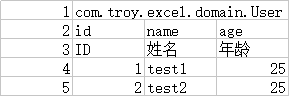
说明:1、前面的序列号,是我为了方便理解加上去的,实际中不用加
2、第一行中的数据为需要保存的实体名路径,后续再保存的时候需要用到
3、第二行是字段主要用于数据的对考,对考到具体的实体中
4、第三行就是给输入数据的人员展示的,第四行开始就是具体的数据了
c、数据处理接口
import com.troy.excel.domain.ExcelParams;public interface ExcelHandle { ExcelParams excelDataHanle(ExcelParams excelParams);}
说明:这个接口目前没有实现方法。提供出来的目前是用于数据处理。自己在处理数据的时候写入数据处理的方式
d、具体的解析过程和实体保存过程
/** * excel导入功能 * @param file * @param excelParams * @param excelHandle * @return * @throws Exception */ public static ExcelParams excelImport(File file, ExcelParams excelParams, ExcelHandle excelHandle) throws Exception { //获取文件流 InputStream inputStream = new FileInputStream(file); //通过poi的方式进行读取 POIFSFileSystem poifsFileSystem = new POIFSFileSystem(inputStream); //声明工作簿 HSSFWorkbook hssfWorkbook = new HSSFWorkbook(poifsFileSystem); //进入sheet页 HSSFSheet hssfSheet = hssfWorkbook.getSheetAt(excelParams.getSheetNum()); //读取实体名称数据 HSSFRow entityRow = hssfSheet.getRow(excelParams.getClazzNum()); HSSFCell entityName = entityRow.getCell(excelParams.getReadColNum()); excelParams.setEntityName(entityName.getStringCellValue()); //读取数据保存到list中 List<Map<String, >> excelList = new ArrayList<>(); //获取字段数据 HSSFRow colunmRow = hssfSheet.getRow(excelParams.getColumnNum()); List<Cell> colums = IteratorUtils.toList(colunmRow.cellIterator()); //读取excel数据 for (int i = excelParams.getDataNum(); i < hssfSheet.getPhysicalNumberOfRows(); i++) { //获取某一行的数据 HSSFRow excelRow = hssfSheet.getRow(i); Map<String, > map = new HashMap<>(); for (int j = 0; j < excelRow.getPhysicalNumberOfCells(); j++) { if (colums != null && colums.size() > j) { HSSFCell rowCell = excelRow.getCell(j); //设置类型的目的方便数据装换 rowCell.setCellType(CellType.STRING); map.put(colums.get(j).getStringCellValue(), rowCell.getStringCellValue()); } } excelList.add(map); } //放入数据放入下一步处理 excelParams.setExcelList(excelList); //ExcelHandle接口用来做进一步数据处理,要求必须重写 excelHandle.excelDataHanle(excelParams); return excelParams; }
说明:ExcelHandle 为接口在使用的时候必须重写才可以实现
/** * 保存excel数据 * @param excelParams * @return */ public static void saveExcelList(ExcelParams excelParams, EntityManager entityManager) throws Exception { //1、获取保存的对象 Class<?> clazz = Class.forName(excelParams.getEntityName()); //2、保存数据 for (Map<String, > map:excelParams.getExcelHandleList()) { //对考数据 = clazz.newInstance(); BeanUtils.populate( , map); //保存数据 entityManager.persist( ); } }
说明:BeanUtils提供了map到实体的拷贝,当然其他Gson,Fastjson也是可以实现的。
entityManager.persist( )是hibernate中保存对象的方法
e、测试方法
public static void main(String[] args) throws Exception { //读取文件 File file = new File("d:\test.xls"); //声明参数 ExcelParams excelParams = new ExcelParams(); excelParams.setSheetNum(0); excelParams.setClazzNum(0); excelParams.setColumnNum(1); excelParams.setDataNum(3); excelParams.setReadColNum(0); //导如数据 ExcelParams excelData = ExcelUtil.excelImport(file, excelParams, (ep) -> { //重写具体的实现方法 ep.setExcelHandleList(excelParams.getExcelList()); return ep; }); //保存实体,这里需要加入到事物中,我这里没有具体测试 ExcelUtil.saveExcelList(excelData, null); System.out.println(excelParams.getExcelList()); }
4)导出功能,导出功能相对简单。我就写了一个简单的实现过程,供理解。当然里面的样式这些,我不细说,自己研究
/** * excel数据导出 * @param * @param datas * @param out * @param <T> * @throws Exception */ public static <T> void excelExport(String , List<T> datas, OutputStream out) throws Exception { //声明一个工作簿 HSSFWorkbook hssfWorkbook = new HSSFWorkbook(); //设置一个sheet名词 HSSFSheet hssfSheet = hssfWorkbook.createSheet( ); //数据处理,通过out写出 for (int i = 0; i < datas.size(); i++) { //创建行数,主要是创建在第几行 HSSFRow hssfRow = hssfSheet.createRow(i); //获取T的字段数 Field[] fields = datas.get(i).getClass().getDeclaredFields(); for (int j = 0; j < fields.length; j++) { //获取字段名称 String fieldName = fields[j].getName(); //获取get方法 String methodName = "get"+ fieldName.substring(0,1).toUpperCase() + fieldName.substring(1); Method method = datas.get(i).getClass().getMethod(methodName); //执行get方法获取对应数据 text = method.invoke(datas.get(i)); //加入到对应单元格 HSSFCell hssfCell = hssfRow.createCell(j); if (text != null) { hssfCell.setCellValue(text.toString()); } } } //写入到输出流中 hssfWorkbook.write(out); }
测试方法:
public static void main(String[] args) throws Exception { OutputStream outputStream = new FileOutputStream("d:\1.xls"); String = "用户数据"; List<User> users = new ArrayList<>(); for (int i = 1; i <= 10; i++) { User user = new User(); user.setId(i); user.setName("name"+i); users.add(user); } ExcelUtil.excelExport( , users, outputStream); }
四、基本上实现过程都在里面,具体的封装过程可以自己参考一下
继续阅读与本文标签相同的文章
一个奇怪的SQL问题
Java之dom4j的简单解析和生成xml的应用
-
lodash中Collection部分所有方法的总结
2026-05-26栏目: 教程
-
HTTP-点开浏览器输入网址背后发生的那点事
2026-05-26栏目: 教程
-
MySQL-主从复制
2026-05-26栏目: 教程
-
MySQL-Xtrabackup备份还原
2026-05-26栏目: 教程
-
MySQL-备份与还原
2026-05-26栏目: 教程