
组件化改造TodoList
原始代码
<!DOCTYPE html><html lang="en"><head> < charset="UTF-8"> < >TodoList</ > < src = "./vue.js"></ ></head><body> <div id ='app'> <input type="text" v-model="inputValue"/> <button v-on:click="handleBtnClick">提交</button> <ul> <li v-for="item in list">{{item}}</li> </ul> </div> < > var app = new Vue({ el: '#app', data:{ list: [], inputValue:'' }, methods:{ handleBtnClick:function(){ this.list.push(this.inputValue) this.inputValue = '' } } }) </ > </body></html>全局组件
Vue.component( ) 创建全局组件的方法
Vue.component("TodoItem",{ template:"<li>todo item</li>" })创建全局组件,组件名字叫做"TodoItem", template 是模板,内容是 <li>todo item</li>。
使用 TodoItem 组件代替前面的 <ul><li v-for="item in list">{{item}}</li></ul>
写成 <todo-item v-for="item in list"></todo-item> 即可
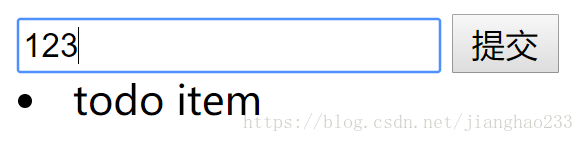
但无论输入什么,输出都是 todo item,为解决这个问题
引入 v-bind :向子组件传入绑定值;写成<todo-item v-bind:content="item" v-for="item in list"></todo-item>
在循环 list 的时候,把 list 的每个值赋值给 item ,再将 item 以 v-bind 的形式传给 todo-item(通过 content 变量传递);
子组件接受内容: props:['content'] , 子组件可以接受到 content 的值 ,content 值是 item ,item 值是 list 的每一项 ,则
props 接收到了list 的每一项的值 ,则在 <li> 中显示出来即可 ,即 template:"<li>" + this.content + "</li>"
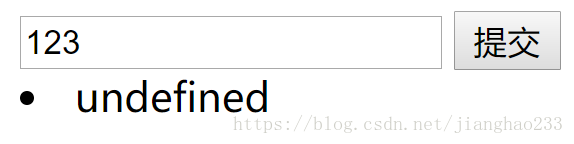
故将 template:"<li>" + this.content + "</li>" 改为 <li>{{content}}</li>
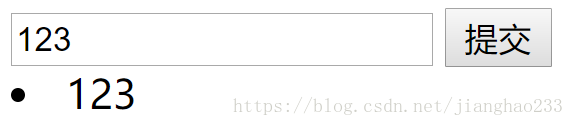
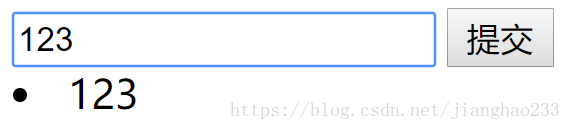
组件化代码(全局组件)
<!DOCTYPE html><html lang="en"><head> < charset="UTF-8"> < >TodoList</ > < src = "./vue.js"></ ></head><body> <div id ='app'> <input type="text" v-model="inputValue"/> <button v-on:click="handleBtnClick">提交</button> <todo-item v-bind:content="item" v-for="item in list"> </todo-item> </div> < > Vue.component("TodoItem",{ props:['content'], template:"<li>{{content}}</li>" }) var app = new Vue({ el: '#app', data:{ list: [], inputValue:'' }, methods:{ handleBtnClick:function(){ this.list.push(this.inputValue) this.inputValue = '' } } }) </ > </body></html><todo-item v-bind:content="item" v-for="item in list"> </todo-item> </div> < > Vue.component("TodoItem",{ props:['content'], template:"<li>{{content}}</li>" }) var app = new Vue({ el: '#app', data:{ list: [], inputValue:'' }, methods:{ handleBtnClick:function(){ this.list.push(this.inputValue) this.inputValue = '' } } }) </ > </body></html>局部组件
<!DOCTYPE html><html lang="en"><head> < charset="UTF-8"> < >TodoList</ > < src = "./vue.js"></ ></head><body> <div id ='app'> <input type="text" v-model="inputValue"/> <button v-on:click="handleBtnClick">提交</button> <todo-item v-bind:content="item" v-for="item in list"> </todo-item> </div> < > var TodoItem = { props:['content'], template:"<li>{{content}}</li>" } var app = new Vue({ el: '#app', components:{ TodoItem:TodoItem }, data:{ list: [], inputValue:'' }, methods:{ handleBtnClick:function(){ this.list.push(this.inputValue) this.inputValue = '' } } }) </ > </body></html> var TodoItem = { props:['content'], template:"<li>{{content}}</li>" } var app = new Vue({ el: '#app', components:{ TodoItem:TodoItem }, data:{ list: [], inputValue:'' }, methods:{ handleBtnClick:function(){ this.list.push(this.inputValue) this.inputValue = '' } } }) </ > </body></html>将 TodoItem 注册到实例之中 ,原来是 TodoItem ,在实例中仍然是 TodoItem ,注册后再用 todo-item 即可
继续阅读与本文标签相同的文章
-
初识 JSP---(JSTL)
2026-05-26栏目: 教程
-
初识 JSP---(EL表达式)
2026-05-26栏目: 教程
-
初识 JSP---(注释/小脚本/声明/指令/动作/内置对象)
2026-05-26栏目: 教程
-
初识 JSP---(Cookie / 重写URL / 防止表单重复提交)
2026-05-26栏目: 教程
-
初识 JSP---(Session机制)
2026-05-26栏目: 教程