
计算属性的 setter 和 getter
方法一:
<!DOCTYPE html><html lang="en"><head> < charset="UTF-8"> < >计算属性、方法、侦听器</ > < src="./vue.js"></ ></head><body> <div id="app"> {{fullName}} {{age}} </div> < > var vm = new Vue({ el:"#app", data:{ firstName:"Dell", lastName:"Lee", age:28 }, //计算属性 computed:{ fullName:function(){ console.log("计算了一次"); return this.firstName + " " + this.lastName } } }) </ ></body></html>方法二:
<!DOCTYPE html><html lang="en"><head> < charset="UTF-8"> < >计算属性的 setter 和 getter</ > < src="./vue.js"></ ></head><body> <div id="app"> {{fullName}} </div> < > var vm = new Vue({ el:"#app", data:{ firstName:"Dell", lastName:"Lee", }, //计算属性 computed:{ fullName:{ get:function(){ return this.firstName + " " + this.lastName }, set:function(value){ console.log(value); } } } }) </ ></body></html>输出:
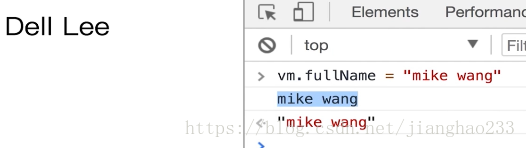
改变fullName的值,第一个是输出的,第二个是返回的
做出下列改动:var arr = value.split(""); this.firstName = arr[0]; this.lastName = arr[1];
<!DOCTYPE html><html lang="en"><head> < charset="UTF-8"> < >计算属性的 setter 和 getter</ > < src="./vue.js"></ ></head><body> <div id="app"> {{fullName}} </div> < > var vm = new Vue({ el:"#app", data:{ firstName:"Dell", lastName:"Lee", }, //计算属性 computed:{ fullName:{ get:function(){ return this.firstName + " " + this.lastName }, set:function(value){ var arr = value.split(""); this.firstName = arr[0]; this.lastName = arr[1]; console.log(value); } } } }) </ ></body></html>


这时的值随输入的也发生变化,compute 的特点:当依赖的值发生变化则会重新计算,当重新输入值时导致
firstName 的值发生变化,进而导致 compute 重新计算 fullName 的值发生变化
继续阅读与本文标签相同的文章
-
delegate委托的例子,实现对Form中控件的更新
2026-05-26栏目: 教程
-
C#中用WMI实现对驱动的查询
2026-05-26栏目: 教程
-
WMI_COM_API
2026-05-26栏目: 教程
-
C#窗体实现打开关闭VM虚拟机
2026-05-26栏目: 教程
-
C#控制台打开VM虚拟机
2026-05-26栏目: 教程