
Vue 中使用插槽(slot)
案例:子组件中的一部分内容是根据父组件传递来的 DOM 来进行显示
<!DOCTYPE html><html lang="en"><head> < charset="UTF-8"> < >Vue 中使用插槽(slot)</ > < src="./vue.js"></ ></head><body> <div id="root"> <child content='<p>Dell</p>'></child> </div> < > Vue.component('child',{ props:['content'], template:'<div><p>hello</p><div v-html="this.content"></div></div>' }) var vm = new Vue({ el:'#root', }) </ ></body></html>输出:

存在问题:1.通过 content 传值,想直接使用里面的 <p> ,必须在外面包裹一层 DIV;
2.用这种方法向子组件传值时,当传递的数值过多时会造成代码可读性很差
子组件中的一部分内容是根据父组件传递来的 DOM 来进行显示的时候,可以使用插槽的方法
<!DOCTYPE html><html lang="en"><head> < charset="UTF-8"> < >Vue 中使用插槽(slot)</ > < src="./vue.js"></ ></head><body> <div id="root"> <child> <p>Dell</p> </child> </div> < > Vue.component('child',{ props:['content'], //获取插槽内容 template:'<div> <p>Hello</p><slot></slot></div>' }) var vm = new Vue({ el:'#root', }) </ ></body></html>输出:

slot 还可以设置默认样式
<body> <div id="root"> <child> </child> </div> < > Vue.component('child',{ props:['content'], //获取插槽内容 template:'<div> <p>Hello</p><slot>默认内容</slot></div>' })输出:

功能:输出,其中 header 部分和 footer 部分均由父组件传入
<!DOCTYPE html><html lang="en"><head> < charset="UTF-8"> < >Vue 中使用插槽(slot)</ > < src="./vue.js"></ ></head><body> <div id="root"> <body-content> <div class="header" slot='header'>header</div> <div class="footer" slot='footer'>footer</div> </body-content> </div> < > Vue.component('body-content',{ //获取插槽内容 template:'<div> <slot name='header'></slot> <div class='content'>content</div> <slot name='footer'></slot> </div>' }) var vm = new Vue({ el:'#root', }) </ ></body></html>给每一个插槽给定具体的名字称为 具名插槽(可以有多个,也可以有默认值,但插槽只能有一个)
输出:
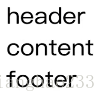
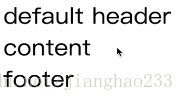
具名插槽 默认值
<!DOCTYPE html><html lang="en"><head> < charset="UTF-8"> < >Vue 中使用插槽(slot)</ > < src="./vue.js"></ ></head><body> <div id="root"> <body-content> <div class="footer" slot='footer'>footer</div> </body-content> </div> < > Vue.component('body-content',{ //获取插槽内容 template:'<div> <slot name='header'>default header</slot> <div class='content'>content</div> <slot name='footer'></slot> </div>' }) var vm = new Vue({ el:'#root', }) </ ></body></html>输出:
继续阅读与本文标签相同的文章
上一篇 :
初识 Vue(18)---(非父子组件间的传值)
下一篇 :
初识 Vue(20)---(作用域插槽)
-
正则表达式不再难懂
2026-05-26栏目: 教程
-
初识 Spring(08)---(jdbc)
2026-05-26栏目: 教程
-
初识 Spring(02)---(IOC)
2026-05-26栏目: 教程
-
初识 Spring(07)---(AOP)
2026-05-26栏目: 教程
-
初识 Spring(06)---(MVC原理)
2026-05-26栏目: 教程