
一、跨域CORS是什么
当一个资源从与该资源本身所在的服务器的域或端口不同的域或不同的端口请求一个资源时,浏览器会发起一个跨域 HTTP 请求。出于安全考虑,浏览器会限制从脚本内发起的跨域HTTP请求或者拦截了服务器返回内容。例如, HttpRequest 和 Fetch 遵循同源策略。因此,使用 HttpRequest或 Fetch 的Web应用程序只能将HTTP请求发送到其自己的域;这种安全机制是为避免出现类似CSRF 跨站攻击等问题。
二、实现CORS
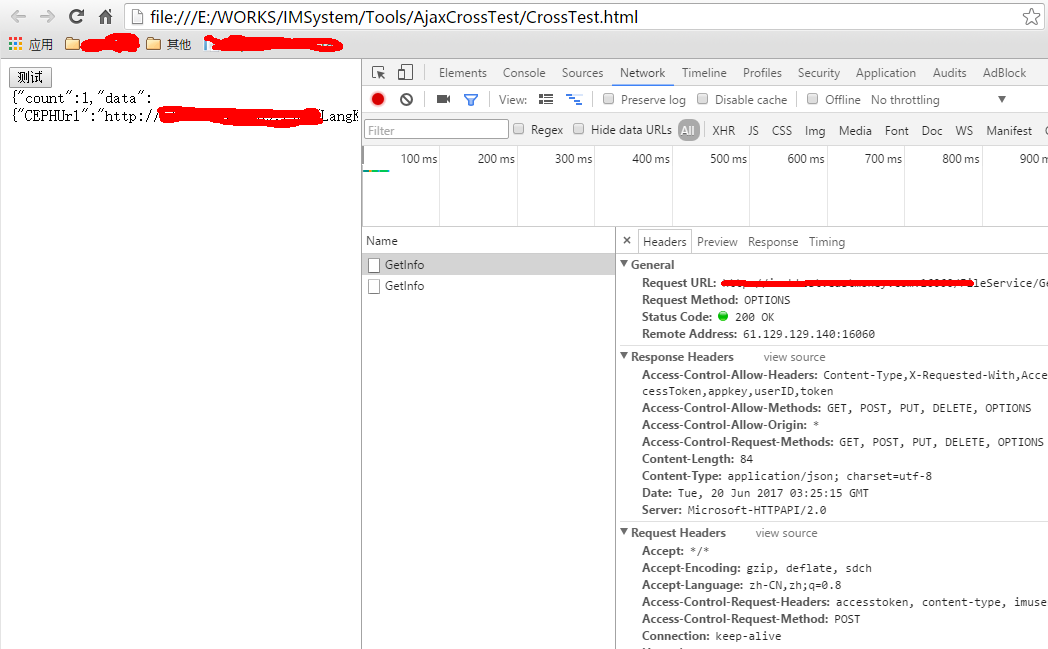
根据CORS的定义和W3C相关规范,明白了跨域的关键问题是在于服务端是否允许;而服务端是通过W3C所规定的相关CORS heades来实现的;相关headers如下:
Access-Control-Allow-Origin:*
该字段是必须的。它的值要么是请求时Origin字段的值,要么是一个*,表示接受任意域名的请求。
Access-Control-Allow-Methods: POST, GET, OPTIONS
该字段可选。表明服务器允许客户端使用 POST, GET 和 OPTIONS
Access-Control-Allow-Headers: X-PINGOTHER, Content-Type
该字段可选。表明服务器允许请求中携带字段 X-PINGOTHER 与 Content-Type。
Access-Control-Max-Age: 86400
表明该响应的有效时间为 86400 秒,也就是 24 小时。在有效时间内,浏览器无须为同一请求再次发起预检请求。
Access-Control-Allow-Credentials: true
该字段可选。它的值是一个布尔值,表示是否允许发送Cookie。
三、WCF restful实现CORS
1. View CodeView Code

1 /// <summary> 2 /// js跨域过滤器 3 /// </summary> 4 [AttributeUsage(AttributeTargets.Class, AllowMultiple = true)] 5 public class CORSAttribute : Attribute, IServiceBehavior 6 { 7 public void AddBindingParameters(ServiceDe ion serviceDe ion, ServiceHost serviceHost , Collection<ServiceEndpoint> endpoints, BindingParameterCollection bindingParameters) 8 { 9 }10 /// <summary>11 /// 扩展拦截12 /// </summary>13 /// <param name="serviceDe ion"></param>14 /// <param name="serviceHost "></param>15 public void ApplyDispatchBehavior(ServiceDe ion serviceDe ion, ServiceHost serviceHost )16 {17 foreach (ChannelDispatcher channelDispatch in serviceHost .ChannelDispatchers)18 {19 foreach (EndpointDispatcher endpointDispatch in channelDispatch.Endpoints)20 {21 endpointDispatch.DispatchRuntime.MessageInspectors.Add(new CrossDomain());22 }23 }24 }25 26 public void Validate(ServiceDe ion serviceDe ion, ServiceHost serviceHost )27 {28 }29 }
2.
1 /// <summary> 2 /// js跨域过滤器 3 /// </summary> 4 public class CrossDomain : IDispatchMessageInspector 5 { 6 #region IDispatchMessageInspector 7 /// <summary> 8 /// token验证 9 /// </summary> 10 /// <param name="request"></param> 11 /// <param name="channel"></param> 12 /// <param name="instanceContext"></param> 13 /// <returns></returns> 14 public AfterReceiveRequest(ref Message request, IClientChannel channel, InstanceContext instanceContext) 15 { 16 if (CrossDomain.DealOptions(ref request)) 17 { 18 return "3"; 19 } 20 return string.Empty; 21 } 22 23 /// <summary> 24 /// 回复内容 25 /// </summary> 26 /// <param name="reply"></param> 27 /// <param name="correlationState"></param> 28 public void BeforeSendReply(ref Message reply, correlationState) 29 { 30 if ((string)correlationState == "3") 31 reply = MessageTempleHelper.GetDefault(JsonResultCode.SUCESS.ToString(), "OPTIONS"); 32 else 33 CrossDomain.DealtMessage(ref reply); 34 } 35 #endregion 36 37 38 /// <summary> 39 /// 对已处理的消息进行cross加工 40 /// </summary> 41 /// <param name="msg"></param> 42 public static void DealtMessage(ref Message msg) 43 { 44 try 45 { 46 var ct = ((HttpResponseMessageProperty)msg.Properties["httpResponse"]).Headers["Content-Type"]; 47 48 if (MimeTypes.Contains(ct)) 49 { 50 if (ct == MimeTypes[0]) 51 { 52 if (!msg.Properties.ContainsKey("WebBodyFormatMessageProperty")) 53 { 54 msg.Properties.Add("WebBodyFormatMessageProperty", new WebBodyFormatMessageProperty(WebContentFormat.Json)); 55 } 56 else if (msg.Properties["WebBodyFormatMessageProperty"] == new WebBodyFormatMessageProperty(WebContentFormat. )) //强制将 返回值改为json 57 { 58 msg.Properties.Remove("WebBodyFormatMessageProperty"); 59 msg.Properties.Add("WebBodyFormatMessageProperty", new WebBodyFormatMessageProperty(WebContentFormat.Json)); 60 } 61 } 62 var property = new HttpResponseMessageProperty(); 63 property.StatusCode = HttpStatusCode.OK; 64 property.Headers.Add("Content-Type", ct); 65 property.Headers.Add("Access-Control-Allow-Methods", "GET, POST, PUT, DELETE, OPTIONS"); 66 property.Headers.Add("Access-Control-Allow-Origin", "*"); 67 property.Headers.Add("Access-Control-Allow-Headers", "Content-Type,X-Requested-With,Accept,imUserID,accessToken,appkey,userID,token"); 68 property.Headers.Add("Access-Control-Request-Methods", "GET, POST, PUT, DELETE, OPTIONS"); 69 property.SuppressEntityBody = false; 70 property.SuppressPreamble = false; 71 if (msg.Properties.ContainsKey("httpResponse")) 72 msg.Properties.Remove("httpResponse"); 73 msg.Properties.Add("httpResponse", property); 74 } 75 } 76 catch (Exception ex) 77 { 78 Log4NetUtil.WriteErrLog("CrossDomain.DealtMessage", ex); 79 } 80 } 81 82 /// <summary> 83 /// 处理新的消息 84 /// </summary> 85 /// <param name="msg"></param> 86 public static void DealNewMessage(ref Message msg) 87 { 88 try 89 { 90 msg.Properties.Add("WebBodyFormatMessageProperty", new WebBodyFormatMessageProperty(WebContentFormat.Json)); 91 var property = new HttpResponseMessageProperty(); 92 property.StatusCode = HttpStatusCode.OK; 93 property.Headers.Add("Content-Type", MimeTypes[0]); 94 property.Headers.Add("Access-Control-Allow-Methods", "GET, POST, PUT, DELETE, OPTIONS"); 95 property.Headers.Add("Access-Control-Allow-Origin", "*"); 96 property.Headers.Add("Access-Control-Allow-Headers", "Content-Type,X-Requested-With,Accept,imUserID,accessToken,appkey,userID,token"); 97 property.Headers.Add("Access-Control-Request-Methods", "GET, POST, PUT, DELETE, OPTIONS"); 98 property.SuppressEntityBody = false; 99 property.SuppressPreamble = false;100 if (msg.Properties.ContainsKey("httpResponse"))101 msg.Properties.Remove("httpResponse");102 msg.Properties.Add("httpResponse", property);103 }104 catch { }105 106 }107 108 /// <summary>109 /// 对当前请求是OPTIONS进行处理110 /// </summary>111 /// <param name="request"></param>112 /// <returns>已处理为true,未处理为false</returns>113 public static bool DealOptions(ref Message request)114 {115 try116 {117 if (((System.ServiceModel.Channels.HttpRequestMessageProperty)request.Properties["httpRequest"]).Method == "OPTIONS")118 {119 WebOperationContext.Current.OutgoingResponse.Headers.Add("Access-Control-Allow-Methods", "GET, POST, PUT, DELETE, OPTIONS");120 WebOperationContext.Current.OutgoingResponse.Headers.Add("Access-Control-Allow-Origin", "*");121 WebOperationContext.Current.OutgoingResponse.Headers.Add("Access-Control-Allow-Headers", "Content-Type,X-Requested-With,Accept,imUserID,accessToken,appkey,userID,token");122 WebOperationContext.Current.OutgoingResponse.Headers.Add("Access-Control-Request-Methods", "GET, POST, PUT, DELETE, OPTIONS");123 WebOperationContext.Current.OutgoingResponse.StatusCode = HttpStatusCode.Accepted;124 request.Close();125 return true;126 }127 }128 catch { }129 return false;130 }131 132 133 134 private static string[] _mimeTypes = null;135 136 /// <summary>137 /// html格式138 /// </summary>139 public static string[] MimeTypes140 {141 get142 {143 if (_mimeTypes == null)144 {145 _mimeTypes = new string[] {146 "application/json; charset=utf-8",147 "image/png"148 };149 }150 return _mimeTypes;151 }152 }153 }
3.在所要公开的服务类上面[CORS],例如:

四、js测试
< type="text/ "> $(function () { $("button").click(function () { var postData = JSON.stringify({ name: "ASDF.txt", md5Code: "F006096956B5062F8EFB72AF4DF59BC2"}); console.log(postData); $.ajax({ url: "http://127.0.0.1:16060/FileService/GetInfo", headers: { imUserID: "e82287ac45c14040ba8ef34b9c2dac29", accessToken: "U6wJgLoAdxVXUpx5R6AdZnFW/ytU+kgnVzaejZZoSdR31lNoRmDsQz42viOP7Jtm3iz8L2COA16r9rl5YUvZPhpHAAWxLNJBWWjHGKibHYejUuerO9qoxEkb6Yi+apPf60MzfmZ+SIgwhs6UBYOx2AbTkMdywYPCgKh8Q/mlVImUz0BU6WG4QCqgdqIefGi3" }, contentType: "application/json; charset=utf-8", type: "post", dataType: "json", data: postData, success: function (data) { $("#s").html(JSON.stringify(data)); console.log(data); }, error: function (e) { $("#e").html(e); console.log(e); } }); }); }); </ >
测试结果:
继续阅读与本文标签相同的文章
上一篇 :
WCF消息压缩
-
C# 多线程及同步简介示例
2026-06-02栏目: 教程
-
Log4net使用详细说明
2026-06-02栏目: 教程
-
WCF Cookie处理
2026-06-02栏目: 教程
-
webpack + vue
2026-06-02栏目: 教程
-
javascript之ProtoBuf在websocket中的使用
2026-06-02栏目: 教程