
前言
本人觉得码农的技术提升应该是从how to do到why do,而项目或产品都是从why do到how to do,按题来,所以呢下面先从大的方面介绍一下消息队列。
消息队列是分布式高并发面目中必不可少的一部分,随着互联网、云计算、大数据的使用,消息队列的应用越来越多,消息队列在系统的可伸缩性、稳定性、提升吞吐量等方面有着显著的作用;它主要的作用一般如下:
1.通过异步处理提高系统性能
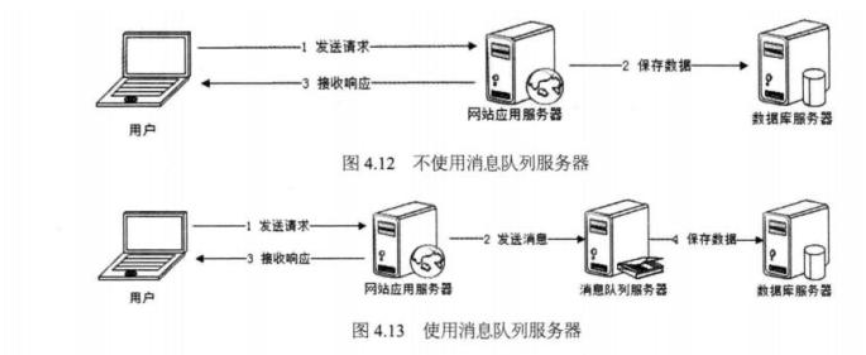
<img src="https://pic3.zhimg.com/50/v2-223c09f60af24f2b9eb10d1b60774109_hd.jpg" data-caption="" data-size="normal" data-rawwidth="910" data-rawheight="350" class="origin_image zh-lightbox-thumb" width="910" data-original="https://pic3.zhimg.com/v2-223c09f60af24f2b9eb10d1b60774109_r.jpg"> 如上图,在不使用消息队列服务器的时候,用户的请求数据直接写入数据库,在高并发的情况下数据库压力剧增,使得响应速度变慢。但是在使用消息队列之后,用户的请求数据发送给消息队列之后立即 返回,再由消息队列的消费者进程从消息队列中获取数据,异步写入数据库。由于消息队列服务器处理速度快于数据库(消息队列也比数据库有更好的伸缩性),因此响应速度得到大幅改善。
通过以上分析我们可以得出消息队列具有很好的削峰作用的功能——即通过异步处理,将短时间高并发产生的事务消息存储在消息队列中,从而削平高峰期的并发事务。 举例:在电子商务一些秒杀、促销活动中,合理使用消息队列可以有效抵御促销活动刚开始大量订单涌入对系统的冲击。如下图所示:
<img src="https://pic3.zhimg.com/50/v2-6b95a9281690c3d190f8bf84312ee536_hd.jpg" data-caption="" data-size="normal" data-rawwidth="780" data-rawheight="384" class="origin_image zh-lightbox-thumb" width="780" data-original="https://pic3.zhimg.com/v2-6b95a9281690c3d190f8bf84312ee536_r.jpg">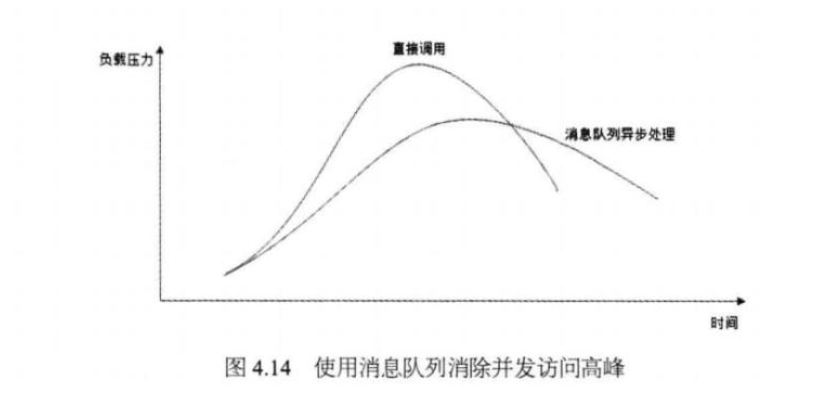
因为用户请求数据写入消息队列之后就立即返回给用户了,但是请求数据在后续的业务校验、写数据库等操作中可能失败。因此使用消息队列进行异步处理之后,需要适当修改业务流程进行配合,比如用户在提交订单之后,订单数据写入消息队列,不能立即返回用户订单提交成功,需要在消息队列的订单消费者进程真正处理完该订单之后,甚至出库后,再通过电子邮件或短信通知用户订单成功,以免交易纠纷。这就类似我们平时手机订火车票和电影票。
2.降低系统耦合性
我们知道模块分布式部署以后聚合方式通常有两种:1.分布式消息队列和2.分布式服务。先来简单说一下分布式服务:目前使用比较多的用来构建SOA(Service Oriented Architecture面向服务体系结构)的分布式服务框架是阿里巴巴开源的Dubbo.如果想深入了解Dubbo的可以看我写的关于Dubbo的这一篇文章:《高性能优秀的服务框架-dubbo介绍》:https://juejin.im/post/5acadeb1f265da2375072f9c 再来谈我们的分布式消息队列:我们知道如果模块之间不存在直接调用,那么新增模块或者修改模块就对其他模块影响较小,这样系统的可扩展性无疑更好一些。
我们最常见的事件驱动架构类似生产者消费者模式,在大型网站中通常用利用消息队列实现事件驱动结构。如下图所示:
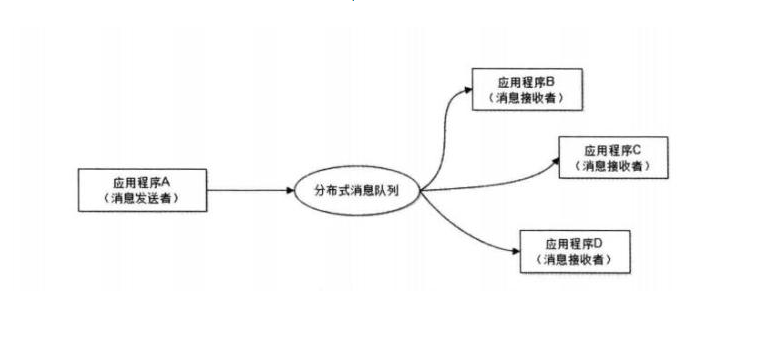
消息队列使利用发布-订阅模式工作,消息发送者(生产者)发布消息,一个或多个消息接受者(消费者)订阅消息。 从上图可以看到消息发送者(生产者)和消息接受者(消费者)之间没有直接耦合,消息发送者将消息发送至分布式消息队列即结束对消息的处理,消息接受者从分布式消息队列获取该消息后进行后续处理,并不需要知道该消息从何而来。对新增业务,只要对该类消息感兴趣,即可订阅该消息,对原有系统和业务没有任何影响,从而实现网站业务的可扩展性设计。
消息接受者对消息进行过滤、处理、包装后,构造成一个新的消息类型,将消息继续发送出去,等待其他消息接受者订阅该消息。因此基于事件(消息对象)驱动的业务架构可以是一系列流程。
另外为了避免消息队列服务器宕机造成消息丢失,会将成功发送到消息队列的消息存储在消息生产者服务器上,等消息真正被消费者服务器处理后才删除消息。在消息队列服务器宕机后,生产者服务器会选择分布式消息队列服务器集群中的其他服务器发布消息。
前面说了这么多消息队列的重要性、使用场景、工作模式,有很多人就可能会说了,现有的ActiveMQ、RabbitMQ、Kafka、RocketMQ等多了去了,那在项目架构的时候选一个用上去就不行了,完全没有必要重复造轮子啊!本人认为对于重复造轮子的事情和其它任何事情都是一样的——任何事情没有绝对的好处或者坏处,比如是刚入门的码农、又或者很急的项目,完全可以选用现有一种通用的、成熟的产品,没必要去从零开始做;实际上没有任何一个优秀的产品全部使用三方的产品来组装完成的,任何一个好一点的项目发展到一定的时候都不约而同的进行底层开发。原因很简单:第一个任何通用型的产品总用功能覆盖不到的场景;第二个任何通用型的产品为了实现通用必将做了一些性能或架构的牺牲;现在道理都讲完了,开始动手了(都听你逼半天,能动手就尽量少逼逼!)。
概述
动手前先构思一下,本人需要一个简单的、可发布订阅的、高吞吐量的消息队列,并将之简单大的方面分成QServer、QClient;QServer主要有Exchange、Binding、MessageQueue构成;QClient和QServer共用一套相同的传输编解码器QCoder ,主要实现Publish、Subscribe、Unsubcribe、Closes等功能;先想这么多,开干!
Exchange
主要在QServer中提供发布、订阅、连接、队列信息等管理
1 /**************************************************************************** 2 *Copyright (c) 2018 Microsoft All Rights Reserved. 3 *CLR版本: 4.0.30319.42000 4 *机器名称:WENLI-PC 5 *公司名称:Microsoft 6 *命名空间:SAEA.QueueSocket.Model 7 *文件名: Exchange 8 *版本号: V1.0.0.0 9 *唯一标识:6a576aad-edcc-446d-b7e5-561a622549bf 10 *当前的用户域:WENLI-PC 11 *创建人: yswenli 12 *电子邮箱:wenguoli_520@qq.com 13 *创建时间:2018/3/5 16:36:44 14 *描述: 15 * 16 *===================================================================== 17 *修改标记 18 *修改时间:2018/3/5 16:36:44 19 *修改人: yswenli 20 *版本号: V1.0.0.0 21 *描述: 22 * 23 *****************************************************************************/ 24 25 using SAEA.Commom; 26 using SAEA.Sockets.Interface; 27 using System; 28 using System.Collections.Generic; 29 using System.Linq; 30 using System.Text; 31 using System.Threading; 32 using System.Threading.Tasks; 33 34 namespace SAEA.QueueSocket.Model 35 { 36 class Exchange : ISync 37 { 38 _syncLocker = new (); 39 40 public SyncLocker 41 { 42 get 43 { 44 return _syncLocker; 45 } 46 } 47 48 long _pNum = 0; 49 50 long _cNum = 0; 51 52 long _inNum = 0; 53 54 long _outNum = 0; 55 56 private Binding _binding; 57 58 private MessageQueue _messageQueue; 59 60 public Exchange() 61 { 62 this._binding = new Binding(); 63 64 this._messageQueue = new MessageQueue(); 65 } 66 67 68 public void AcceptPublish(string sessionID, QueueResult pInfo) 69 { 70 lock (_syncLocker) 71 { 72 this._binding.Set(sessionID, pInfo.Name, pInfo.Topic); 73 74 this._messageQueue.Enqueue(pInfo.Topic, pInfo.Data); 75 76 _pNum = this._binding.GetPublisherCount(); 77 78 Interlocked.Increment(ref _inNum); 79 } 80 } 81 82 public void AcceptPublishForBatch(string sessionID, QueueResult[] datas) 83 { 84 if (datas != null) 85 { 86 foreach (var data in datas) 87 { 88 if (data != null) 89 { 90 AcceptPublish(sessionID, data); 91 } 92 } 93 } 94 } 95 96 97 public void GetSubscribeData(string sessionID, QueueResult sInfo, int maxSize = 500, int maxTime = 500, Action<List<string>> callBack = null) 98 { 99 lock (_syncLocker)100 {101 var result = this._binding.GetBingInfo(sInfo);102 103 if (result == null)104 {105 this._binding.Set(sessionID, sInfo.Name, sInfo.Topic, false);106 107 _cNum = this._binding.GetSubscriberCount();108 109 Task.Factory.StartNew(() =>110 {111 while (this._binding.Exists(sInfo))112 {113 var list = this._messageQueue.DequeueForList(sInfo.Topic, maxSize, maxTime);114 if (list != null)115 {116 list.ForEach(i => { Interlocked.Increment(ref _outNum); });117 callBack?.Invoke(list);118 list.Clear();119 list = null;120 }121 }122 });123 }124 } 125 }126 127 public void Unsubscribe(QueueResult sInfo)128 {129 Interlocked.Decrement(ref _cNum);130 this._binding.Del(sInfo.Name, sInfo.Topic);131 }132 133 public void Clear(string sessionID)134 {135 lock (_syncLocker)136 {137 var data = this._binding.GetBingInfo(sessionID);138 139 if (data != null)140 {141 if (data.Flag)142 {143 Interlocked.Decrement(ref _pNum);144 }145 else146 {147 Interlocked.Decrement(ref _cNum);148 }149 this._binding.Remove(sessionID);150 }151 }152 }153 154 public Tuple<long, long, long, long> GetConnectInfo()155 {156 return new Tuple<long, long, long, long>(_pNum, _cNum, _inNum, _outNum);157 }158 159 public List<Tuple<string, long>> GetQueueInfo()160 {161 List<Tuple<string, long>> result = new List<Tuple<string, long>>();162 lock (_syncLocker)163 {164 var list = this._messageQueue.ToList();165 if (list != null)166 {167 var tlts = list.Select(b => b.Topic).Distinct().ToList();168 169 if (tlts != null)170 {171 foreach (var topic in tlts)172 {173 var count = this._messageQueue.GetCount(topic);174 var t = new Tuple<string, long>(topic, count);175 result.Add(t);176 }177 tlts.Clear();178 }179 list.Clear();180 }181 }182 return result;183 }184 185 }186 }
思维发散:这里可以增加全局消息队列、指定连接消息队列等;将连接通过类型redis cluster模式进行一个均衡分布等
Binding
主要功能是将连接、主题进行映射管理
1 /**************************************************************************** 2 *Copyright (c) 2018 Microsoft All Rights Reserved. 3 *CLR版本: 4.0.30319.42000 4 *机器名称:WENLI-PC 5 *公司名称:Microsoft 6 *命名空间:SAEA.QueueSocket.Model 7 *文件名: Binding 8 *版本号: V1.0.0.0 9 *唯一标识:7472dabd-1b6a-4ffe-b19f-2d1cf7348766 10 *当前的用户域:WENLI-PC 11 *创建人: yswenli 12 *电子邮箱:wenguoli_520@qq.com 13 *创建时间:2018/3/5 17:10:19 14 *描述: 15 * 16 *===================================================================== 17 *修改标记 18 *修改时间:2018/3/5 17:10:19 19 *修改人: yswenli 20 *版本号: V1.0.0.0 21 *描述: 22 * 23 *****************************************************************************/ 24 25 using SAEA.Commom; 26 using SAEA.Sockets.Interface; 27 using System; 28 using System.Collections.Generic; 29 using System.Linq; 30 using System.Text; 31 32 namespace SAEA.QueueSocket.Model 33 { 34 /// <summary> 35 /// 连接与主题的映射 36 /// </summary> 37 class Binding : ISync , IDisposable 38 { 39 List<BindInfo> _list = new List<BindInfo>(); 40 41 _syncLocker = new (); 42 43 public SyncLocker 44 { 45 get 46 { 47 return _syncLocker; 48 } 49 } 50 51 bool _isDisposed = false; 52 53 int _minutes = 10; 54 55 public Binding(int minutes = 10) 56 { 57 _minutes = minutes; 58 59 ThreadHelper.PulseAction(() => 60 { 61 lock (_syncLocker) 62 { 63 var list = _list.Where(b => b.Expired <= DateTimeHelper.Now).ToList(); 64 if (list != null) 65 { 66 list.ForEach(item => 67 { 68 _list.Remove(item); 69 }); 70 list.Clear(); 71 list = null; 72 } 73 } 74 }, new TimeSpan(0, 0, 10), _isDisposed); 75 } 76 77 78 public void Set(string sessionID, string name, string topic, bool isPublisher = true) 79 { 80 81 lock (_syncLocker) 82 { 83 var result = _list.FirstOrDefault(b => b.Name == name && b.Topic == topic); 84 if (result == null) 85 { 86 _list.Add(new BindInfo() 87 { 88 SessionID = sessionID, 89 Name = name, 90 Topic = topic, 91 Flag = isPublisher, 92 Expired = DateTimeHelper.Now.AddMinutes(_minutes) 93 }); 94 } 95 else 96 { 97 result.Expired = DateTimeHelper.Now.AddMinutes(_minutes); 98 } 99 }100 }101 102 public void Del(string sessionID, string topic)103 {104 lock (_syncLocker)105 {106 var result = _list.FirstOrDefault(b => b.Name == sessionID && b.Topic == topic);107 if (result != null)108 {109 _list.Remove(result);110 }111 }112 }113 114 public void Remove(string sessionID)115 {116 lock (_syncLocker)117 {118 var result = _list.Where(b => b.SessionID == sessionID).ToList();119 if (result != null)120 {121 result.ForEach((item) =>122 {123 _list.Remove(item);124 });125 result.Clear();126 }127 }128 }129 130 public BindInfo GetBingInfo(QueueResult sInfo)131 {132 lock (_syncLocker)133 {134 var bi = _list.FirstOrDefault(b => b.Name == sInfo.Name && b.Topic == sInfo.Topic);135 136 if (bi != null)137 {138 if (bi.Expired <= DateTimeHelper.Now)139 {140 Remove(bi.SessionID);141 }142 else143 {144 return bi;145 }146 }147 return null;148 }149 }150 151 public BindInfo GetBingInfo(string sessionID)152 {153 lock (_syncLocker)154 {155 return _list.FirstOrDefault(b => b.SessionID == sessionID);156 }157 }158 159 public bool Exists(QueueResult sInfo)160 {161 lock (_syncLocker)162 {163 var data = _list.FirstOrDefault(b => b.Name == sInfo.Name && b.Topic == sInfo.Topic);164 165 if (data != null)166 {167 if (data.Expired <= DateTimeHelper.Now)168 {169 Remove(data.SessionID);170 171 return false;172 }173 174 data.Expired = DateTimeHelper.Now.AddMinutes(_minutes);175 176 return true;177 }178 }179 return false;180 }181 182 183 public IEnumerable<BindInfo> GetPublisher()184 {185 lock (_syncLocker)186 {187 return _list.Where(b => b.Flag);188 }189 }190 191 public int GetPublisherCount()192 {193 lock (_syncLocker)194 {195 return _list.Where(b => b.Flag).Count();196 }197 }198 199 public IEnumerable<BindInfo> GetSubscriber()200 {201 lock (_syncLocker)202 {203 return _list.Where(b => !b.Flag);204 }205 }206 207 public int GetSubscriberCount()208 {209 lock (_syncLocker)210 {211 return _list.Where(b => !b.Flag).Count();212 }213 }214 215 216 public void Dispose()217 {218 _isDisposed = true;219 lock (_syncLocker)220 {221 _list.Clear();222 _list = null;223 }224 }225 }226 }
思维发散:实现多个QServer的主题与队列映射克隆、或者队列消息转发实现容灾集群或大容量集群等
MessageQueue
将主题与队列形成一个映射,并对主题映射进行管理
1 /**************************************************************************** 2 *Copyright (c) 2018 Microsoft All Rights Reserved. 3 *CLR版本: 4.0.30319.42000 4 *机器名称:WENLI-PC 5 *公司名称:Microsoft 6 *命名空间:SAEA.QueueSocket.Model 7 *文件名: QueueCollection 8 *版本号: V1.0.0.0 9 *唯一标识:89a65c12-c4b3-486b-a933-ad41c3db6621 10 *当前的用户域:WENLI-PC 11 *创建人: yswenli 12 *电子邮箱:wenguoli_520@qq.com 13 *创建时间:2018/3/6 10:31:11 14 *描述: 15 * 16 *===================================================================== 17 *修改标记 18 *修改时间:2018/3/6 10:31:11 19 *修改人: yswenli 20 *版本号: V1.0.0.0 21 *描述: 22 * 23 *****************************************************************************/ 24 25 using SAEA.Commom; 26 using SAEA.Sockets.Interface; 27 using System; 28 using System.Collections.Concurrent; 29 using System.Collections.Generic; 30 using System.Linq; 31 using System.Threading.Tasks; 32 33 namespace SAEA.QueueSocket.Model 34 { 35 public class MessageQueue : ISync , IDisposable 36 { 37 bool _isDisposed = false; 38 39 ConcurrentDictionary<string, Queue > _list; 40 41 _syncLocker = new (); 42 43 public SyncLocker 44 { 45 get 46 { 47 return _syncLocker; 48 } 49 } 50 51 public MessageQueue() 52 { 53 _list = new ConcurrentDictionary<string, Queue >(); 54 55 ThreadHelper.Run(() => 56 { 57 while (!_isDisposed) 58 { 59 var list = _list.Values.Where(b => b.Expired <= DateTimeHelper.Now); 60 if (list != null) 61 { 62 foreach (var item in list) 63 { 64 if (item.Length == 0) 65 { 66 _list.TryRemove(item.Topic, out Queue q); 67 } 68 } 69 } 70 ThreadHelper.Sleep(10000); 71 } 72 }, true, System.Threading.ThreadPriority.Highest); 73 } 74 75 76 public void Enqueue(string topic, string data) 77 { 78 var queue = _list.Values.FirstOrDefault(b => b.Topic.Equals(topic)); 79 lock (_syncLocker) 80 { 81 if (queue == null) 82 { 83 queue = new Queue (topic); 84 _list.TryAdd(topic, queue); 85 } 86 } 87 queue.Enqueue(data); 88 } 89 90 91 public string Dequeue(string topic) 92 { 93 var queue = _list.Values.FirstOrDefault(b => b.Topic.Equals(topic)); 94 if (queue != null) 95 { 96 return queue.Dequeue(); 97 } 98 return null; 99 }100 101 /// <summary>102 /// 批量读取数据103 /// </summary>104 /// <param name="topic"></param>105 /// <param name="maxSize"></param>106 /// <param name="maxTime"></param>107 /// <returns></returns>108 public List<string> DequeueForList(string topic, int maxSize = 500, int maxTime = 500)109 {110 List<string> result = new List<string>();111 bool running = true;112 var m = 0;113 var task = Task.Factory.StartNew(() =>114 {115 while (running)116 {117 var data = Dequeue(topic);118 if (data != null)119 {120 result.Add(data);121 m++;122 if (m == maxSize)123 {124 running = false;125 }126 }127 else128 {129 ThreadHelper.Sleep(1);130 }131 }132 });133 Task.WaitAll(new Task[] { task }, maxTime);134 running = false;135 return result;136 }137 138 public string BlockDequeue(string topic)139 {140 var queue = _list.Values.FirstOrDefault(b => b.Topic == topic);141 if (queue != null)142 {143 return queue.BlockDequeue();144 }145 return null;146 }147 148 public List<Queue > ToList()149 {150 lock (_syncLocker)151 {152 return _list.Values.ToList();153 }154 }155 156 public long GetCount(string topic)157 {158 var queue = _list.Values.FirstOrDefault(b => b.Topic == topic);159 if (queue != null)160 return queue.Length;161 return 0;162 }163 164 public void Dispose()165 {166 _isDisposed = true;167 _list.Clear();168 _list = null;169 }170 }171 }
思维发散:增加硬盘持久化以实现down机容灾、增加ack确认再移除以实现高可靠性等
QCoder
在QServer和QClient之间进行传输编解码,这个编解码的速度直接影响消息队列的传输性能;本人使用了2种方案:1.使用类似redis传输方案,使用回车作为分隔符方式,这种方案结果要么一个字节一个字节检查分隔符,这种for操作还是C、C++屌,C#做这个真心不行;要么先将字节数组通过Encoding转换成String再来for,虽说能提升几倍性能,但是遇到不完整的字节数组时,本人没有找一个好的方法。2.使用自定义类型+长度+内容这种格式
1 /**************************************************************************** 2 *Copyright (c) 2018 Microsoft All Rights Reserved. 3 *CLR版本: 4.0.30319.42000 4 *机器名称:WENLI-PC 5 *公司名称:Microsoft 6 *命名空间:SAEA.QueueSocket.Net 7 *文件名: QCoder 8 *版本号: V1.0.0.0 9 *唯一标识:88f5a779-8294-47bc-897b-8357a09f2fdb 10 *当前的用户域:WENLI-PC 11 *创建人: yswenli 12 *电子邮箱:wenguoli_520@qq.com 13 *创建时间:2018/3/5 18:01:56 14 *描述: 15 * 16 *===================================================================== 17 *修改标记 18 *修改时间:2018/3/5 18:01:56 19 *修改人: yswenli 20 *版本号: V1.0.0.0 21 *描述: 22 * 23 *****************************************************************************/ 24 25 using SAEA.Commom; 26 using SAEA.QueueSocket.Model; 27 using SAEA.QueueSocket.Type; 28 using SAEA.Sockets.Interface; 29 using System; 30 using System.Collections.Generic; 31 using System.Text; 32 33 namespace SAEA.QueueSocket.Net 34 { 35 public sealed class QCoder : ICoder 36 { 37 static readonly int MIN = 1 + 4 + 4 + 0 + 4 + 0 + 0; 38 39 private List<byte> _buffer = new List<byte>(); 40 41 private _locker = new (); 42 43 public void Pack(byte[] data, Action<DateTime> onHeart, Action<ISocketProtocal> onUnPackage, Action<byte[]> onFile) 44 { 45 46 } 47 48 /// <summary> 49 /// 队列编解码器 50 /// </summary> 51 public QueueCoder QueueCoder { get; set; } = new QueueCoder(); 52 53 /// <summary> 54 /// 包解析 55 /// </summary> 56 /// <param name="data"></param> 57 /// <param name="OnQueueResult"></param> 58 public void GetQueueResult(byte[] data, Action<QueueResult> OnQueueResult) 59 { 60 lock (_locker) 61 { 62 try 63 { 64 _buffer.AddRange(data); 65 66 if (_buffer.Count > (1 + 4 + 4 + 0 + 4 + 0 + 0)) 67 { 68 var buffer = _buffer.ToArray(); 69 70 QCoder.Decode(buffer, (list, offset) => 71 { 72 if (list != null) 73 { 74 foreach (var item in list) 75 { 76 OnQueueResult?.Invoke(new QueueResult() 77 { 78 Type = (QueueSocketMsgType)item.Type, 79 Name = item.Name, 80 Topic = item.Topic, 81 Data = item.Data 82 }); 83 } 84 _buffer.RemoveRange(0, offset); 85 } 86 }); 87 } 88 } 89 catch (Exception ex) 90 { 91 ConsoleHelper.WriteLine("QCoder.GetQueueResult error:" + ex.Message + ex.Source); 92 _buffer.Clear(); 93 } 94 } 95 } 96 97 98 99 /// <summary>100 /// socket 传输字节编码101 /// 格式为:1+4+4+x+4+x+4102 /// </summary>103 /// <param name="queueSocketMsg"></param>104 /// <returns></returns>105 public static byte[] Encode(QueueSocketMsg queueSocketMsg)106 {107 List<byte> list = new List<byte>();108 109 var total = 4 + 4 + 4;110 111 var nlen = 0;112 113 var tlen = 0;114 115 byte[] n = null;116 byte[] tp = null;117 byte[] d = null;118 119 if (!string.IsNullOrEmpty(queueSocketMsg.Name))120 {121 n = Encoding.UTF8.GetBytes(queueSocketMsg.Name);122 nlen = n.Length;123 total += nlen;124 }125 if (!string.IsNullOrEmpty(queueSocketMsg.Topic))126 {127 tp = Encoding.UTF8.GetBytes(queueSocketMsg.Topic);128 tlen = tp.Length;129 total += tlen;130 }131 if (!string.IsNullOrEmpty(queueSocketMsg.Data))132 {133 d = Encoding.UTF8.GetBytes(queueSocketMsg.Data);134 total += d.Length;135 }136 137 list.Add(queueSocketMsg.Type);138 list.AddRange(BitConverter.GetBytes(total));139 list.AddRange(BitConverter.GetBytes(nlen));140 if (nlen > 0)141 list.AddRange(n);142 list.AddRange(BitConverter.GetBytes(tlen));143 if (tlen > 0)144 list.AddRange(tp);145 if (d != null)146 list.AddRange(d);147 var arr = list.ToArray();148 list.Clear();149 return arr;150 }151 152 /// <summary>153 /// socket 传输字节解码154 /// </summary>155 /// <param name="data"></param>156 /// <param name="onDecode"></param>157 public static bool Decode(byte[] data, Action<QueueSocketMsg[], int> onDecode)158 {159 int offset = 0;160 161 try162 {163 if (data != null && data.Length > offset + MIN)164 {165 var list = new List<QueueSocketMsg>();166 167 while (data.Length > offset + MIN)168 {169 var total = BitConverter.ToInt32(data, offset + 1);170 171 if (data.Length >= offset + total + 1)172 {173 offset += 5;174 175 var qm = new QueueSocketMsg((QueueSocketMsgType)data[0]);176 qm.Total = total;177 178 qm.NLen = BitConverter.ToInt32(data, offset);179 offset += 4;180 181 182 if (qm.NLen > 0)183 {184 var narr = new byte[qm.NLen];185 Buffer.BlockCopy(data, offset, narr, 0, narr.Length);186 qm.Name = Encoding.UTF8.GetString(narr);187 }188 offset += qm.NLen;189 190 qm.TLen = BitConverter.ToInt32(data, offset);191 192 offset += 4;193 194 if (qm.TLen > 0)195 {196 var tarr = new byte[qm.TLen];197 Buffer.BlockCopy(data, offset, tarr, 0, tarr.Length);198 qm.Topic = Encoding.UTF8.GetString(tarr);199 }200 offset += qm.TLen;201 202 var dlen = qm.Total - 4 - 4 - qm.NLen - 4 - qm.TLen;203 204 if (dlen > 0)205 {206 var darr = new byte[dlen];207 Buffer.BlockCopy(data, offset, darr, 0, dlen);208 qm.Data = Encoding.UTF8.GetString(darr);209 offset += dlen;210 }211 list.Add(qm);212 }213 else214 {215 break;216 }217 }218 if (list.Count > 0)219 {220 onDecode?.Invoke(list.ToArray(), offset);221 return true;222 }223 }224 }225 catch (Exception ex)226 {227 ConsoleHelper.WriteLine($"QCoder.Decode error:{ex.Message} stack:{ex.StackTrace} data:{data.Length} offset:{offset}");228 }229 onDecode?.Invoke(null, 0);230 return false;231 }232 233 234 /// <summary>235 /// dispose236 /// </summary>237 public void Dispose()238 {239 _buffer.Clear();240 _buffer = null;241 }242 243 244 245 }246 }
测试
简单的How to do和Why do已经完成了,是时候定义个Producer、Consumer来测试一把了
1 using SAEA.QueueSocket; 2 using SAEA.Commom; 3 using SAEA.QueueSocket.Model; 4 using System; 5 using System.Collections.Generic; 6 using System.Diagnostics; 7 using System.Text; 8 using System.Threading; 9 using System.Threading.Tasks; 10 11 namespace SAEA.QueueSocketTest 12 { 13 class Program 14 { 15 static void Main(string[] args) 16 { 17 do 18 { 19 ConsoleHelper.WriteLine("输入s启动队列服务器,输入p启动生产者,输入c启动消费者"); 20 21 var inputStr = ConsoleHelper.ReadLine(); 22 23 if (!string.IsNullOrEmpty(inputStr)) 24 { 25 var topic = "测试频道"; 26 27 switch (inputStr.ToLower()) 28 { 29 case "s": 30 ConsoleHelper. = "SAEA.QueueServer"; 31 ServerInit(); 32 break; 33 case "p": 34 ConsoleHelper. = "SAEA.QueueProducer"; 35 ConsoleHelper.WriteLine("输入ip:port连接到队列服务器"); 36 inputStr = ConsoleHelper.ReadLine(); 37 ProducerInit(inputStr, topic); 38 break; 39 case "c": 40 ConsoleHelper. = "SAEA.QueueConsumer"; 41 ConsoleHelper.WriteLine("输入ip:port连接到队列服务器"); 42 inputStr = ConsoleHelper.ReadLine(); 43 ConsumerInit(inputStr, topic); 44 break; 45 default: 46 ServerInit(); 47 inputStr = "127.0.0.1:39654"; 48 ProducerInit(inputStr, topic); 49 ConsumerInit(inputStr, topic); 50 break; 51 } 52 ConsoleHelper.WriteLine("回车退出!"); 53 ConsoleHelper.ReadLine(); 54 return; 55 } 56 } 57 while (true); 58 } 59 60 61 62 static QServer _server; 63 static void ServerInit() 64 { 65 _server = new QServer(); 66 _server.OnDisconnected += Server_OnDisconnected; 67 _server.CalcInfo((ci, qi) => 68 { 69 var result = string.Format("生产者:{0} 消费者:{1} 收到消息:{2} 推送消息:{3}{4}", ci.Item1, ci.Item2, ci.Item3, ci.Item4, Environment.NewLine); 70 71 qi.ForEach((item) => 72 { 73 result += string.Format("队列名称:{0} 堆积消息数:{1} {2}", item.Item1, item.Item2, Environment.NewLine); 74 }); 75 ConsoleHelper.WriteLine(result); 76 }); 77 _server.Start(); 78 } 79 80 private static void Server_OnDisconnected(string ID, Exception ex) 81 { 82 _server.Clear(ID); 83 if (ex != null) 84 { 85 ConsoleHelper.WriteLine("{0} 已从服务器断开,err:{1}", ID, ex.ToString()); 86 } 87 } 88 89 static void ProducerInit(string ipPort, string topic) 90 { 91 int pNum = 0; 92 93 //string msg = "主要原因是由于在高并发环境下,由于来不及同步处理,请求往往会发生堵塞,比如说,大量的insert,update之类的请求同时到达MySQL,直接导致无数的行锁表锁,甚至最后请求会堆积过多,从而触发too many connections错误。通过使用消息队列,我们可以异步处理请求,从而缓解系统的压力。"; 94 string msg = "123"; 95 if (string.IsNullOrEmpty(ipPort)) ipPort = "127.0.0.1:39654"; 96 97 QClient producer = new QClient("productor" + Guid.NewGuid().ToString("N"), ipPort); 98 99 producer. += Producer_ ;100 101 producer.OnDisconnected += Client_OnDisconnected;102 103 producer.ConnectAsync((s) =>104 {105 Task.Factory.StartNew(() =>106 {107 var old = 0;108 var speed = 0;109 while (producer.Connected)110 {111 speed = pNum - old;112 old = pNum;113 ConsoleHelper.WriteLine("生产者已成功发送:{0} 速度:{1}/s", pNum, speed);114 Thread.Sleep(1000);115 }116 });117 118 var list = new List<Tuple<string, byte[]>>();119 120 121 while (producer.Connected)122 { 123 124 producer.Publish(topic, msg);125 126 Interlocked.Increment(ref pNum);127 }128 });129 130 131 }132 133 private static void Producer_ (string ID, Exception ex)134 {135 ConsoleHelper.WriteLine("id:" + ID + ",error:" + ex.Message);136 }137 138 static void ConsumerInit(string ipPort, string topic)139 {140 if (string.IsNullOrEmpty(ipPort)) ipPort = "127.0.0.1:39654";141 QClient consumer = new QClient("subscriber-" + Guid.NewGuid().ToString("N"), ipPort);142 consumer.OnMessage += Subscriber_OnMessage;143 consumer.OnDisconnected += Client_OnDisconnected;144 consumer.ConnectAsync((s) =>145 {146 Task.Factory.StartNew(() =>147 {148 var old = 0;149 var speed = 0;150 while (consumer.Connected)151 {152 speed = _outNum - old;153 old = _outNum;154 ConsoleHelper.WriteLine("消费者已成功接收:{0} 速度:{1}/s", _outNum, speed);155 Thread.Sleep(1000);156 }157 });158 159 consumer.Subscribe(topic);160 });161 162 }163 164 private static void Client_OnDisconnected(string ID, Exception ex)165 {166 ConsoleHelper.WriteLine("当前连接已关闭");167 }168 169 static int _outNum = 0;170 171 private static void Subscriber_OnMessage(QueueResult obj)172 {173 if (obj != null)174 _outNum += 1;175 }176 }177 }
单线程的、单生产者、单消费者、单队列服务器的测试结果如下图:

到此一个自行实现的简单的消息队列完成了,虽说它离实际产品还很遥远,但是本人还是觉的技术的提升离不开钻研,路漫漫其修远兮,吾将上下而求索!
转载请标明本文来源:http://www.cnblogs.com/yswenli/p//9029587.html
更多内容欢迎star作者的github:https://github.com/yswenli/SAEA
如果发现本文有什么问题和任何建议,也随时欢迎交流~
继续阅读与本文标签相同的文章
自行实现高性能MVC WebAPI
自行实现 dotnet core rpc
-
ARMS 发布 V2.4.3.3 发布,API支持RAM子账号调用。
2026-06-02栏目: 教程
-
你真的有处理好异常吗
2026-06-02栏目: 教程
-
前端工程化之路-语法检查
2026-06-02栏目: 教程
-
动手做webserver的核心之http解析
2026-06-02栏目: 教程
-
C#高性能二进制序列化
2026-06-02栏目: 教程