
D3.js + Canvas 绘制组织结构图
使用 D3.js 默认的 svg 渲染
D3默认的树状图画图使用的是svg, 比如这个来自D3作者的例子:
https://bl.ocks.org/mbostock/4339083
使用svg有好有坏:
- 好处是方便操作dom元素, 添加用户交互
- 坏处是渲染效率不高, 在数据量较大时页面易掉帧, 卡顿
在大多数数据量不是特别大情况下, 使用svg的好处是远远盖过坏处的,但如果我们真的需要渲染大量的数据呢?
使用 D3.js + Canvas 渲染
source code
https://github.com/ssthouse/organization-chart
demo page
https://ssthouse.github.io/organization-chart/#/
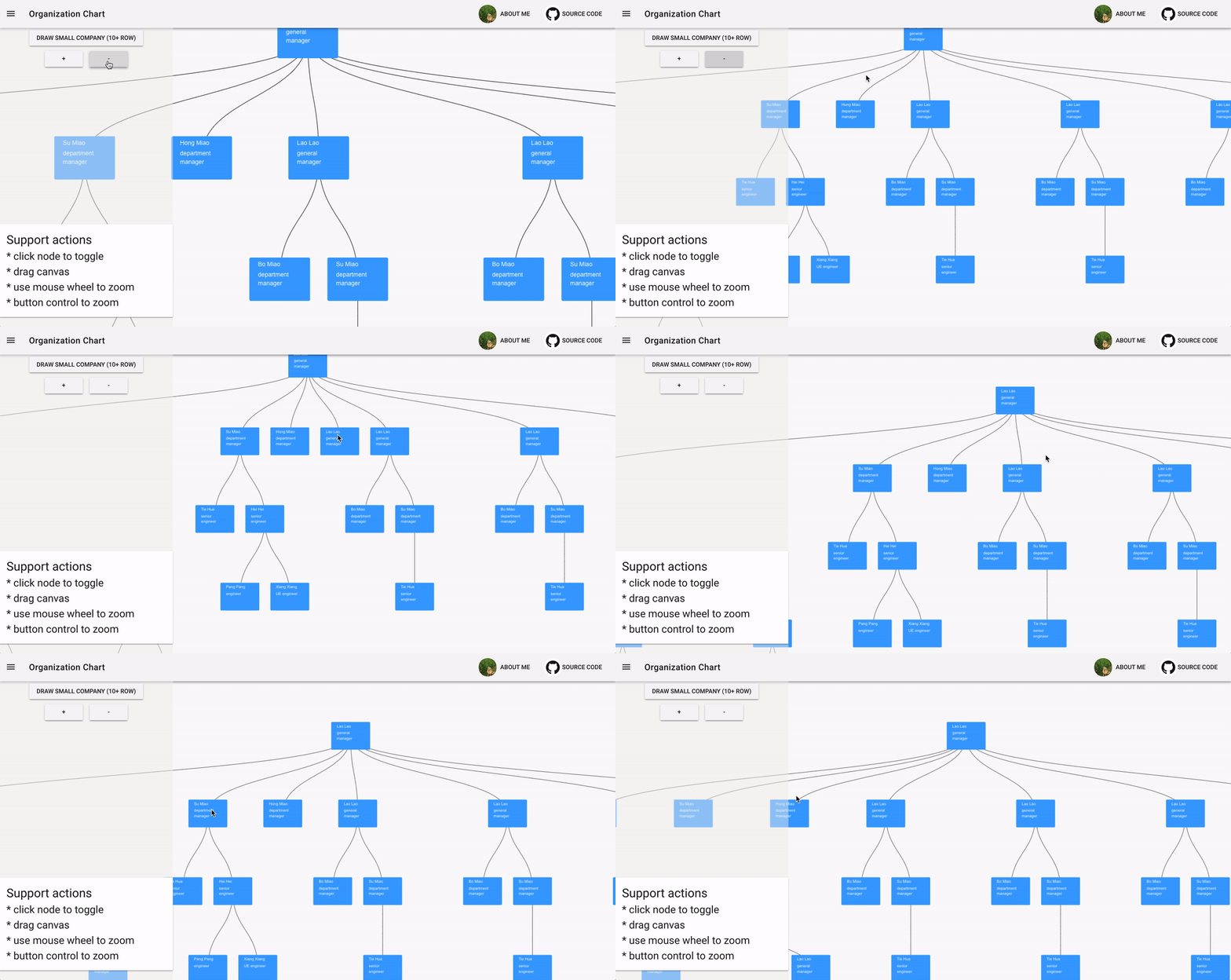
上面的demo就是使用 D3.js + Canvas 的方式实现的, 在组织的层数超过300时才会出现明显的卡顿, 能满足大部分的组织结构图的数据.
思路
- 使用 D3.js的 Three 在
虚拟Dom中画好图像 - 使用Canvas绘图 API将
虚拟Dom中的数据 (坐标 & 线的path) 等绘制到Canvas上 - 使用
Unique-color的方式实现Canvas 的用户交互- 通过绘制一张和之前 Canvas数据相同的隐藏Canvas, 并给每一个 想要接受用户交互的节点赋予唯一的颜色
- 通过监听Canvas点击事件, 获取点击像素的颜色值来判断点击的节点
- 该文章中有对该思路的详细介绍: https://medium.com/@lverspohl/how-to-turn-d3-and-canvas-into-good-friends-b7a240a32915
1.使用 D3.js的 Three 在 虚拟Dom 中画好图像
首先调使用D3创建 Tree的虚拟Dom:
this.data = this.d3.hierarchy(data)this.treeGenerator = this.d3.tree() .nodeSize([this.nodeWidth, this.nodeHeight])let nodes = this.treeData.descendants()let s = this.treeData. s()上面的变量 nodes 和 s 现在就包含了结构图中每个 组织节点 和 连接线 的坐标信息.
2. 使用Canvas绘图 API将 虚拟Dom 中的数据 (坐标 & 线的path) 等绘制到Canvas上
在 drawShowCanvas中, 通过 d3.select拿到虚拟的dom节点, 再使用 Canvas的绘图函数进行绘制, 这里用到了一些 Util的工具方法, 具体实现请参考源码.
drawShowCanvas () { this.context.clearRect(-50000, -10000, 100000, 100000) let self = this // draw s this.virtualContainerNode.selectAll('. ') .each(function () { let node = self.d3.select(this) let Path = self.d3. Vertical() .x(function (d) { return d.x }) .y(function (d) { return d.y }) .source(function () { return {x: node.attr('sourceX'), y: node.attr('sourceY')} }) .target(function () { return {x: node.attr('targetX'), y: node.attr('targetY')} }) let path = new Path2D( Path()) self.context.stroke(path) }) this.virtualContainerNode.selectAll('.orgUnit') .each(function () { let node = self.d3.select(this) let treeNode = node.data()[0] let data = treeNode.data self.context.fillStyle = '#3ca0ff' let indexX = Number(node.attr('x')) - self.unitWidth / 2 let indexY = Number(node.attr('y')) - self.unitHeight / 2 // draw unit outline rect (if you want to modify this line ===> please modify the same line in `drawHiddenCanvas`) Util.roundRect(self.context, indexX, indexY, self.unitWidth, self.unitHeight, 4, true, false) Util.text(self.context, data.name, indexX + self.unitPadding, indexY + self.unitPadding, '20px', '#ffffff') // Util.text(self.context, data. , indexX + self.unitPadding, indexY + self.unitPadding + 30, '20px', '#000000') let maxWidth = self.unitWidth - 2 * self.unitPadding Util.wrapText(self.context, data. , indexX + self.unitPadding, indexY + self.unitPadding + 24, maxWidth, 20) }) }3. 使用 Unique-color 的方式实现Canvas 的用户交互
下图中可以看到, 实际上是有两张Canvas的, 其中下面的Canvas除了的节点颜色不同外, 和上面的Cavans绘制的数据完全相同.
drawCanvas () { this.drawShowCanvas() this.drawHiddenCanvas() }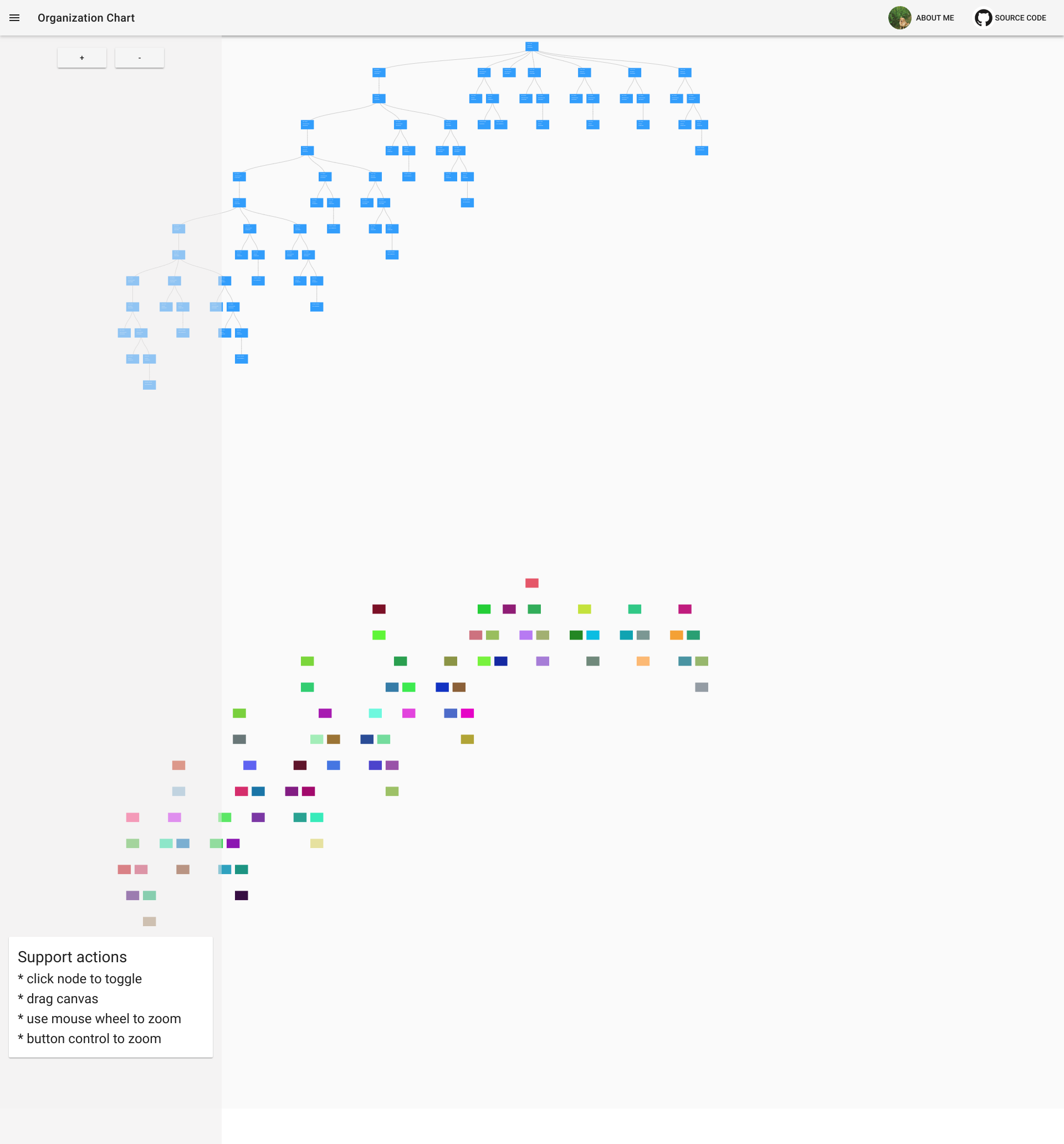
在上面一张Canvas上监听用户点击事件, 通过象素的坐标, 在下面一张图中拿到用户点击的节点 (注意: 颜色和节点的键值对 是在下面一张Canvas绘制的时候就已经创建好的.)
setClickListener () { let self = this this.canvasNode.node().addEventListener('click', function (e) { let colorStr = Util.getColorStrFromCanvas(self.hiddenContext, e. X, e. Y) let node = self.colorNodeMap[colorStr] if (node) { // let treeNodeData = node.data()[0] // self.hideChildren(treeNodeData, true) self.toggleTreeNode(node.data()[0]) self.update(node.data()[0]) } }) }下面是创建 unique-color和节点的 键值对 的参考代码:
addColorKey () { // give each node a unique color let self = this this.virtualContainerNode.selectAll('.orgUnit') .each(function () { let node = self.d3.select(this) let newColor = Util.randomColor() while (self.colorNodeMap[newColor]) { newColor = Util.randomColor() } node.attr('colorKey', newColor) node.data()[0]['colorKey'] = newColor self.colorNodeMap[newColor] = node }) }其他
To draw your own nested data
please replace the data in /src/ /data-generator with your own nested data.
please add your data drawing logic in /src/components/org-chart.js #drawShowCanvas
Want to develop locally ?
source code
if you like it , welcome to star and fork :tada:
https://github.com/ssthouse/organization-chart
# install dependenciesnpm install# serve with hot reload at localhostnpm run dev# build for production with minification (build to ./docs folder, which can be auto servered by github page ?)npm run build1
继续阅读与本文标签相同的文章
D3.js学习之路
-
MySQL事务隔离级别详解
2026-06-02栏目: 教程
-
Hibernate缓存机制
2026-06-02栏目: 教程
-
MAT Memory Analyzer Tool 插件装配(图解)
2026-06-02栏目: 教程
-
访问者模式
2026-06-02栏目: 教程
-
VS 2010 SP1 Installation frozed at KB-983509
2026-06-02栏目: 教程