
Vuex 概念篇
Vuex 是什么?
Vuex 是一个专为 Vue.js 应用程序开发的状态管理模式。它采用集中式存储管理应用的所有组件的状态,并以相应的规则保证状态以一种可预测的方式发生变化。
什么是“状态管理模式”?
从软件设计的角度,就是以一种统一的约定和准则,对全局共享状态数据进行管理和操作的设计理念。你必须按照这种设计理念和架构来对你项目里共享状态数据进行CRUD。所以所谓的“状态管理模式”就是一种软件设计的一种架构模式(思想)。
为什么需要这种“状态管理模式”应用到项目中呢?
现如今,流行组件化、模块化开发,多人开发各自组件的时候,不难保证各个组件都是唯一性的,多个组件共享状态肯定是存在的,共享状态又是谁都可以进行操作和修改的,这样就会导致所有对共享状态的操作都是不可预料的,后期出现问题,进行 debug 也是困难重重,往往我们是尽量去避免全局变量。
但大量的业务场景下,不同的模块(组件)之间确实需要共享数据,也需要对其进行修改操作。也就引发软件设计中的矛盾:模块(组件)之间需要共享数据 和 数据可能被任意修改导致不可预料的结果。
为了解决其矛盾,软件设计上就提出了一种设计和架构思想,将全局状态进行统一的管理,并且需要获取、修改等操作必须按我设计的套路来。就好比马路上必须遵守的交通规则,右行斑马线就是只能右转一个道理,统一了对全局状态管理的唯一入口,使代码结构清晰、更利于维护。
Vuex 是借鉴了 Flux 、Redux 和 The Elm Architecture 架构模式、设计思想的产物。
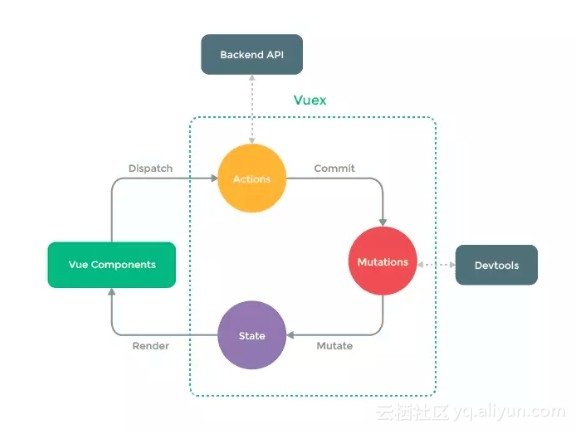
什么情况下我应该使用 Vuex?
不打算开发大型单页应用,使用 Vuex 可能是繁琐冗余的。应用够简单,最好不要使用 Vuex。一个简单的 global event bus (父子组件通信,父组件管理所需的数据状态)就足够您所需了。构建一个中大型单页应用,您很可能会考虑如何更好地在组件外部管理状态,Vuex 将会成为自然而然的选择。
个人见解,什么时候用?管你小中大型应用,我就想用就用呗,一个长期构建的小型应用项目,谁能知道项目需求以后会是什么样子,毕竟在这浮躁的时代,需求就跟川剧变脸一样快,对不对?毕竟学习了 Vuex 不立马用到项目实战中,你永远不可能揭开 Vuex 的面纱。项目中使用多了,自然而然就会知道什么时候该用上状态管理,什么时候不需要。老话说的好熟能生巧,你认为呢?(括弧 -- 先了解好Vuex 一些基本概念,然后在自己的项目中使用过后,再用到你公司项目上,你别这么虎一上来就给用上去了~)
Vuex 基本使用篇
安装
npm i vuex -S项目全局中任何地方使用 Vuex, 需要将 Vuex 注册到 Vue 实例中:
import Vue from 'vue'import Vuex from 'vuex'Vue.use(Vuex)Vuex 上车前的一个
上车规则:
- 每一个 Vuex 应用的核心就是 store(仓库),一个项目中必须只有一个 store 实例。包含着你的应用中大部分的状态 (state)。
- 不能直接改变 store 中的状态。改变 store 中的状态的唯一途径就是显式地提交 (commit) mutation。
Vuex 和单纯的全局对象有以下两点不同:(1) Vuex 的状态存储是响应式的。Vue 组件从 store 中读取状态的时候,若 store 中的状态发生变化,那么相应的组件也会相应地得到高效更新。(2)不能直接改变 store 中的状态。(重要的事情多来一遍)
上:
<div id="app"> <p>{{ count }}</p> <p> <button @click="increment">+</button> <button @click="decrement">-</button> </p></div>import Vue from 'vue'import Vuex from 'vuex'Vue.use(Vuex) // Vuex 注册到 Vue 中// 创建一个 storeconst store = new Vuex.Store({ // 初始化 state state: { count: 0 }, // 改变状态唯一声明处 mutations: { increment: state => state.count++, decrement: state => state.count-- }})new Vue({ el: '#app', // 从根组件将 store 的实例注入到所有的子组件 store, computed: { count () { // Vuex 的状态存储是响应式的,从 store 实例中读取状态最简单的方法就是在计算属性中返回某个状态, // 每当状态 count 发生变化,都会重新求取计算 return this.$store.state.count } }, methods: { increment () { this.$store.commit('increment') }, decrement () { this.$store.commit('decrement') } }})state 一个对象管理应用的所有状态,唯一数据源(SSOT, Single source of truth),必须前期初始化就定义好,不然后面在来修改设置 state,程序就不会捕获到 mutations(突变的意思) 所以数据也就不会又任何的更新,组件上也无法体现出来。
获取 store 管理的状态, 因为在 Vue 实例化的时候将 Vuex store 对象 注入了进来 ,所以任何地方都可以通过 this.$store 获取到 store, this.$store.state 来获取状态对象, this.$store.commit 来触发之前定义好的 mutations 中的方法
this.$store.state('count') // => 0this.$store.commit('increment') // => 1通过提交 mutation 的方式,而非直接改变 store.state.count, 使用 commit 方式可以让 Vuex 明确地追踪到状态的变化,利于后期维护和调试。
通过了解 state (状态,数据)和 mutations (修改数据唯一声明的地方,类似 SQL 语句)知道了 Vuex 最重要的核心两部分,然后通过掌握 gttter、action、module 来让 Vuex 更加的工程化、合理化来适应更大型的项目的状态管理。
mapState 辅助函数
mapState 可以干什么呢?字面意思状态映射,通过 mapState 可以更加快捷方便帮我们生成计算属性,拿上面的例子进行演示:
computed: { count () { return this.$store.state.count } }// 使用 mapStateimport { mapState } from 'vuex' // 需要先导入computed: mapState([ // 箭头函数方式 count: state => state.count , // or 传字符串参数方式, 'count' 等同于 state => state.count countAlias: 'count' // 获取状态后,你还需要和当前组件别的属性值时,就必须使用常规函数的写法了, 只有这样才能获取到当前组件的 this countPlusLocalState (state) { return state.count + this.localCount } ])当前计算属性名称和状态名称相同时,可以传递一个字符串数组:
computed: mapState([ // 映射 `this.count` 为 `this.$store.state.count` 'count'])以上使用 mapState 辅助函数后,整个 computed 计算属性都成了 state 状态管理聚集地了, 组件里并不是所有的计算属性都需要被状态管理化,还是有很多计算属性是不需要状态管理的数据的,那如何将它与局部计算属性混合使用呢?
因为 mapState 函数返回的是一个对象。所以我们使用对象扩展运算符就可以把局部计算属性和 mapState 函数返回的对象融合了。
computed: { ...mapState({ count: state => state.count }), localComputed () { /* ... */ } }️ 注意:对象扩展运算符,现处于 ECMA 提案 stage-4 阶段(将被添加到下一年度发布),所以项目中要使用需要安装 babel-plugin-transform- -rest-spread 插件 或 安装 presets 环境为 stage 为 1的 env 版本 babel-preset-stage-1 和修改 babelrc 配置文件
.babelrc
{ "presets": [ "env", "stage-1" // 添加此项 ], "plugins": [ "transform-vue-jsx", "syntax-dynamic-import" ]}核心概念
上面以讲述过 state 了,这里就不过多的说明。
Getter
Getter 就是 Store 状态管理层中的计算属性,获取源 State 后,希望在对其进行一些包装,再返回给组件中使用。也是就将直接获取到 State 后在 computed 里进行再次的过滤、包装逻辑统统提取出放到 Getter 里进行,提高了代码的复用性、可读性。
computed: { doneTodosCount () { return this.$store.state.todos.filter(todo => todo.done).length }}提取到
Getter:const store = new Vuex.Store({ state: { todos: [ { id: 1, text: '...', done: true }, { id: 2, text: '...', done: false } ] }, // `Getter` 默认第一个参数为 `state`: getters: { doneTodos: state => { return state.todos.filter( todo => todo.done ) } }})// 组件中获取,通过属性访问computed: { doneTodosCount () { return this.$store.getters.doneTodos.length } }️ 注意: getter 在通过属性访问时是作为 Vue 的响应式系统的一部分进行缓存。
Getter 还接受其他 getter 作为第二个参数
const store = new Vuex.Store({ state: { todos: [ { id: 1, text: '...', done: true }, { id: 2, text: '...', done: false } ] }, getters: { doneTodos: state => { return state.todos.filter( todo => todo.done ) }, // 第二个参数为 getters doneTodosLength: (state, getters) => { return getters.doneTodos.length } }})还可以通过给 Getter 传递参数获取特定的数据
getters: { // ... getTodoById: state => id => { return state.todos.find( todo => todo.id === id ) }}组件内调用方式
this.$store.getters.getTodoById(2) // => { id: 2, text: '...', done: false }️ 注意:getter 在通过方法访问时,每次都会去进行调用,而不会缓存结果。
mapGetters 辅助函数
和前面 mapState 辅助函数作用和使用上基本相同。
import { mapGetters } from 'vuex'// getter 名称和 计算属性名称相同的情况下,可以传递字符串数组export default { // ... computed: { ...mapGetters([ 'doneTodos' ]) }}// 传递对象的方式export default { // ... computed: { ...mapGetters({ doneTodos: 'doneTodos', getTodoById: 'getTodoById' // 此处传递回来的是一个函数,所以在使用的时候 => {{ getTodoById(2) }} }) }}Mutation
不能直接修改状态,需要通过 Vuex store 中声明的 Mutations 里的方法修改状态。 更改 Vuex 的 store 中的状态的唯一方法是提交 mutation。mutation 是一个对象, 含有一个字符串的 事件类型 (type) 和 一个 回调函数 (handler)。回调函数就是我们实际进行状态更改的地方,默认接受 state 作为第一个参数。
const store = new Vuex.Store({ state: { count: 1 }, mutations: { // increment 事件类型(type)名称,increment() 回调函数 // increment: function (state) {} 原本写法 increment (state) { // 变更状态 state.count++ } }})mutation handler 不能被直接调用,需要通过 store.commit() 来通知我需要触发一个 mutation handler。this.$store.commit('increment')mutation 接收参数必须只能两个,超出的都无法获取;第二个参数推荐传递的是一个对象,来接收更多的信息。this.$store.commit('increment', 10) // orthis.$store.commit('increment', { num: 10 }) 对象风格的提交方式
this.$store.commit({ type: 'increment', num: 10})Mutation 需要遵守 Vue 的响应规则
Vuex 的 store 中的状态是响应式的,那么当我们变更状态时,监视状态的 Vue 组件也会自动更新。这也意味着 Vuex 中的 mutation 也需要与使用 Vue 一样遵守一些注意事项:
- 最好提前在你的 store 中初始化好所有所需属性(state 中的属性)。
- 当需要在对象上添加新属性时,你应该返回的是一个新对象* 使用 Vue.set(obj, 'newProp', 123),或者* 以新对象替换老对象。例如:
.assgin({}, state.obj, newProps)、对象扩展运算符state.obj = {...state.obj, newProp: 123 }
mapMutation 辅助函数
使用方式跟 mapState 和 mapGetters 基本相同。
import { mapMutations } from 'vuex'export default { // ... methods: { // 传递字符串数组,同名哦~ ...mapMutations([ 'increment', // 将 `this.increment()` 映射为 `this.$store.commit('increment')` // `mapMutations` 也支持载荷: 'incrementBy' // 将 `this.incrementBy(amount)` 映射为 `this.$store.commit('incrementBy', amount)` ]), // 传递对象 ...mapMutations({ add: 'increment' // 将 `this.add()` 映射为 `this.$store.commit('increment')` }) }}调用方式就跟 methods 其他普通方法一样,通过 this.<methodName> 来调用。
️ 注意:mutation 必须是同步函数,修改 state 必须是同步的、同步的、同步的。如果是异步的,当触发 mutation 的时候,内部的回调函数还没有被调用,根本不知道实际执行在何处,很难追踪起问题。(实质上任何在回调函数中进行的状态的改变都是不可追踪的。Vuex 也提供了异步操作的解决方案, 需要将异步操作提取出来放入到 Action 里进行操作。而 Mutation 只负责同步事务。
Action
在之前也讲述了,Action 是用来处理异步操作的。这里在详细说明一下 Action 的基本使用。
Action 类似于 mutation, 不同在于:
- Action 提交的是 mutation,而不是直接变更状态。(不直接修改状态,修改状态还是需要通过 mutation)
- Action 可以包含任意异步操作。
const store = new Vuex.Store({ state: { count: 0 }, mutations: { increment (state) { state.count++ } }, actions: { // 实践中,经常用到参数解构来简化代码, increment ({commit}) { commit('') } increment (context) { context.commit('increment') } }})Action 函数接受一个与 store 实例具有相同方法和属性的 context 对象(并不是真正的 store 本身),因此可以调用 store.commit 进行提交 mutation, 或者通过 context.state 和 context.getters 来获取 state 和 getters。
触发Action
Action 通过 store.dispatch 方法触发:
this.$store.dispatch('increment')// 以传递额外参数分发store.dispatch('incrementAsync', { amount: 10})// 以对象形式分发store.dispatch({ type: 'incrementAsync', amount: 10})与服务器数据异步请求基本在 Action 里进行, 然后通过 Mutation 来同步应用状态state
mapAction 辅助函数
和 mapMutions 使用方式基本一致
import { mapActions } from 'vuex'export default { // ... methods: { ...mapActions([ 'increment', // 将 `this.increment()` 映射为 `this.$store.dispatch('increment')` // `mapActions` 也支持载荷: 'incrementBy' // 将 `this.incrementBy(amount)` 映射为 `this.$store.dispatch('incrementBy', amount)` ]), // 传递对象 ...mapActions({ add: 'increment' // 将 `this.add()` 映射为 `this.$store.dispatch('increment')` }) }}组合 Action
Action 通常是异步的,那么如何知道 action 什么时候结束呢?更重要的是,我们如何才能组合多个 action,以处理更加复杂的异步流程?
通过返回一个 Promise 对象来进行组合多个 Action。
actions: { actionA ({ commit }) { return new Promise((resolve, reject) => { setTimeout(() => { commit('someMutation') resolve() }, 1000) }) }}然后:
store.dispatch('actionA').then(() => { // ...})利用
async / await,我们可以如下组合 action:// 假设 getData() 和 getOtherData() 返回的是 Promiseactions: { async actionA ({ commit }) { commit('gotData', await getData()) }, async actionB ({ dispatch, commit }) { await dispatch('actionA') // 等待 actionA 完成 commit('gotOtherData', await getOtherData()) }}Module
由于 Vuex 使用单一状态树模式,来统一管理应用所有的状态,导致所有状态会集中到一个比较大的对象,随着后续不断得迭代,这个对象就会越来越庞大,后期的代码可读性、可维护性就会不断加大。
解决以上问题,就需要对这个对象的内部进行拆分和细分化,对状态进行分门别类,也就产生了模块(module) 这个概念。每个模块拥有自己的 state、mutation、action、getter、甚至是嵌套子模块——从上至下进行同样方式的分割,将庞大的系统进行合理有效的职能划分,遵循单一职责的理念,每个模块清晰明了的自己的职责和职能。
const moduleA = { state: { ... }, mutations: { ... }, actions: { ... }, getters: { ... }}const moduleB = { state: { ... }, mutations: { ... }, actions: { ... }}const store = new Vuex.Store({ modules: { a: moduleA, b: moduleB }})store.state.a // -> moduleA 的状态store.state.b // -> moduleB 的状态声明模块后,state、mutation、action、getter 等使用方式、作用和不在 modules 内声明方式基本一样,只是在细节上进行了一些细微的改变,比如: getter 里默认接收一个参数 state,模块里接收 state 就是本身模块自己的 state 状态了,而不是全局的了; 调用获取上也多一道需要告知那个模块获取状态 等一些细节上的差异。
Module 里 state、mutation、action、getter 上的一些差异
(1)模块内部的 mutation 和 getter,接收的第一个参数 state 是模块的局部状态对象。(2)模块内部的 action,局部状态通过 context.state 暴露出来,根节点状态则为 context.rootState(3)模块内部的 getter,根节点状态会作为第三个参数暴露出来
命名空间
默认情况下,模块内部的 action、mutation 和 getter 是注册在全局命名空间的——这样使得多个模块能够对同一 mutation 或 action 作出响应,所以必须防止模块里属性或方法重名。
为了模块具有更高的封装度、复用性和独立性,可以通过添加 namespaced: true 的方式使其成为带命名空间的模块。在调用上也就需要添加上声明 getter、action 及 mutation 到底属于那个模块了,以路径的形式表示属于那个模块。
const store = new Vuex.Store({ modules: { account: { namespaced: true, // 开启命名空间 // 模块内容(module assets) state: { ... }, // 模块内的状态已经是嵌套的了,使用 `namespaced` 属性不会对其产生影响 getters: { isAdmin () { ... } // -> getters['account/isAdmin'] 调用时以路径的形式表明归属 }, actions: { login () { ... } // -> dispatch('account/login') }, mutations: { login () { ... } // -> commit('account/login') }, // 嵌套模块 modules: { // 继承父模块的命名空间 myPage: { state: { ... }, getters: { profile () { ... } // -> getters['account/profile'] } }, // 进一步嵌套命名空间 posts: { namespaced: true, state: { ... }, getters: { popular () { ... } // -> getters['account/posts/popular'] } } } } }})在带命名空间的模块内访问全局内容
带命名空间的模块内访问全局 state 、getter 和 action, rootState和 rootGetter会作为第三和第四参数传入 getter,也会通过 context 对象的属性传入 action。
需要在全局命名空间内分发 action 或提交 mutation,将 { root: true } 作为第三参数传给 dispatch 或 commit 即可。
modules: { foo: { namespaced: true, getters: { // 在这个模块的 getter 中,`getters` 被局部化了 // 全局的 state 和 getters 可以作为第三、四个参数进行传入,从而访问全局 state 和 getters someGetter (state, getters, rootState, rootGetters) { getters.someOtherGetter // -> 'foo/someOtherGetter' rootGetters.someOtherGetter // -> 'someOtherGetter' }, someOtherGetter: state => { ... } }, actions: { // 在这个模块中, dispatch 和 commit 也被局部化了 // 他们可以接受 `root` 属性以访问根 dispatch 或 commit someAction ({ dispatch, commit, getters, rootGetters }) { getters.someGetter // -> 'foo/someGetter' rootGetters.someGetter // -> 'someGetter' dispatch('someOtherAction') // -> 'foo/someOtherAction' dispatch('someOtherAction', null, { root: true }) // -> 'someOtherAction' commit('someMutation') // -> 'foo/someMutation' commit('someMutation', null, { root: true }) // -> 'someMutation' }, someOtherAction (ctx, payload) { ... } } }}在带命名空间的模块注册全局 action
需要在带命名空间的模块注册全局 action,你可添加 root: true,并将这个 action 的定义放在函数 handler 中。例如:
{ actions: { someOtherAction ({dispatch}) { dispatch('someAction') } }, modules: { foo: { namespaced: true, actions: { someAction: { root: true, handler (namespacedContext, payload) { ... } // -> 'someAction' } } } }}带命名空间的模块里辅助函数如何使用?
将模块的空间名称字符串作为第一个参数传递给上述函数,这样所有绑定都会自动将该模块作为上下文。
computed: { ...mapState('some/nested/module', { a: state => state.a, b: state => state.b })},methods: { ...mapActions('some/nested/module', [ 'foo', 'bar' ])}还可以通过使用
createNamespacedHelpers 创建基于某个命名空间辅助函数。它返回一个对象,对象里有新的绑定在给定命名空间值上的组件绑定辅助函数:import { createNamespacedHelpers } from 'vuex'const { mapState, mapActions } = createNamespacedHelpers('some/nested/module')export default { computed: { // 在 `some/nested/module` 中查找 ...mapState({ a: state => state.a, b: state => state.b }) }, methods: { // 在 `some/nested/module` 中查找 ...mapActions([ 'foo', 'bar' ]) }}模块动态注册
在 store 创建之后,你可以使用 store.registerModule 方法注册模块:
// 注册模块 `myModule`store.registerModule('myModule', { // ...})// 注册嵌套模块 `nested/myModule`store.registerModule(['nested', 'myModule'], { // ...})模块动态注册功能使得其他 Vue 插件可以通过在 store 中附加新模块的方式来使用 Vuex 管理状态。例如,vuex-router-sync 插件就是通过动态注册模块将 vue-router 和 vuex 结合在一起,实现应用的路由状态管理。
你也可以使用 store.unregisterModule(moduleName)来动态卸载模块。注意,你不能使用此方法卸载静态模块(即创建 store 时声明的模块)。
待更新~
原文作者:Junting
本文来源: 掘金 如需转载请联系原作者
继续阅读与本文标签相同的文章
-
前端的焦虑,你想过30岁以后的前端路怎么走吗?
2026-06-02栏目: 教程
-
精读《你不知道的javascript》中卷
2026-06-02栏目: 教程
-
Feflow 源码解读
2026-06-02栏目: 教程
-
50行代码的MVVM,感受闭包的艺术
2026-06-02栏目: 教程
-
为XHR对象所有方法和属性提供钩子 全局拦截AJAX
2026-06-02栏目: 教程