前后端的结合前言:前后端分离趋势越来越明显,分离的好处在于前后端可独立进行开发进行,前端写前端的...
前后端的结合
前言:前后端分离趋势越来越明显,分离的好处在于前后端可独立进行开发进行,前端写前端的代码,后端写后端的代码,后端提供相应的数据接口提供给前端。本文采用的是Vue+springboot的结合,做了一个登陆的demo,主要是理解前后端如何结合在一起,这里演示的为前后端在各自的服务器上运行,可参考前后端分离之Vue(一)Vue环境搭建,建立Vue项目
一、后端服务器的开发
后端采用的是SSM的框架结构进行改造,将前端部分交由Vue看来完成,只负责请求处理。这里只列举变化的部分,不变的部分springboot搭建的SSM结构即可,具体后端代码可参看https://github.com/dgyuanjun/SpringBoot-Vue.git
1.跨域的处理
import org.springframework.context.annotation.Bean;import org.springframework.context.annotation.Configuration;import org.springframework.web.cors.CorsConfiguration;import org.springframework.web.cors.UrlBasedCorsConfigurationSource;import org.springframework.web.filter.CorsFilter; /** * @author Administrator * @create 2018/3/12-15:17 * @DESCRIPTION 跨域系统配置 */public class CorsConfig { /** 允许任何域名使用 允许任何头 允许任何方法(post、get等) */ private CorsConfiguration buildConfig() { CorsConfiguration corsConfiguration = new CorsConfiguration(); // // addAllowedOrigin 不能设置为* 因为与 allowCredential 冲突,需要设置为具体前端开发地址 corsConfiguration.addAllowedOrigin("http://localhost:8000");//前端的开发地址 corsConfiguration.addAllowedHeader("*"); corsConfiguration.addAllowedMethod("*"); // allowCredential 需设置为true corsConfiguration.setAllowCredentials(true); return corsConfiguration; } public CorsFilter corsFilter() { UrlBasedCorsConfigurationSource source = new UrlBasedCorsConfigurationSource(); source.registerCorsConfiguration("/**", buildConfig()); return new CorsFilter(source); }}2.统一API响应结果封装
import com.alibaba.fastjson.JSON;/** * @author Administrator * @create 2018/3/12-14:31 * @DESCRIPTION 统一API响应结果封装 */public class RestResult { private int code;//状态码 private String message;//消息 private Object data;//数据 get.set方法}3.响应码的枚举
/** * @author Administrator * @create 2018/3/12-14:33 * @DESCRIPTION 响应码枚举,参考HTTP状态码的语义 */public enum ResultCode { SUCCESS(200),//成功 FAIL(400),//失败 UNAUTHORIZED(401),//未认证(签名错误) NOT_FOUND(404),//接口不存在 INTERNAL_SERVER_ERROR(500);//服务器内部错误 private final int code; ResultCode(int code) { this.code = code; } public int code() { return code; }}4.接口响应信息生成
import org.springframework.stereotype.Component; /** * 工厂模式 * 接口信息生成工具 * 。@Component 添加到Spring组件中 * Created by bekey on 2017/12/10. */public class ResultGenerator { private static final String SUCCESS = "success"; //成功 public RestResult getSuccessResult() { return new RestResult() .setCode(ResultCode.SUCCESS) .setMessage(SUCCESS); } //成功,附带额外数据 public RestResult getSuccessResult(Object data) { return new RestResult() .setCode(ResultCode.SUCCESS) .setMessage(SUCCESS) .setData(data); } //成功,自定义消息及数据 public RestResult getSuccessResult(String message,Object data) { return new RestResult() .setCode(ResultCode.SUCCESS) .setMessage(message) .setData(data); } //失败,附带消息 public RestResult getFailResult(String message) { return new RestResult() .setCode(ResultCode.FAIL) .setMessage(message); } //失败,自定义消息及数据 public RestResult getFailResult(String message, Object data) { return new RestResult() .setCode(ResultCode.FAIL) .setMessage(message) .setData(data); } //自定义创建 public RestResult getFreeResult(ResultCode code, String message, Object data) { return new RestResult() .setCode(code) .setMessage(message) .setData(data); }}具体代码可参考:https://github.com/dgyuanjun/SpringBoot-Vue.git
二、Vue前端的开发
1.新建登陆页面,在components里,新建Login.vue
<template> <div class="login"> {{ message }} <input v-model="username" placeholder="用户名"> <input v-model="password" placeholder="密码"> <button v-on:click="login">登陆 </button> </div></template> <script> export default { name: "login", data() { return { message: 'Hello Vue!', username: '', password: '' } }, http: { headers: {'Content-Type': 'application/x-www-form-urlencoded; charset=UTF-8'} }, methods: { login: function () { var _this = this; console.log(_this.username+_this.password); _this.$http.post('http://localhost:8080/person/login', { username: _this.username, password: _this.password },{emulateJSON:true} ) .then(function (response) { var errorcode = response.data.code; console.log(response.data.data) if (errorcode == "200") { _this.$router.push( { path: '/HelloWorld', query: { user: response.data.data, } }); } else { _this.$router.push({ path: '/Test' }); } }) .catch(function (error) { console.log(error); }); } } }</script> <style scoped> </style>2.新建登陆失败的提示页面Fail.vue,成功的页面可采用原有的HelloWorld.vue
<template> <div class="hello"> <h2>{{ msg }}</h2> </div></template> <script>export default { name: 'HelloWorld', data () { return { msg: '登陆失败' } }}</script> <!-- Add "scoped" attribute to limit CSS to this component only --><style scoped>h1, h2 { font-weight: normal;}ul { padding: 0;}li { display: inline-block; margin: 0 10px;}a { color: #42b983;}</style>3.将组件添加到路由表中,在router下的index.js文件
import Vue from 'vue'import Router from 'vue-router'import HelloWorld from '@/components/HelloWorld'//组件的位置import Login from '@/components/Login'import Fail from '@/components/Fail' Vue.use(Router)export default new Router({ routes: [ { path: '/',//系统的首页面url name: 'Login', component: Login//对应上文的import },{ path: '/HelloWorld', name: 'HelloWorld', component: HelloWorld },{ path: '/Fail', name: 'Fail', component: Fail } ]})4.main.js文件添加vue-resource,支持http请求,如果未安装依赖包,先npm安装依赖
$ npm install vue-resource// The Vue build version to load with the `import` command// (runtime-only or standalone) has been set in webpack.base.conf with an alias.import Vue from 'vue'import App from './App'import router from './router'import VueResource from 'vue-resource' Vue.use(VueResource);Vue.config.productionTip = false /* eslint-disable no-new */new Vue({ el: '#app', router, components: { App }, template: '<App/>'})三、测试效果
1.登陆页面
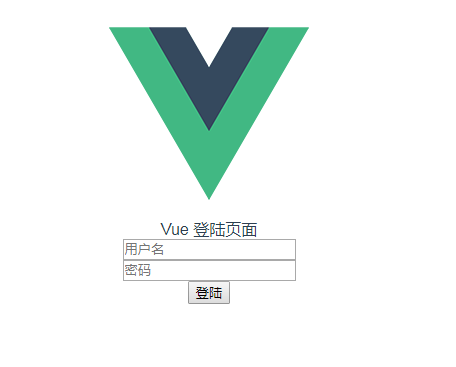
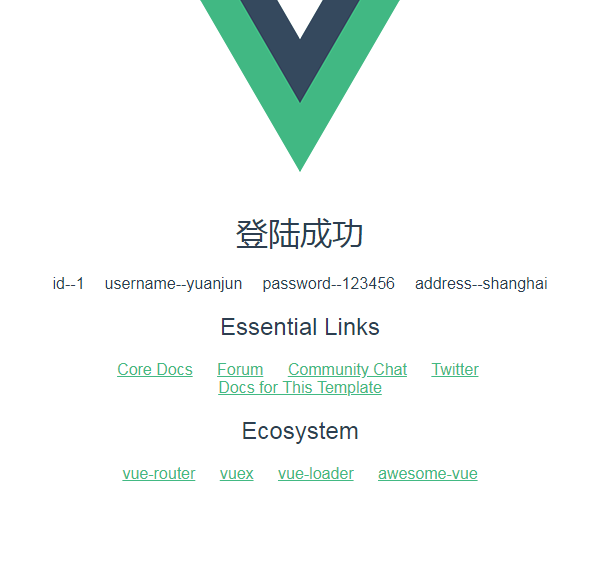
2.成功后显示后台数据信息
3.登陆失败

本文作者:shenbug
本文发布时间:2018年03月13日
本文来自云栖社区合作伙伴CSDN,了解相关信息可以关注csdn.net网站。
版权声明
本文仅代表作者观点,不代表百度立场。
本文系作者授权百度百家发表,未经许可,不得转载。
上一篇:整数的分类处理 下一篇:web前端面试之CSS布局(码动未来)