vuex的安装 npm install vuex --save或cnpm install vue...
vuex的安装
npm install vuex --save或cnpm install vuex --save- 1
main.js引入vuex
import Vue from 'vue'import Vuex from 'vuex'import store from './vuex/store'Vue.use(Vuex)- 1
- 2
- 3
- 4
- 5
vuex的目录结构和store.js的代码
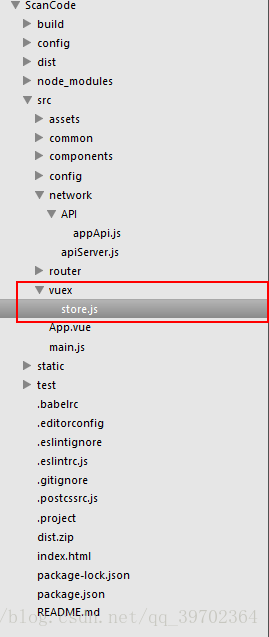
store.js的代码(异步和同步的代码均留下两个方法)
import Vue from 'vue'import Vuex from 'vuex'import GLOBAL_CONFIG from '../config/config'import axios from 'axios'import BScroll from 'better-scroll'// import BScroll from '../assets/js/iscroll'Vue.use(Vuex)const menu = { state: { mannumber:[1,2,3,4,5,6,7,8,9,10,11,12,13,14,15,'其它'], activeindex: null, nowindex:null, products: {}, GLOBAL_CONFIG:GLOBAL_CONFIG['GLOBAL_CONFIG'] }, mutations: { get_product: function (state, products) { state.products = products; for(let i = 0; i < state.products.length; i++){ if(state.products[i]['image'] != false && state.products[i]['image'].indexOf(state.GLOBAL_CONFIG['dataImage']) === -1){ state.products[i]['image'] = state.GLOBAL_CONFIG['base64Header'] + state.products[i]['image']; }else{ state.products[i]['image'] = require("../assets/file.png"); } } } }, actions: { }}export default new Vuex.Store({ state: { mastdisplay: false, supervisory_control:false, product: {}, countNumber:{}, orderdetail:{}, GLOBAL_CONFIG:GLOBAL_CONFIG['GLOBAL_CONFIG'] }, mutations: { mastdisplay: function (state,name) { if(typeof name !== 'string'){ if(name['name'] == 'mastdisplay' || name['name'] == 'mastspecificat' || name['name'] == 'mastflavour'){ if(name['product'].hasOwnProperty('specs')){ for(let i = 0; i < name['product']['specs'].length; i++){ name['product']['specs'][i]['number'] = 0; } } state.product = name['product']; if(name['name'] === 'mastspecificat'){ let specificatscroll = new BScroll('.mast-scrollspecificat',{ scrollY: true, click: true }); } if(name['name'] === 'mastflavour'){ let flavouringscroll = new BScroll('.mast-flavouringscroll',{ scrollY: true, click: true }); } } name = name['name']; } if(state[name]){ state[name] = false; }else{ state[name] = true; } }, countNumber: function (state,countNumber) { state.countNumber = countNumber; }, get_orderdetail: function (state,response) { state.orderdetail = response; console.dir(state.orderdetail); }, hidden_customcount: function (state) { if(state.mastload){ state.mastload = false; } } }, components:{ }, modules: { menu:menu }, actions: { get_orderdetail: function (context,company,name) { axios.post('/point-api-order_detail',{ tableid:company['tableid'], companyid:company['companyid'] }).then(function(response){ context.commit('get_orderdetail',response); }, function(response){ mui.toast('网络错误'); }); }, check_cart: function (context,product) { axios.post('/point-api-checkcart',{ user_id:product['user_id'], url:context.state.GLOBAL_CONFIG['WECHAT_API_HOST']+"/wechat/app/index.php?i="+localStorage.i+"&c=entry&do=ShopCart&m=wei_scan_code" }).then(function(response){ if(response.hasOwnProperty('error')){ mui.toast(response['erron']); return false; }else{ context.commit('set_cart',response); // let menuscroll = new BScroll('.mast-cart-content-parent',{ // scrollY: true, // click: true // }); } }, function(response){ mui.toast('网络错误'); }); }})- 1
- 2
- 3
- 4
- 5
- 6
- 7
- 8
- 9
- 10
- 11
- 12
- 13
- 14
- 15
- 16
- 17
- 18
- 19
- 20
- 21
- 22
- 23
- 24
- 25
- 26
- 27
- 28
- 29
- 30
- 31
- 32
- 33
- 34
- 35
- 36
- 37
- 38
- 39
- 40
- 41
- 42
- 43
- 44
- 45
- 46
- 47
- 48
- 49
- 50
- 51
- 52
- 53
- 54
- 55
- 56
- 57
- 58
- 59
- 60
- 61
- 62
- 63
- 64
- 65
- 66
- 67
- 68
- 69
- 70
- 71
- 72
- 73
- 74
- 75
- 76
- 77
- 78
- 79
- 80
- 81
- 82
- 83
- 84
- 85
- 86
- 87
- 88
- 89
- 90
- 91
- 92
- 93
- 94
- 95
- 96
- 97
- 98
- 99
- 100
- 101
- 102
- 103
- 104
- 105
- 106
- 107
- 108
- 109
- 110
- 111
- 112
- 113
- 114
- 115
- 116
- 117
- 118
- 119
- 120
- 121
- 122
- 123
- 124
- 125
mutations的使用,可以在mutations里面定义方法,里面的方法为同步操作,方法里的第一个参数是state对象,可操作state对象里定义的属性,第二个参数为传进来的参数,也可不传,在组件里可以直接操作state里的属性,例如:
this.$store.state.mastdisplay 或通过store里的方法改变this.$store.commit('mastdisplay');- 1
actions的使用,actions里面的方法用来处理异步操作,调用异步接口后,获取到数据,对state里的属性进行重新赋值,然后在组件里计算该属性的变化
computed: { orderdetail: function () { return this.$store.state.orderdetail; } mastdisplay: function () { return this.$store.state.mastdisplay; } products: function () { return this.$store.state.menu.products; }, product: function () { return this.$store.state.product; } }- 1
- 2
- 3
- 4
- 5
- 6
- 7
- 8
- 9
- 10
- 11
- 12
- 13
- 14
在组件里调用actions方法
this.$store.dispatch('get_orderdetail',{ tableid:localStorage.tableid, companyid:localStorage.companyid });- 1
- 2
- 3
- 4
有时候我们可能会把一个组件分为一个模块,例如上面的代码,我定义了一个menu的模块,那么我需要在modules里面引入这个模块,在组件里操作该模块的属性如下:
this.$store.state.menu.products
调用该模块的mutations里的方法不需要加上menu.
版权声明
本文仅代表作者观点,不代表百度立场。
本文系作者授权百度百家发表,未经许可,不得转载。
上一篇:ES6模块化之export和import的用法 下一篇:Vuex 最简单有效的使用