准备工作
第一步,建立一个模板项目
本文从CookieAuthenticationMiddleware入手分析,首先我们来看看哪里用到了这个中间件,打开VisualStudio,创建一个Mvc项目,然后身份验证选择个人身份验证。此时我们获得了一个完整的项目,这个项目中登陆注册都已实现且较为完整,可以直接运行,所以我们从模板代码中来学习CookieAuthenticationMiddleware.
接下来打开项目下的根目录App_StartStartup.Auth.cs这个文件,文件中的部分类Startup。上一篇文章中写到Owin会加载Startup类,所以在这个Mvc项目中会有一个位置加载了这个类,在代码中寻找 根目录Startup.cs,这是Startup类的另一部分,并且在其命名空间上被打上了[assembly: OwinStartupAttribute(typeof(MyIdentity.Startup))]特性。
回到Startup.Auth.cs
public void ConfigureAuth(IAppBuilder app){ // 配置数据库上下文、用户管理器和登录管理器,以便为每个请求使用单个实例 app.CreatePerOwinContext(ApplicationDbContext.Create); app.CreatePerOwinContext<ApplicationUserManager>(ApplicationUserManager.Create); app.CreatePerOwinContext<ApplicationSignInManager>(ApplicationSignInManager.Create); // 使应用程序可以使用 Cookie 来存储已登录用户的信息 // 并使用 Cookie 来临时存储有关使用第三方登录提供程序登录的用户的信息 // 配置登录 Cookie app.UseCookieAuthentication(new CookieAuthenticationOptions { AuthenticationType = DefaultAuthenticationTypes.ApplicationCookie, LoginPath = new PathString("/Account/Login"), Provider = new CookieAuthenticationProvider { // 当用户登录时使应用程序可以验证安全戳。 // 这是一项安全功能,当你更改密码或者向帐户添加外部登录名时,将使用此功能。 OnValidateIdentity = SecurityStampValidator.OnValidateIdentity<ApplicationUserManager, ApplicationUser>( validateInterval: TimeSpan.FromMinutes(30), regenerateIdentity: (manager, user) => user.GenerateUserIdentityAsync(manager)) } }); app.UseExternalSignInCookie(DefaultAuthenticationTypes.ExternalCookie); // 使应用程序可以在双重身份验证过程中验证第二因素时暂时存储用户信息。 app.UseTwoFactorSignInCookie(DefaultAuthenticationTypes.TwoFactorCookie, TimeSpan.FromMinutes(5)); // 使应用程序可以记住第二登录验证因素,例如电话或电子邮件。 // 选中此选项后,登录过程中执行的第二个验证步骤将保存到你登录时所在的设备上。 // 此选项类似于在登录时提供的“记住我”选项。 app.UseTwoFactorRememberBrowserCookie(DefaultAuthenticationTypes.TwoFactorRememberBrowserCookie);}app.UseCookieAuthenticationOwin管道中添加中间件。进入UseCookieAuthentication的定义
using Microsoft.Owin.Security.Cookies;namespace Owin{ public static class CookieAuthenticationExtensions { public static IAppBuilder UseCookieAuthentication(this IAppBuilder app, CookieAuthenticationOptions options); public static IAppBuilder UseCookieAuthentication(this IAppBuilder app, CookieAuthenticationOptions options, PipelineStage stage); }}在这个方法在Microsoft.Owin.Security.Cookies.dll程序集中,这个程序集属于Katana项目。
第二步,下载Katana源码
到katana Github仓库地址下载Katana的源代码。然后打开Katana.sln打开解决方案,然后在解决方案上点击右键选择还原Nuget包。
准备工作结束
从CookieAuthenticationExtensions入手
找到UseCookieAuthentication方法如下:
public static IAppBuilder UseCookieAuthentication(this IAppBuilder app, CookieAuthenticationOptions options, PipelineStage stage){ if (app == null) { throw new ArgumentNullException("app"); } app.Use(typeof(CookieAuthenticationMiddleware), app, options); app.UseStageMarker(stage); return app;}app.Use(typeof(CookieAuthenticationMiddleware), app, options);是Owin标准中定义的添加中间件的方法
namespace Owin{ public interface IAppBuilder { IDictionary<string, object> Properties { get; } object Build(Type returnType); IAppBuilder New(); IAppBuilder Use(object middleware, params object[] args); }}接下来进入CookieAuthenticationMiddleware
public class CookieAuthenticationMiddleware : AuthenticationMiddleware<CookieAuthenticationOptions>{ private readonly ILogger _logger;...再进入AuthenticationMiddleware<CookieAuthenticationOptions>
public abstract class AuthenticationMiddleware<TOptions> : OwinMiddleware where TOptions : AuthenticationOptions{ protected AuthenticationMiddleware(OwinMiddleware next, TOptions options) : base(next) { if (options == null) { throw new ArgumentNullException("options"); } Options = options; } public TOptions Options { get; set; } public override async Task Invoke(IOwinContext context) { AuthenticationHandler<TOptions> handler = CreateHandler(); await handler.Initialize(Options, context); if (!await handler.InvokeAsync()) { await Next.Invoke(context); } await handler.TeardownAsync(); } protected abstract AuthenticationHandler<TOptions> CreateHandler();}这里可以看到 AuthenticationMiddleware<TOptions>直接继承了OwinMiddleware也就是Katana中定义的,上一篇文章中提到了这个类,Katana中Middlware的抽象基类。
重点看下Invoke方法
public override async Task Invoke(IOwinContext context){ AuthenticationHandler<TOptions> handler = CreateHandler(); await handler.Initialize(Options, context); if (!await handler.InvokeAsync()) { await Next.Invoke(context); } await handler.TeardownAsync();}首先通过抽象的CreateHandler()方法获取一个认证委托,然后初始化,然后Invoke。进入InvokeAsync的代码。位于AuthenticationHandler
/// <summary>/// Called once by common code after initialization. If an authentication middleware responds directly to/// specifically known paths it must override this virtual, compare the request path to it's known paths, /// provide any response information as appropriate, and true to stop further processing./// </summary>/// <returns>Returning false will cause the common code to call the next middleware in line. Returning true will/// cause the common code to begin the async completion journey without calling the rest of the middleware/// pipeline.</returns>public virtual Task<bool> InvokeAsync(){ return Task.FromResult<bool>(false);}很意外,竟然直接返回了false。仔细看下注释:
在初始化之后的代码调用一次。如果一个 身份认证中间件直接响应了特定的 中间件知道的路径,那么它必须重写这个虚方法,将请求路径与已知路径进行比较,提供适当的响应信息,并停止进一步的处理。
返回false会调用后面的中间件,返回true不会调用下面的中间件
if (!await handler.InvokeAsync()){ await Next.Invoke(context);}和注释中描述的一致,最后写在调用 await handler.TeardownAsync();卸载handler。
暂时跳过TeardownAsync();方法,回到CookieAuthenticationMiddleware中。
可以看到其直接继承了AuthenticationMiddleware它没有重写InvokeAsync,这代表Authentication之后不会停止,这就让人很迷惑,认证失败了也不停止吗?我们就绪探索。
先看下 重写CreateHandler抽象方法
protected override AuthenticationHandler<CookieAuthenticationOptions> CreateHandler(){ return new CookieAuthenticationHandler(_logger);}进入CookieAuthenticationHandler
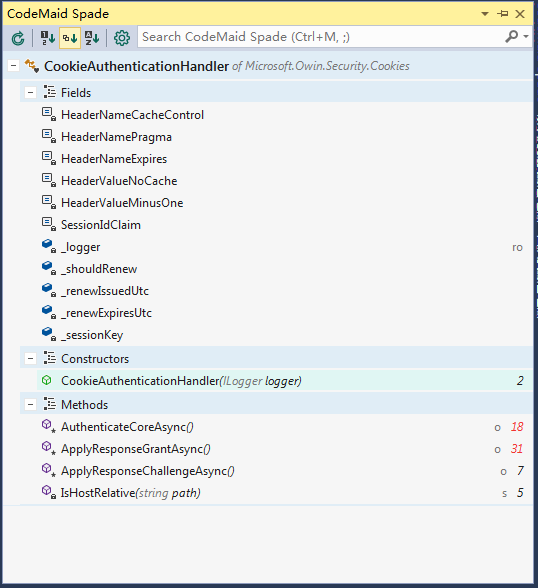
CookieAuthenticationHandler的父继承关系如下
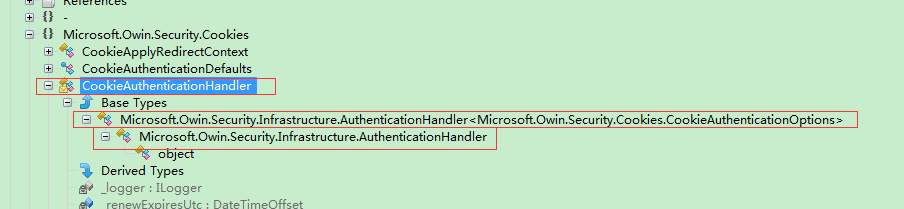
CookieAuthenticationHandler从名字中可以猜测这是真正处理 身份认证的类
先看下类中的字段
private const string HeaderNameCacheControl = "Cache-Control";private const string HeaderNamePragma = "Pragma";private const string HeaderNameExpires = "Expires";private const string HeaderValueNoCache = "no-cache";private const string HeaderValueMinusOne = "-1";private const string SessionIdClaim = "Microsoft.Owin.Security.Cookies-SessionId";private readonly ILogger _logger;private bool _shouldRenew;private DateTimeOffset _renewIssuedUtc;private DateTimeOffset _renewExpiresUtc;private string _sessionKey;这里的常量多是关于Http头的,还有Session的Claim
private bool _shouldRenew;private DateTimeOffset _renewIssuedUtc;private DateTimeOffset _renewExpiresUtc;private string _sessionKey;这一组应该是关于cookie过期时间和滑动窗口的
public CookieAuthenticationHandler(ILogger logger){ if (logger == null) { throw new ArgumentNullException("logger"); } _logger = logger;}构造函数注入了Logger
接下来是AuthenticationCore,应该就是人分认证的核心了
protected override async Task<AuthenticationTicket> AuthenticateCoreAsync(){ AuthenticationTicket ticket = null; try { string cookie = Options.CookieManager.GetRequestCookie(Context, Options.CookieName); if (string.IsNullOrWhiteSpace(cookie)) { return null; } ticket = Options.TicketDataFormat.Unprotect(cookie); if (ticket == null) { _logger.WriteWarning(@"Unprotect ticket failed"); return null; } if (Options.SessionStore != null) { Claim claim = ticket.Identity.Claims.FirstOrDefault(c => c.Type.Equals(SessionIdClaim)); if (claim == null) { _logger.WriteWarning(@"SessionId missing"); return null; } _sessionKey = claim.Value; ticket = await Options.SessionStore.RetrieveAsync(_sessionKey); if (ticket == null) { _logger.WriteWarning(@"Identity missing in session store"); return null; } } DateTimeOffset currentUtc = Options.SystemClock.UtcNow; DateTimeOffset? issuedUtc = ticket.Properties.IssuedUtc; DateTimeOffset? expiresUtc = ticket.Properties.ExpiresUtc; if (expiresUtc != null && expiresUtc.Value < currentUtc) { if (Options.SessionStore != null) { await Options.SessionStore.RemoveAsync(_sessionKey); } return null; } bool? allowRefresh = ticket.Properties.AllowRefresh; if (issuedUtc != null && expiresUtc != null && Options.SlidingExpiration && (!allowRefresh.HasValue || allowRefresh.Value)) { TimeSpan timeElapsed = currentUtc.Subtract(issuedUtc.Value); TimeSpan timeRemaining = expiresUtc.Value.Subtract(currentUtc); if (timeRemaining < timeElapsed) { _shouldRenew = true; _renewIssuedUtc = currentUtc; TimeSpan timeSpan = expiresUtc.Value.Subtract(issuedUtc.Value); _renewExpiresUtc = currentUtc.Add(timeSpan); } } var context = new CookieValidateIdentityContext(Context, ticket, Options); await Options.Provider.ValidateIdentity(context); if (context.Identity == null) { // Rejected _shouldRenew = false; return null; } return new AuthenticationTicket(context.Identity, context.Properties); } catch (Exception exception) { CookieExceptionContext exceptionContext = new CookieExceptionContext(Context, Options, CookieExceptionContext.ExceptionLocation.AuthenticateAsync, exception, ticket); Options.Provider.Exception(exceptionContext); if (exceptionContext.Rethrow) { throw; } return exceptionContext.Ticket; }}先进入AuthenticationTicket看下
public class AuthenticationTicket{ /// <summary> /// Initializes a new instance of the <see cref="AuthenticationTicket"/> class /// </summary> /// <param name="identity"></param> /// <param name="properties"></param> public AuthenticationTicket(ClaimsIdentity identity, AuthenticationProperties properties) { Identity = identity; Properties = properties ?? new AuthenticationProperties(); } /// <summary> /// Gets the authenticated user identity.(获取已经过认证的用户Identity) /// </summary> public ClaimsIdentity Identity { get; private set; } /// <summary> /// Additional state values for the authentication session.(认证回话中的额外的值) /// </summary> public AuthenticationProperties Properties { get; private set; }}ClaimsIdentity位于System.Security.Claims,属于mscorlib.dll,是.Net freamework的一部分,之前学习Asp.Net Identity框架时经常和这个类打交道。Asp.Net Identity 是基于Owin的实现Katana的,Katana里用了ClaimsIdentity,所以Asp.Net Identity中的IIdentity类型是ClaimsIdentity,如果你创建了一个没有身份验证的的mvc项目,那么在controller中User的实际类型就不是ClaimsIdentity。
进入AuthenticationProperties
internal const string IssuedUtcKey = ".issued";internal const string ExpiresUtcKey = ".expires";internal const string IsPersistentKey = ".persistent";internal const string RedirectUriKey = ".redirect";internal const string RefreshKey = ".refresh";internal const string UtcDateTimeFormat = "r";这些常量可能是和claims有关(博主并不十分确定)。
这个类主要内容是认证回话中的额外数据,没有太多的方法所以我把注释信息翻译下,以便理解,然后继续分析
/// <summary>/// Gets or sets if refreshing the authentication session should be allowed./// 获取或者设置值指示是否允许舒心 认证会话/// </summary>public bool? AllowRefresh{ get... set...}/// <summary>/// State values about the authentication session./// 关于认证会话的状态值集合/// </summary>public IDictionary<string, string> Dictionary{ get { return _dictionary; }}/// <summary>/// Gets or sets the time at which the authentication ticket expires./// 认证票据的过期时间/// </summary>public DateTimeOffset? ExpiresUtc{ get... set...}/// <summary>/// Gets or sets whether the authentication session is persisted across multiple requests./// 指示认证会话是否在在跨越多个请求中持续保持/// </summary>public bool IsPersistent{ get... set...}/// <summary>/// Gets or sets the time at which the authentication ticket was issued./// 指示 认证票据的签发时间/// </summary>public DateTimeOffset? IssuedUtc{ get... set...}/// <summary>/// Gets or sets the full path or absolute URI to be used as an http redirect response value. /// 指示重定向响应所用到的完全路径或者绝对uri路径/// </summary>[SuppressMessage("Microsoft.Design", "CA1056:UriPropertiesShouldNotBeStrings", Justification = "By design")]public string RedirectUri{ get... set...}现在回到CookieAuthenticationHandler.AuthenticateCoreAsync方法中
string cookie = Options.CookieManager.GetRequestCookie(Context, Options.CookieName); 获取Cookie。进入GetRequestCookie
public interface ICookieManager{ /// <summary> /// Read a cookie with the given name from the request. /// </summary> /// <param name="context"></param> /// <param name="key"></param> /// <returns></returns> string GetRequestCookie(IOwinContext context, string key);...这是个接口,从请求中获取指定的cookie。Options是 CookieAuthenticationHandler的直接父类中定义的
public abstract class AuthenticationHandler<TOptions> : AuthenticationHandler where TOptions : AuthenticationOptions{ protected TOptions Options { get; private set; }...从internal class CookieAuthenticationHandler : AuthenticationHandler<CookieAuthenticationOptions>的签名中我们可以知道Options的实际类型,在这里找到上文提到的Options.CookieName
/// <summary>/// Determines the cookie name used to persist the identity. The default value is ".AspNet.Cookies"./// This value should be changed if you change the name of the AuthenticationType, especially if your/// system uses the cookie authentication middleware multiple times./// </summary>public string CookieName{ get { return _cookieName; } set { if (value == null) { throw new ArgumentNullException("value"); } _cookieName = value; }}决定存储identity的cookie name,它的默认值是 .AspNet.Cookies,这个值会在你改变AuthenticationType的名称是改变,尤其是你的系统多次使用了身份认证中间件。
这里至少知道了存储的cookie默认值是.AspNet.Cookies
运行之前的项目注册并登陆,检查Cookie
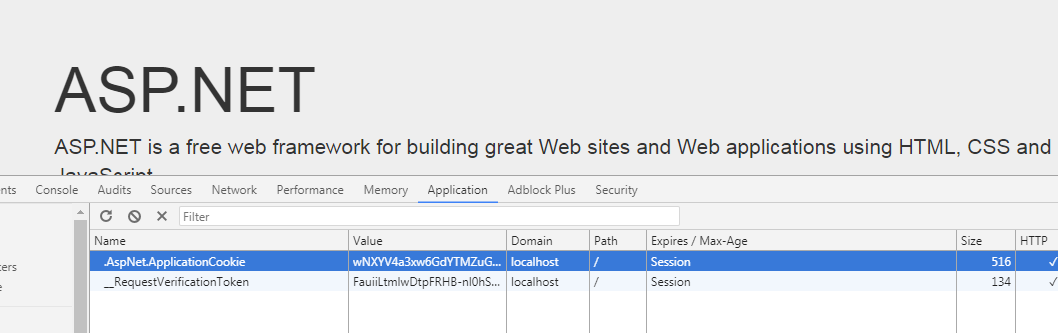
结果似乎和预期的不太一致,我们继续探索
打开 Startup类
public partial class Startup{ // 有关配置身份验证的详细信息,请访问 http://go.microsoft.com/fwlink/?LinkId=301864 public void ConfigureAuth(IAppBuilder app) { // 配置数据库上下文、用户管理器和登录管理器,以便为每个请求使用单个实例 app.CreatePerOwinContext(ApplicationDbContext.Create); app.CreatePerOwinContext<ApplicationUserManager>(ApplicationUserManager.Create); app.CreatePerOwinContext<ApplicationSignInManager>(ApplicationSignInManager.Create); // 使应用程序可以使用 Cookie 来存储已登录用户的信息 // 并使用 Cookie 来临时存储有关使用第三方登录提供程序登录的用户的信息 // 配置登录 Cookie app.UseCookieAuthentication(new CookieAuthenticationOptions { AuthenticationType = DefaultAuthenticationTypes.ApplicationCookie, LoginPath = new PathString("/Account/Login"), Provider = new CookieAuthenticationProvider ...在AuthenticationType = DefaultAuthenticationTypes.ApplicationCookie一行中改变了AuthenticationType的值,ApplicationCookie的值是ApplicationCookie
public const string ApplicationCookie = "ApplicationCookie";接下来在源代码中搜索 .AspNet.,找到了Microsoft.Owin.Security.Cookies.CookieAuthenticationDefaults类
public static class CookieAuthenticationDefaults{ ... /// <summary> /// The prefix used to provide a default CookieAuthenticationOptions.CookieName /// </summary> public const string CookiePrefix = ".AspNet."; ...这是CookieAuthenticationOptions.CookieName默认的Cookie前缀
查找CookieAuthenticationDefaults类的引用,我们找到了CookieAuthenticationMiddleware(前文正在研究的),其中的代码
Options.CookieName = CookieAuthenticationDefaults.CookiePrefix + Options.AuthenticationType;结果不言而喻。
回到之前的AuthenticateCoreAsync方法中
string cookie = Options.CookieManager.GetRequestCookie(Context, Options.CookieName);拿到了存储Identity的cookie。
ticket = Options.TicketDataFormat.Unprotect(cookie);这一步从Cookie中解密数据获得ticket票据,Options.TicketDataFormat是CookieAuthenticationOptions类型中的属性
/// <summary>/// The TicketDataFormat is used to protect and unprotect the identity and other properties which are stored in the/// cookie value. If it is not provided a default data handler is created using the data protection service contained/// in the IAppBuilder.Properties. The default data protection service is based on machine key when running on ASP.NET, /// and on DPAPI when running in a different process./// </summary>public ISecureDataFormat<AuthenticationTicket> TicketDataFormat { get; set; }从注释信息中得知,这个属性用来加解密identity,而且在asp.net中基于 machine key。知道这个之后暂时不研究它的具体实现细节,我们回到之前的AuthenticateCoreAsync方法中
if (Options.SessionStore != null){ Claim claim = ticket.Identity.Claims.FirstOrDefault(c => c.Type.Equals(SessionIdClaim)); if (claim == null) { _logger.WriteWarning(@"SessionId missing"); return null; } _sessionKey = claim.Value; ticket = await Options.SessionStore.RetrieveAsync(_sessionKey); if (ticket == null) { _logger.WriteWarning(@"Identity missing in session store"); return null; }}这些步骤的主要内容是从解析出的ticket中拿到session id 的claim,RetrieveAsync方法没有注释,不知道这一步对ticket做了什么。
DateTimeOffset currentUtc = Options.SystemClock.UtcNow;DateTimeOffset? issuedUtc = ticket.Properties.IssuedUtc;DateTimeOffset? expiresUtc = ticket.Properties.ExpiresUtc;if (expiresUtc != null && expiresUtc.Value < currentUtc){ if (Options.SessionStore != null) { await Options.SessionStore.RemoveAsync(_sessionKey); } return null;}bool? allowRefresh = ticket.Properties.AllowRefresh;if (issuedUtc != null && expiresUtc != null && Options.SlidingExpiration && (!allowRefresh.HasValue || allowRefresh.Value)){ TimeSpan timeElapsed = currentUtc.Subtract(issuedUtc.Value); TimeSpan timeRemaining = expiresUtc.Value.Subtract(currentUtc); if (timeRemaining < timeElapsed) { _shouldRenew = true; _renewIssuedUtc = currentUtc; TimeSpan timeSpan = expiresUtc.Value.Subtract(issuedUtc.Value); _renewExpiresUtc = currentUtc.Add(timeSpan); }}这些步骤做了刷新签发时间的一些工作
var context = new CookieValidateIdentityContext(Context, ticket, Options);进入CookieValidateIdentityContext这个类中的东西不多
public CookieValidateIdentityContext(IOwinContext context, AuthenticationTicket ticket, CookieAuthenticationOptions options) : base(context, options) { if (ticket == null) { throw new ArgumentNullException("ticket"); } Identity = ticket.Identity; Properties = ticket.Properties; }所以进入其父类看一下
/// <summary>/// Base class used for certain event contexts/// </summary>public abstract class BaseContext<TOptions>{ protected BaseContext(IOwinContext context, TOptions options) { OwinContext = context; Options = options; } public IOwinContext OwinContext { get; private set; } public TOptions Options { get; private set; } public IOwinRequest Request { get { return OwinContext.Request; } } public IOwinResponse Response { get { return OwinContext.Response; } }}用于某些事件上下文的基类,这里有 OwinRequest,OwinResponse,OwinContext,加上CookieValidateIdentityContext Identity 和Properties,共同构成了 cookie 验证身份上下文。
CookieValidateIdentityContext中还有一个方法
/// <summary>/// Called to reject the incoming identity. This may be done if the application has determined the/// account is no longer active, and the request should be treated as if it was anonymous./// </summary>public void RejectIdentity(){ Identity = null;}这个方法可以拒绝输入的Identity,可能在 app发现账户不在活动,并且向对待匿名用户那样对待当前的request
await Options.Provider.ValidateIdentity(context);然后验证了这个上下文,继续寻找Options.Provider.ValidateIdentity直到
public interface ICookieAuthenticationProvider{ /// <summary> /// Called each time a request identity has been validated by the middleware. By implementing this method the /// application may alter or reject the identity which has arrived with the request. /// </summary> /// <param name="context">Contains information about the login session as well as the user <see cref="System.Security.Claims.ClaimsIdentity"/>.</param> /// <returns>A <see cref="Task"/> representing the completed operation.</returns> Task ValidateIdentity(CookieValidateIdentityContext context); ...这是个接口方法,作用是 每次通过中间件验证请求身份时调用, 通过实现此方法,应用程序可以编辑或拒绝与请求一起到达的Identity。
我们知道它是做什么的了,接下来找下它的实现类 CookieAuthenticationProvider
/// <summary>/// Implements the interface method by invoking the related delegate method/// </summary>/// <param name="context"></param>/// <returns></returns>public virtual Task ValidateIdentity(CookieValidateIdentityContext context){ return OnValidateIdentity.Invoke(context);}最终调用了OnValidateIdentity委托。
该委托在构造函数中赋予了默认值
public CookieAuthenticationProvider(){ OnValidateIdentity = context => Task.FromResult<object>(null); ...接下来
if (context.Identity == null){ // Rejected _shouldRenew = false; return null;}判断Identity是否是null,上文中提到RejectIdentity方法可能为其赋值为null
return new AuthenticationTicket(context.Identity, context.Properties);最后 返回一个新的票据。
捕获异常的部分如下,就不看了
catch (Exception exception){ CookieExceptionContext exceptionContext = new CookieExceptionContext(Context, Options, CookieExceptionContext.ExceptionLocation.AuthenticateAsync, exception, ticket); Options.Provider.Exception(exceptionContext); if (exceptionContext.Rethrow) { throw; } return exceptionContext.Ticket;}版权声明
本文仅代表作者观点,不代表百度立场。
本文系作者授权百度百家发表,未经许可,不得转载。