
一、前言
图片背景时钟控件,是全套控件中唯一的几个贴图的控件,这个背景要是不贴图,会画到猝死,必须用美工做好的图贴图作为背景,此控件以前学C#的时候写过,后面在写Qt控件的过程中把他移植过来了,其实画法完全一模一样,我能说连代码我都是直接复制粘贴过来改改的吗?所以有过多年编程经验的程序员们都知道,编程都是一通百通的,只要掌握好了一门,或者精通了一门,其他都是水到渠成的事情,基本上学习个把星期都能直接撸的那种,配合F1帮助文档和官方手册,直接手撸起来(各位别多想,是指撸代码)。
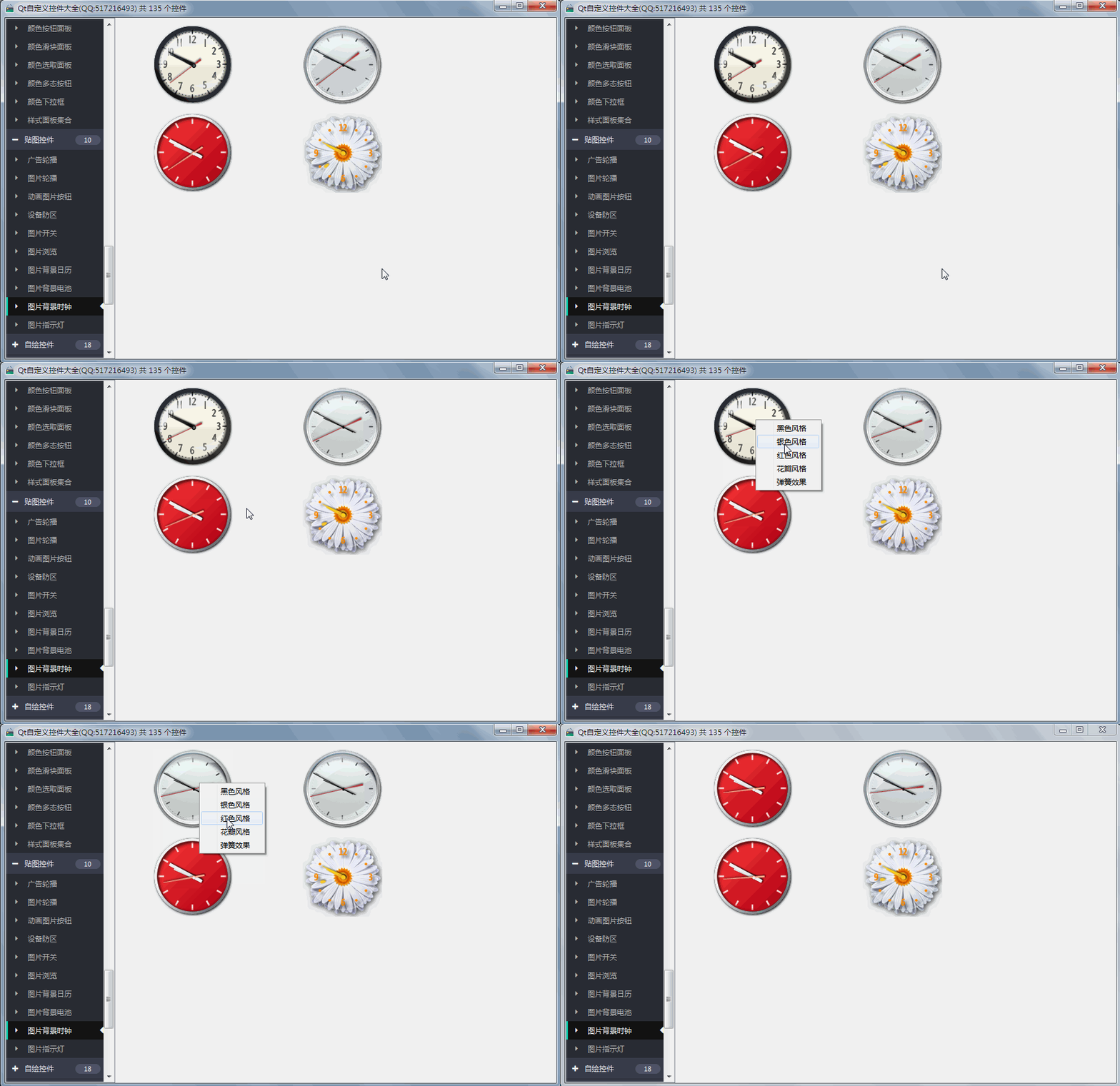
贴图的控件都很简单,直接drawimage完事,本控件除了支持多种背景风格样式以外,还特意增加了指针走动风格样式,直接鼠标右键切换风格等。
二、实现的功能
- 1:支持鼠标右键切换风格
- 2:支持设置四种背景风格样式
- 3:支持四种秒针走动风格样式
- 4:增加设置时间接口
三、效果图
四、头文件代码
#ifndef IMAGECLOCK_H#define IMAGECLOCK_H/** * 图片时钟控件 作者:feiyangqingyun(QQ:517216493) 2016-11-4 * 1:支持鼠标右键切换风格 * 2:支持设置四种背景风格样式 * 3:支持四种秒针走动风格样式 * 4:增加设置时间接口 */#include <QWidget>#ifdef quc#if (QT_VERSION < QT_VERSION_CHECK(5,7,0))#include <QtDesigner/QDesignerExportWidget>#else#include <QtUiPlugin/QDesignerExportWidget>#endifclass QDESIGNER_WIDGET_EXPORT ImageClock : public QWidget#elseclass ImageClock : public QWidget#endif{ Q_ Q_ENUMS(ClockStyle) Q_ENUMS(SecondStyle) Q_PROPERTY(ClockStyle clockStyle READ getClockStyle WRITE setClockStyle) Q_PROPERTY(SecondStyle secondStyle READ getSecondStyle WRITE setSecondStyle)public: enum ClockStyle { ClockStyle_Trad = 0, //黑色风格 ClockStyle_System = 1, //银色风格 ClockStyle_Modern = 2, //红色风格 ClockStyle_Flower = 3 //花瓣风格 }; enum SecondStyle { SecondStyle_Normal = 0, //普通效果 SecondStyle_Spring = 1, //弹簧效果 SecondStyle_Continue = 2, //连续效果 SecondStyle_Hide = 3 //隐藏效果 }; explicit ImageClock(QWidget *parent = 0); ~ImageClock();protected: void paintEvent(QPaintEvent *); void drawBg(QPainter *painter); void drawHour(QPainter *painter); void drawMin(QPainter *painter); void drawSec(QPainter *painter); void drawDot(QPainter *painter);private: ClockStyle clockStyle; //背景样式 SecondStyle secondStyle; //秒针走动样式 QImage clockBg; //主背景 QImage clockHour; //时钟背景 QImage clockMin; //分钟背景 QImage clockSec; //秒钟背景 QImage clockDot; //中间点背景 QImage clockHighlights; //高亮背景 QStringList imageNames; //图片名称集合 QTimer *timer; //定时器计算时间 int hour, min, sec, msec; //时分秒毫秒 QTimer *timerSpring; //定时器显示弹簧效果 double angleSpring; //弹簧角度 QAction *action_secondstyle;//秒针样式右键菜单private Q_SLOTS: void doAction(); void updateTime(); void updateSpring();public: ClockStyle getClockStyle() const; SecondStyle getSecondStyle() const; QSize sizeHint() const; QSize minimumSizeHint() const;public Q_SLOTS: //设置图片背景时钟样式 void setClockStyle(const ClockStyle &clockStyle); //设置秒针走动样式 void setSecondStyle(const SecondStyle &secondStyle); //设置系统时间 void setSystemDateTime(const QString &year, const QString &month, const QString &day, const QString &hour, const QString &min, const QString &sec);};#endif // IMAGECLOCK_H五、完整代码
#pragma execution_character_set("utf-8")#include "imageclock.h"#include "qpainter.h"#include "qtimer.h"#include "qdatetime.h"#include "qmath.h"#include "qaction.h"#include "qprocess.h"#include "qdebug.h"ImageClock::ImageClock(QWidget *parent): QWidget(parent){    setFont(QFont("Microsoft Yahei", 9));    QAction *action_trad = new QAction("黑色风格", this);    connect(action_trad, SIGNAL(triggered(bool)), this, SLOT(doAction()));    this->addAction(action_trad);    QAction *action_system = new QAction("银色风格", this);    connect(action_system, SIGNAL(triggered(bool)), this, SLOT(doAction()));    this->addAction(action_system);    QAction *action_modern = new QAction("红色风格", this);    connect(action_modern, SIGNAL(triggered(bool)), this, SLOT(doAction()));    this->addAction(action_modern);    QAction *action_flower = new QAction("花瓣风格", this);    connect(action_flower, SIGNAL(triggered(bool)), this, SLOT(doAction()));    this->addAction(action_flower);    action_secondstyle = new QAction("弹簧效果", this);    connect(action_secondstyle, SIGNAL(triggered(bool)), this, SLOT(doAction()));    this->addAction(action_secondstyle);    this->setContextMenuPolicy(Qt::ActionsContextMenu);    imageNames << "trad" << "system" << "modern" << "flower";    timer = new QTimer(this);    timer->setInterval(1000);    connect(timer, SIGNAL(timeout()), this, SLOT(updateTime()));    timer->start();    timerSpring = new QTimer(this);    timerSpring->setInterval(30);    connect(timerSpring, SIGNAL(timeout()), this, SLOT(updateSpring()));    angleSpring = 6.0 * (sec + (double)msec / 1000);    setClockStyle(ClockStyle_System);    setSecondStyle(SecondStyle_Normal);    updateTime();}ImageClock::~ImageClock(){    if (timer->isActive()) {        timer->stop();    }    if (timerSpring->isActive()) {        timerSpring->stop();    }}void ImageClock::paintEvent(QPaintEvent *){    int width = this->width();    int height = this->height();    //绘制准备工作,启用反锯齿,启用图片平滑缩放    QPainter painter(this);    painter.setRenderHints(QPainter::Antialiasing | QPainter::TextAntialiasing);    painter.setRenderHint(QPainter::SmoothPixmapTransform, true);    //绘制背景    drawBg(&painter);    painter.translate(width / 2, height / 2);    //绘制时钟指针 尺寸:13×129    drawHour(&painter);    //绘制分钟指针 尺寸:13×129    drawMin(&painter);    //绘制秒钟指针 尺寸:13×129    drawSec(&painter);    //绘制中心盖板    drawDot(&painter);}void ImageClock::drawBg(QPainter *painter){    painter->save();    int pixX = rect().center().x() - clockBg.width() / 2;    int pixY = rect().center().y() - clockBg.height() / 2;    QPoint point(pixX, pixY);    painter->drawImage(point, clockBg);    painter->drawImage(point, clockHighlights);    painter->restore();}void ImageClock::drawHour(QPainter *painter){    painter->save();    painter->rotate(30.0 * ((hour + min / 60.0)));    painter->drawImage(QRect(-6.5, -64.5, 13, 129), clockHour);    painter->restore();}void ImageClock::drawMin(QPainter *painter){    painter->save();    painter->rotate(6.0 * (min + sec / 60.0));    painter->drawImage(QRect(-6.5, -64.5, 13, 129), clockMin);    painter->restore();}void ImageClock::drawSec(QPainter *painter){    if (secondStyle == SecondStyle_Hide) {        return;    }    painter->save();    painter->rotate(angleSpring);    painter->drawImage(QRect(-6.5, -64.5, 13, 129), clockSec);    painter->restore();}void ImageClock::drawDot(QPainter *painter){    painter->save();    painter->drawImage(QRect(-6.5, -64.5, 13, 129), clockDot);    painter->restore();}void ImageClock::doAction(){    QAction *action = (QAction *)sender();    QString str = action->text();    if (str == "黑色风格") {        setClockStyle(ClockStyle_Trad);    } else if (str == "银色风格") {        setClockStyle(ClockStyle_System);    } else if (str == "红色风格") {        setClockStyle(ClockStyle_Modern);    } else if (str == "花瓣风格") {        setClockStyle(ClockStyle_Flower);    } else if (str == "弹簧效果") {        action->setText("连续效果");        setSecondStyle(SecondStyle_Spring);    } else if (str == "连续效果") {        action->setText("隐藏效果");        setSecondStyle(SecondStyle_Continue);    } else if (str == "隐藏效果") {        action->setText("普通效果");        setSecondStyle(SecondStyle_Hide);    } else if (str == "普通效果") {        action->setText("弹簧效果");        setSecondStyle(SecondStyle_Normal);    }}void ImageClock::updateTime(){    QTime now = QTime::currentTime();    hour = now.hour();    min = now.minute();    sec = now.second();    msec = now.msec();    if (secondStyle != SecondStyle_Hide) {        angleSpring = 6.0 * (sec + (double)msec / 1000);        if (secondStyle == SecondStyle_Spring) {            angleSpring += 5;            timerSpring->start();        }    }    update();}void ImageClock::updateSpring(){    angleSpring = 6.0 * (sec + (double)msec / 1000);    update();    timerSpring->stop();}ImageClock::ClockStyle ImageClock::getClockStyle() const{    return this->clockStyle;}ImageClock::SecondStyle ImageClock::getSecondStyle() const{    return this->secondStyle;}QSize ImageClock::sizeHint() const{    return QSize(130, 130);}QSize ImageClock::minimumSizeHint() const{    return QSize(130, 130);}void ImageClock::setClockStyle(const ClockStyle &clockStyle){    if (this->clockStyle != clockStyle){        QString imageName = imageNames.at(clockStyle);        this->clockStyle = clockStyle;        clockBg = QImage(QString(":/image/clock_%1.png").arg(imageName));        clockHour = QImage(QString(":/image/clock_%1_h.png").arg(imageName));        clockMin = QImage(QString(":/image/clock_%1_m.png").arg(imageName));        clockSec = QImage(QString(":/image/clock_%1_s.png").arg(imageName));        clockDot = QImage(QString(":/image/clock_%1_dot.png").arg(imageName));        clockHighlights = QImage(QString(":/image/clock_%1_highlights.png").arg(imageName));        update();    }}void ImageClock::setSecondStyle(const SecondStyle &secondStyle){    if (this->secondStyle != secondStyle){        this->secondStyle = secondStyle;        if (secondStyle == SecondStyle_Continue) {            timer->setInterval(100);        } else {            timer->setInterval(1000);        }        if (secondStyle == SecondStyle_Spring) {            action_secondstyle->setText("连续效果");        } else if (secondStyle == SecondStyle_Continue) {            action_secondstyle->setText("隐藏效果");        } else if (secondStyle == SecondStyle_Hide) {            action_secondstyle->setText("普通效果");        } else if (secondStyle == SecondStyle_Normal) {            action_secondstyle->setText("弹簧效果");            updateTime();            return;        }        update();    }}void ImageClock::setSystemDateTime(const QString &year, const QString &month, const QString &day,                                   const QString &hour, const QString &min, const QString &sec){#ifdef Q_OS_WIN    QProcess p(0);    p.start("cmd");    p.waitForStarted();    p.write(QString("date %1-%2-%3
").arg(year).arg(month).arg(day).toLatin1());    p.closeWriteChannel();    p.waitForFinished(1000);    p.close();    p.start("cmd");    p.waitForStarted();    p.write(QString("time %1:%2:%3.00
").arg(hour).arg(min).arg(sec).toLatin1());    p.closeWriteChannel();    p.waitForFinished(1000);    p.close();#else    QString cmd = QString("date %1%2%3%4%5.%6").arg(month).arg(day).arg(hour).arg(min).arg(year).arg(sec);    system(cmd.toLatin1());    system("hwclock -w");#endif}
六、控件介绍
- 超过150个精美控件,涵盖了各种仪表盘、进度条、进度球、指南针、曲线图、标尺、温度计、导航条、导航栏,flatui、高亮按钮、滑动选择器、农历等。远超qwt集成的控件数量。
- 每个类都可以独立成一个单独的控件,零耦合,每个控件一个头文件和一个实现文件,不依赖其他文件,方便单个控件以源码形式集成到项目中,较少代码量。qwt的控件类环环相扣,高度耦合,想要使用其中一个控件,必须包含所有的代码。
- 全部纯Qt编写,QWidget+QPainter绘制,支持Qt4.6到Qt5.12的任何Qt版本,支持mingw、msvc、gcc等编译器,支持任意操作系统比如windows+linux+mac+嵌入式linux等,不乱码,可直接集成到Qt Creator中,和自带的控件一样使用,大部分效果只要设置几个属性即可,极为方便。
- 每个控件都有一个对应的单独的包含该控件源码的DEMO,方便参考使用。同时还提供一个所有控件使用的集成的DEMO。
- 每个控件的源代码都有详细中文注释,都按照统一设计规范编写,方便学习自定义控件的编写。
- 每个控件默认配色和demo对应的配色都非常精美。
- 超过130个可见控件,6个不可见控件。
- 部分控件提供多种样式风格选择,多种指示器样式选择。
- 所有控件自适应窗体拉伸变化。
- 集成自定义控件属性设计器,支持拖曳设计,所见即所得,支持导入导出 格式。
- 自带activex控件demo,所有控件可以直接运行在ie浏览器中。
- 集成fontawesome图形字体+阿里巴巴iconfont收藏的几百个图形字体,享受图形字体带来的乐趣。
- 所有控件最后生成一个dll动态库文件,可以直接集成到qtcreator中拖曳设计使用。
- 目前已经有qml版本,后期会考虑出pyqt版本,如果用户需求量很大的话。
七、SDK下载
- SDK下载链接:https://pan.baidu.com/s/1A5Gd77kExm8Co5ckT51vvQ 提取码:877p
- 下载链接中包含了各个版本的动态库文件,所有控件的头文件,使用demo,自定义控件+属性设计器。
- 自定义控件插件开放动态库dll使用(永久免费),无任何后门和限制,请放心使用。
- 目前已提供26个版本的dll,其中包括了qt5.12.3 msvc2017 32+64 mingw 32+64 的。
- 不定期增加控件和完善控件,不定期更新SDK,欢迎各位提出建议,谢谢!
- widget版本(QQ:517216493)qml版本(QQ:373955953)三峰驼(QQ:278969898)。
- 涛哥的知乎专栏 Qt进阶之路 https://zhuanlan.zhihu.com/TaoQt
- 欢迎关注微信公众号【高效程序员】,C++/Python、学习方法、写作技巧、热门技术、职场发展等内容,干货多多,福利多多!
继续阅读与本文标签相同的文章
上一篇 :
Confluence 6 文件
下一篇 :
Qt编写自定义控件18-魔法小鱼
-
【Python数据科学手册】专题:朴素贝叶斯分类
2026-05-21栏目: 教程
-
【Python数据科学手册】专题:线性回归
2026-05-21栏目: 教程
-
微服务架构
2026-05-21栏目: 教程
-
Linux 安装python3.7.4
2026-05-21栏目: 教程
-
Qt编写自定义控件11-设备防区按钮控件
2026-05-21栏目: 教程