
一、前言
自定义可拖动多边形控件,原创作者是赵彦博(QQ:408815041 zyb920@hotmail.com),创作之初主要是为了能够在视频区域内用户自定义可拖动的多个区域,即可用来作为警戒区域,也可用来其他的处理,拿到对应的多边形坐标集合,本控件的主要难点是如何计算一个点在一个多边形区域内,何时完成一个多边形区域,支持多个多边形。
二、实现的功能
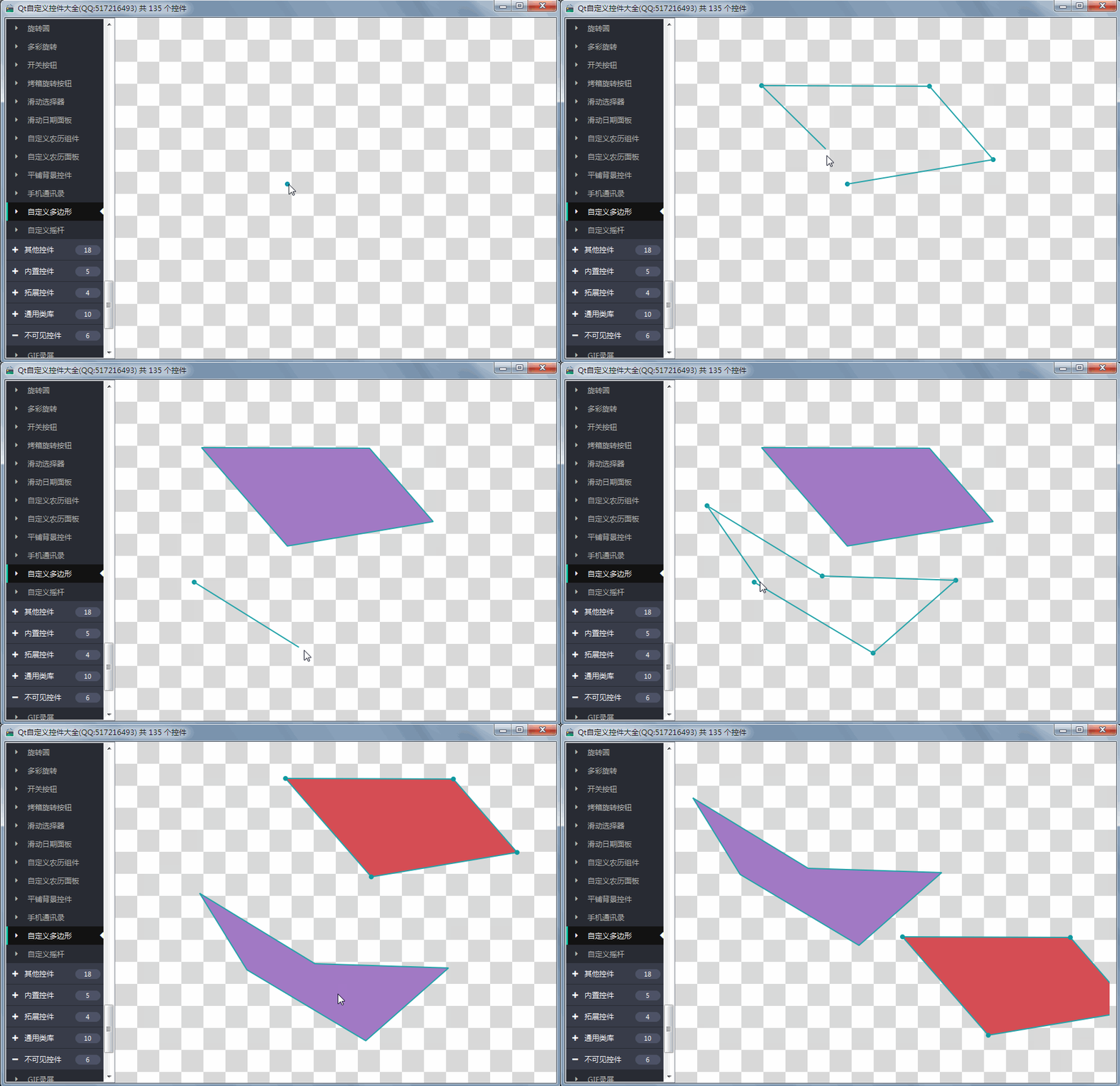
- 1:自定义随意绘制多边形
- 2:产生闭合形状后可单击选中移动整个多边形
- 3:可拉动某个点
- 4:支持多个多边形
- 5:鼠标右键退出绘制
- 6:可设置各种颜色
三、效果图
四、头文件代码
#ifndef CUSTOMGRAPHICS_H#define CUSTOMGRAPHICS_H/** * 自定义多边形控件 作者:赵彦博(QQ:408815041 zyb920@hotmail.com) 2019-3-28 * 1:自定义随意绘制多边形 * 2:产生闭合形状后可单击选中移动整个多边形 * 3:可拉动某个点 * 4:支持多个多边形 * 5:鼠标右键退出绘制 * 6:可设置各种颜色 */#include <QWidget>#ifdef quc#if (QT_VERSION < QT_VERSION_CHECK(5,7,0))#include <QtDesigner/QDesignerExportWidget>#else#include <QtUiPlugin/QDesignerExportWidget>#endifclass QDESIGNER_WIDGET_EXPORT CustomGraphics : public QWidget#elseclass CustomGraphics : public QWidget#endif{ Q_ Q_PROPERTY(bool selectDotVisible READ getSelectDotVisible WRITE setSelectDotVisible) Q_PROPERTY(int dotRadius READ getDotRadius WRITE setDotRadius) Q_PROPERTY(int lineWidth READ getLineWidth WRITE setLineWidth) Q_PROPERTY(QColor dotColor READ getDotColor WRITE setDotColor) Q_PROPERTY(QColor lineColor READ getLineColor WRITE setLineColor) Q_PROPERTY(QColor polygonColor READ getPolygonColor WRITE setPolygonColor) Q_PROPERTY(QColor selectColor READ getSelectColor WRITE setSelectColor)public: typedef struct { QVector<QPoint> pos; bool selected; } Polygon; explicit CustomGraphics(QWidget *parent = 0);protected: void mousePressEvent(QMouseEvent *e); void mouseMoveEvent(QMouseEvent *e); void mouseReleaseEvent(QMouseEvent *e); void paintEvent(QPaintEvent *); void drawPolygon(QPainter *p, const Polygon &v); void drawLines(QPainter *p, const QList<QPoint> &list, bool isFirst = true);private: bool selectDotVisible; //选中点可见 int dotRadius; //点的半径 int lineWidth; //线条宽度 QColor dotColor; //点的颜色 QColor lineColor; //线条颜色 QColor polygonColor; //多边形颜色 QColor selectColor; //选中颜色 QPoint tempPoint; //临时点 QList<QPoint> tempPoints; //点集合 QList<Polygon> tempPolygons;//多边形集合 bool pressed; //鼠标是否按下 QPoint lastPoint; //鼠标按下处的坐标 QPoint ellipsePos; //保存按下点的坐标 int selectedEllipseIndex; //选中点的index Polygon pressedPolygon; //保存按下时多边形的原始坐标 int selectedIndex; //选中多边形的indexprivate: //计算两点间的距离 double length(const QPoint &p1, const QPoint &p2); //检测是否选中多边形 bool checkPoint(const QVector<QPoint> &points, int x, int y);public: bool getSelectDotVisible() const; int getDotRadius() const; int getLineWidth() const; QColor getDotColor() const; QColor getLineColor() const; QColor getPolygonColor() const; QColor getSelectColor() const; QSize sizeHint() const; QSize minimumSizeHint() const;public Q_SLOTS: void setSelectDotVisible(bool selectDotVisible); void setDotRadius(int dotRadius); void setLineWidth(int lineWidth); void setDotColor(const QColor &dotColor); void setLineColor(const QColor &lineColor); void setPolygonColor(const QColor &polygonColor); void setSelectColor(const QColor &selectColor); //清除临时绘制的 void clearTemp(); //清除所有 void clearAll();};#endif // CUSTOMGRAPHICS_H五、核心代码
void CustomGraphics::mousePressEvent(QMouseEvent *e){ QPoint p = e->pos(); pressed = true; lastPoint = this->mapToGlobal(p); //连线模式下不选中 if(tempPoints.isEmpty()) { //如果选中了,检测是否点到点上 bool selectedPot = false; selectedEllipseIndex = -1; if (selectedIndex != -1) { for(int i = tempPolygons.at(selectedIndex).pos.size() - 1; i >= 0; --i) { if(length(p, tempPolygons.at(selectedIndex).pos[i]) <= 36) { selectedPot = true; selectedEllipseIndex = i; ellipsePos = tempPolygons.at(selectedIndex).pos[i]; break; } } } //当前选中了点则不用重绘 if(selectedPot) { return; } //判断是否选中一个 selectedIndex = -1; for(int i = tempPolygons.size() - 1; i >= 0; --i) { tempPolygons[i].selected = checkPoint(tempPolygons.at(i).pos, p.x(), p.y()); if(tempPolygons.at(i).selected) { //防止重叠部分 if(selectedIndex == -1) { selectedIndex = i; pressedPolygon = tempPolygons.at(i); } else { tempPolygons[i].selected = false; } } } this->update(); }}void CustomGraphics::mouseMoveEvent(QMouseEvent *e){ tempPoint = e->pos(); if(pressed && selectedIndex != -1) { //整体偏移坐标 QPoint delta = this->mapToGlobal(tempPoint) - lastPoint; int len = tempPolygons.at(selectedIndex).pos.size(); if(selectedEllipseIndex != -1) { //移动点 tempPolygons[selectedIndex].pos[selectedEllipseIndex] = ellipsePos + delta; } else if(selectedIndex != -1) { //移动面 for(int i = 0; i < len; ++i) { tempPolygons[selectedIndex].pos[i] = pressedPolygon.pos.at(i) + delta; } } } this->update();}void CustomGraphics::mouseReleaseEvent(QMouseEvent *e){ //鼠标右键清空临时的 if (e->button() == Qt::RightButton) { clearTemp(); return; } //检测再次点击与最后个点 - 还没写 pressed = false; if(selectedIndex != -1) { return; } QPoint point = e->pos(); if(tempPoints.count() > 0) { qreal len = (qPow(tempPoints.first().x() - point.x() , 2.0) + qPow(tempPoints.first().y() - point.y() , 2.0) ); if(len < 100) { //完成一个多边形 if(tempPoints.size() >= 3) { Polygon pol; pol.pos = tempPoints.toVector(); pol.selected = false; tempPolygons.append(pol); } tempPoints.clear(); this->update(); return; } } tempPoints.append(point); this->update();}void CustomGraphics::paintEvent(QPaintEvent *){ QPainter painter(this); painter.setRenderHints(QPainter::Antialiasing, true); //绘制多边形 foreach(const Polygon &p, tempPolygons) { drawPolygon(&painter, p); } //绘制点集合 drawLines(&painter, tempPoints, false);}void CustomGraphics::drawPolygon(QPainter *p, const Polygon &v){ p->save(); //绘制多边形 p->setPen(QPen(lineColor, lineWidth)); v.selected ? p->setBrush(selectColor) : p->setBrush(polygonColor); p->drawPolygon(v.pos.data(), v.pos.size()); //绘制圆点 if(selectDotVisible && v.selected) { p->setPen(Qt::NoPen); p->setBrush(dotColor); foreach(const QPoint &point, v.pos) { p->drawEllipse(point, dotRadius, dotRadius); } } p->restore();}void CustomGraphics::drawLines(QPainter *p, const QList<QPoint> &list, bool isFirst){ p->save(); int count = list.count(); if (count > 0) { //绘制点集合 p->setPen(Qt::NoPen); p->setBrush(dotColor); for(int i = 0; i < count; ++i) { p->drawEllipse(list.at(i), dotRadius, dotRadius); } //绘制线条集合 p->setPen(QPen(lineColor, lineWidth)); p->setBrush(Qt::NoBrush); for(int i = 0; i < count - 1; ++i) { p->drawLine(list.at(i), list.at(i + 1)); } //绘制最后一条线条 p->drawLine(list.last(), isFirst ? list.first() : tempPoint); } p->restore();}double CustomGraphics::length(const QPoint &p1, const QPoint &p2){ //平方和 return qPow(p1.x() - p2.x(), 2.0) + qPow(p1.y() - p2.y(), 2.0);}bool CustomGraphics::checkPoint(const QVector<QPoint> &points, int testx, int testy){ //最少保证3个点 const int count = points.size(); if(count < 3) { return false; } QList<int> vertx, verty; for(int i = 0; i < count; ++i) { vertx << points.at(i).x(); verty << points.at(i).y(); } //核心算法,计算坐标是否在多边形内部 int i = 0, j, c = 0; for (i = 0, j = count - 1; i < count; j = i++) { bool b1 = (verty.at(i) > testy) != (verty.at(j) > testy); bool b2 = (testx < (vertx.at(j) - vertx.at(i)) * (testy - verty.at(i)) / (verty.at(j) - verty.at(i)) + vertx.at(i)); if (b1 && b2) { c = !c; } } return c;}六、控件介绍
- 超过150个精美控件,涵盖了各种仪表盘、进度条、进度球、指南针、曲线图、标尺、温度计、导航条、导航栏,flatui、高亮按钮、滑动选择器、农历等。远超qwt集成的控件数量。
- 每个类都可以独立成一个单独的控件,零耦合,每个控件一个头文件和一个实现文件,不依赖其他文件,方便单个控件以源码形式集成到项目中,较少代码量。qwt的控件类环环相扣,高度耦合,想要使用其中一个控件,必须包含所有的代码。
- 全部纯Qt编写,QWidget+QPainter绘制,支持Qt4.6到Qt5.12的任何Qt版本,支持mingw、msvc、gcc等编译器,支持任意操作系统比如windows+linux+mac+嵌入式linux等,不乱码,可直接集成到Qt Creator中,和自带的控件一样使用,大部分效果只要设置几个属性即可,极为方便。
- 每个控件都有一个对应的单独的包含该控件源码的DEMO,方便参考使用。同时还提供一个所有控件使用的集成的DEMO。
- 每个控件的源代码都有详细中文注释,都按照统一设计规范编写,方便学习自定义控件的编写。
- 每个控件默认配色和demo对应的配色都非常精美。
- 超过130个可见控件,6个不可见控件。
- 部分控件提供多种样式风格选择,多种指示器样式选择。
- 所有控件自适应窗体拉伸变化。
- 集成自定义控件属性设计器,支持拖曳设计,所见即所得,支持导入导出 格式。
- 自带activex控件demo,所有控件可以直接运行在ie浏览器中。
- 集成fontawesome图形字体+阿里巴巴iconfont收藏的几百个图形字体,享受图形字体带来的乐趣。
- 所有控件最后生成一个dll动态库文件,可以直接集成到qtcreator中拖曳设计使用。
- 目前已经有qml版本,后期会考虑出pyqt版本,如果用户需求量很大的话。
七、SDK下载
- SDK下载链接:https://pan.baidu.com/s/1A5Gd77kExm8Co5ckT51vvQ 提取码:877p
- 下载链接中包含了各个版本的动态库文件,所有控件的头文件,使用demo,自定义控件+属性设计器。
- 自定义控件插件开放动态库dll使用(永久免费),无任何后门和限制,请放心使用。
- 目前已提供26个版本的dll,其中包括了qt5.12.3 msvc2017 32+64 mingw 32+64 的。
- 不定期增加控件和完善控件,不定期更新SDK,欢迎各位提出建议,谢谢!
- widget版本(QQ:517216493)qml版本(QQ:373955953)三峰驼(QQ:278969898)。
- 涛哥的知乎专栏 Qt进阶之路 https://zhuanlan.zhihu.com/TaoQt
- 欢迎关注微信公众号【高效程序员】,C++/Python、学习方法、写作技巧、热门技术、职场发展等内容,干货多多,福利多多!
继续阅读与本文标签相同的文章
上一篇 :
Qt编写自定义控件8-动画按钮组控件
下一篇 :
随着RPA的发展,人类将越来越多地退居二线
-
实时计算 Flink SQL 核心功能解密
2026-05-21栏目: 教程
-
python 人工智能开发
2026-05-21栏目: 教程
-
大数据列式存储 Parquet 和 ORC 简介
2026-05-21栏目: 教程
-
随着RPA的发展,人类将越来越多地退居二线
2026-05-21栏目: 教程
-
Qt编写自定义控件7-自定义可拖动多边形
2026-05-21栏目: 教程