
一、文件压缩,是很有必要的,我们在进行文件,传输过程中,很多时候都是,都是单个文件单个文件发送接收,但是当数据量特别大,或者文件数量比较多的时候,这个时候就可以考虑文件压缩。
二、优势:文件压缩过后,只需要进行一次文件的传输就可以了。减少频繁发送的问题。缺点:文件大小会变大,如果传输过程中断了,风险较大。
三、实现:
/** * 提供给用户使用的基本压缩类 * @param srcPath * @param outPath * @throws IOException */ public static void compressFile(String srcPath, String outPath) throws IOException { //读取源文件 File srcFile = new File(srcPath); //判断输出路径是否正确 File outFile = new File(outPath); //如果只是路劲加入对应的压缩名称 if (outFile.isDirectory()) { //用"/"作文判断标准 if (outPath.endsWith(File.separator)) { outPath += srcFile.getName().split("\.")[0] + ".zip"; } else { outPath += File.separator + srcFile.getName().split("\.")[0] + ".zip"; } } //读取文件流 FileOutputStream fileOutputStream = new FileOutputStream(outPath); ZipOutputStream zipOutputStream = new ZipOutputStream(fileOutputStream); //压缩文件 compressFile(srcFile, srcFile.getName(),zipOutputStream); //关闭流 zipOutputStream.close(); fileOutputStream.close(); } /** * 迭代方式进行文件压缩 * @param file * @param fileName * @param outputStream * @throws IOException */ private static void compressFile(File file, String fileName, final ZipOutputStream outputStream) throws IOException { //如果是目录 if (file.isDirectory()) { //创建文件夹 outputStream.putNextEntry(new ZipEntry(fileName+"/")); //迭代判断,并且加入对应文件路径 File[] files = file.listFiles(); Iterator<File> iterator = Arrays.asList(files).iterator(); while (iterator.hasNext()) { File f = iterator.next(); compressFile(f, fileName+"/"+f.getName(), outputStream); } } else { //创建文件 outputStream.putNextEntry(new ZipEntry(fileName)); //读取文件并写出 FileInputStream fileInputStream = new FileInputStream(file); BufferedInputStream bufferedInputStream = new BufferedInputStream(fileInputStream); byte[] bytes = new byte[1024]; int n; while ((n = bufferedInputStream.read(bytes)) != -1) { outputStream.write(bytes, 0, n); } //关闭流 fileInputStream.close(); bufferedInputStream.close(); }}
四、测试:
public static void main(String[] args) throws IOException { compressFile("D:\srv", "D:\");}
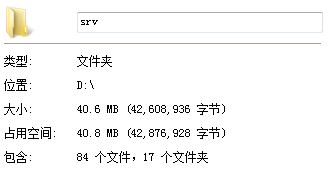
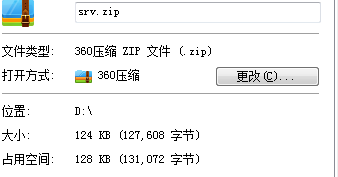
五、效果还是可以,此方式根据需要修改!
继续阅读与本文标签相同的文章
上一篇 :
java之JMS
下一篇 :
jetty之嵌入式开发
-
数据集操作
2026-05-26栏目: 教程
-
说说 input 输入框的事件
2026-05-26栏目: 教程
-
redux 中间件 --- applyMiddleware 源码解析 + 中间件的实战
2026-05-26栏目: 教程
-
react 高阶组件的 理解和应用
2026-05-26栏目: 教程
-
从 源码 谈谈 redux compose
2026-05-26栏目: 教程