
Unity视角的高度自定义

Chinar
END
| 本文提供全流程,中文翻译。 Chinar 坚持将简单的生活方式,带给世人! (拥有更好的阅读体验 —— 高分辨率用户请根据需求调整网页缩放比例) |
| Chinar —— 心分享、心创新! 助力快速完成视角的自定义、逐个功能分离 为新手节省宝贵的时间,避免采坑! |
Chinar 教程效果:
同一个脚本,同时实现拖动视角平移、竖轴限定俯仰角
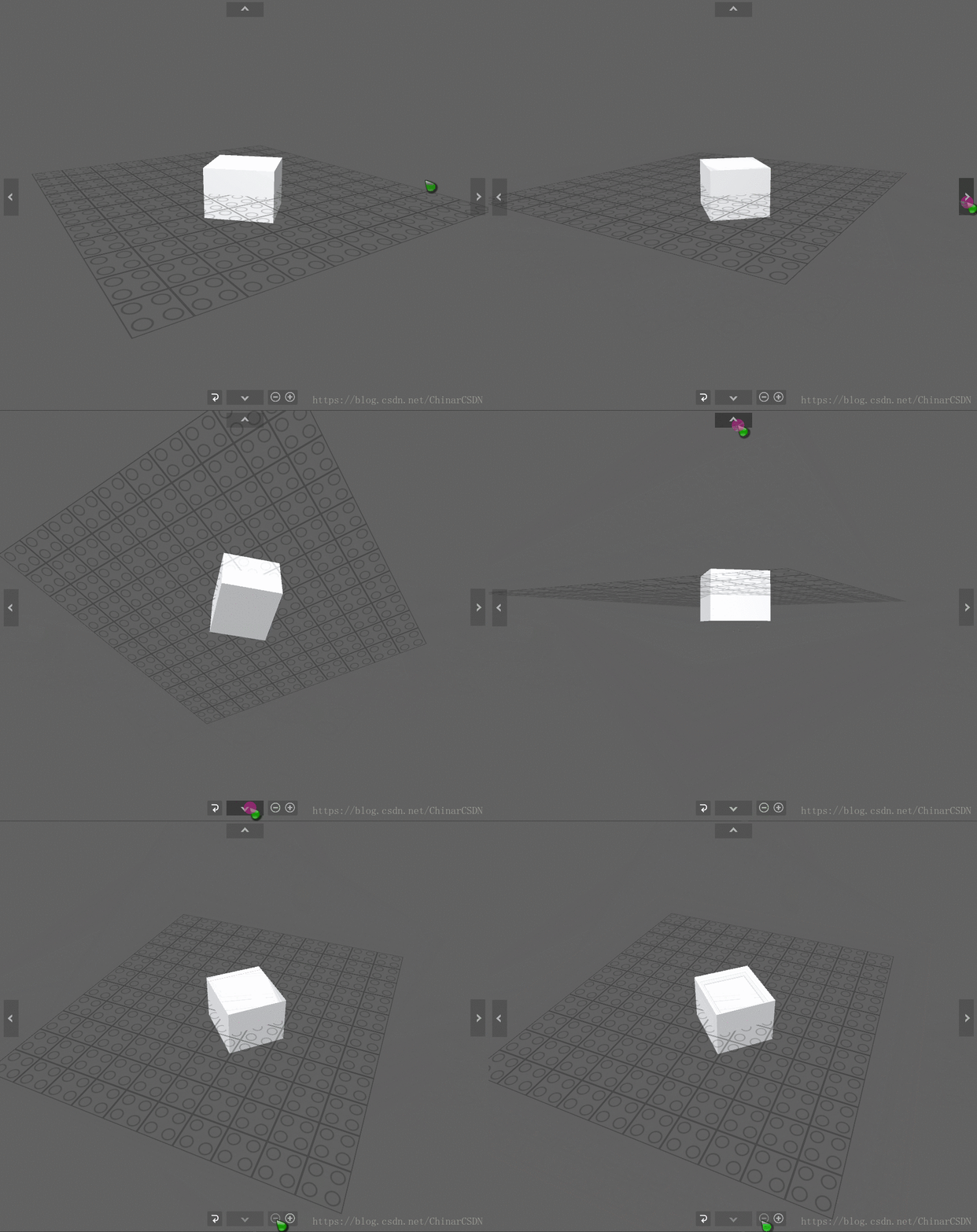

全文高清图片,点击即可放大观看 (很多人竟然不知道)
1
ChinarCamera —— 相机视角专用脚本
之前做的第三人称视角,如果还不能满足你的要求
那么这个脚本的分离、封装,且高度自定义性,应该足够满足市面上大多数游戏对视角的要求
Chinar 已经对 脚本 进行了极为简化的封装

using UnityEngine;using UnityEngine.EventSystems;/// <summary>/// 枚举按钮操作类型/// </summary>public enum ButtonType{ Up, Down, Left, Right, Near, Far, Null}/// <summary>/// Chinar相机专用脚本:挂载到相机上/// </summary>public class ChinarCamera : MonoBehaviour{ public Transform pivot; // 被跟踪的对象:当前无用:留作扩展 public Vector3 pivotOffset = Vector3.zero; // 与目标的偏移量 public float distance = 15.0f; // 距目标距离(使用变焦) public float minDistance = 2f; //最小距离 public float maxDistance = 15f; //最大距离 public float zoomSpeed = 1f; //速度倍率 public float NFzoomSpeed = 20f; //远近速度倍率 public float xSpeed = 250.0f; //x速度 public float ySpeed = 120.0f; //y速度 public bool allowYTilt = true; //允许Y轴倾斜 public float yMinLimit = -90f; //相机向下最大角度 public float yMaxLimit = 90f; //相机向上最大角度 private float x = 0.0f; //x变量 private float y = 0.0f; //y变量 private float targetX = 0f; //目标x private float targetY = 0f; //目标y private float targetDistance = 0f; //目标距离 private float xVelocity = 1f; //x速度 private float yVelocity = 1f; //y速度 private float zoomVelocity = 1f; //速度倍率 public float testSpeed = 30f; //用于外部动态测试相机速度 public ButtonType buttonType = ButtonType.Null; //默认为空操作 public static bool isStart = true; //默认第一次开始,另外通过控制此变量可重置视角 private Main main; void Start() { if (Game .Find("Global s")) { main = Game .Find("Global s").GetComponent<Main>(); } var angles = transform.eulerAngles; targetX = x = angles.x; targetY = y = ClampAngle(angles.y, yMinLimit, yMaxLimit); targetDistance = distance; isStart = true; //默认第一次启动 } /// <summary> /// 相机的控制写在Late比较好 /// </summary> void LateUpdate() { if (Game .Find("Global s")) { if (main.userOp == OperationState.HandMove) { if (Input.GetMouseButtonUp(0)) { pivot.SetParent(null); } if (Input.GetMouseButton(0) && !EventSystem.current.IsPointerOverGame ()) { pivot.SetParent(Camera.main.transform); float x; float y; x = Input.GetAxis("Mouse X"); y = Input.GetAxis("Mouse Y"); transform.Translate(new Vector3(-x, -y, 0) * Time.deltaTime * 10); return; } } else { pivot.parent = null; } } if (!EventSystem.current.IsPointerOverGame ()) { GunLun(); MouseControlCamera(); } switch (buttonType) { case ButtonType.Up: SetDirectional(0); break; case ButtonType.Down: SetDirectional(1); break; case ButtonType.Left: SetDirectional(2); break; case ButtonType.Right: SetDirectional(3); break; case ButtonType.Near: SetDirectional(4); break; case ButtonType.Far: SetDirectional(5); break; case ButtonType.Null: break; } AddTransform(); } /// <summary> /// 根据点击按钮类型,设置方向 /// </summary> /// <param name="arg"></param> void SetDirectional(int arg) { switch (arg) { case 0: targetY += testSpeed * 0.02f * Time.deltaTime; break; case 1: targetY -= testSpeed * 0.02f * Time.deltaTime; break; case 2: targetX += testSpeed * 0.04f * Time.deltaTime; break; case 3: targetX -= testSpeed * 0.04f * Time.deltaTime; break; case 4: if (targetDistance <= minDistance) break; targetDistance -= NFzoomSpeed * Time.deltaTime; break; case 5: if (targetDistance >= maxDistance) break; targetDistance += NFzoomSpeed * Time.deltaTime; break; } } /// <summary> /// 鼠标控制镜头 /// </summary> void MouseControlCamera() { if (Input.GetMouseButton(1)) //鼠标右键 { targetX += Input.GetAxis("Mouse X") * xSpeed * 0.02f; targetY -= Input.GetAxis("Mouse Y") * ySpeed * 0.02f; } } /// <summary> /// 添加矩阵信息 /// </summary> void AddTransform() { if (isStart) { //默认第一次启动的位置 targetX = 178f; targetY = 36.956f; isStart = false; } targetY = ClampAngle(targetY, yMinLimit, yMaxLimit); Quaternion rotation = Quaternion.Euler(targetY, targetX, 0); transform.rotation = rotation; transform.position = rotation * new Vector3(0.0f, 0.0f, -targetDistance) + pivot.position + pivotOffset; } /// <summary> /// 滚轮放大缩小 /// </summary> void GunLun() { float scroll = Input.GetAxis("Mouse ScrollWheel"); if (scroll > 0.0f) targetDistance -= zoomSpeed; else if (scroll < 0.0f) targetDistance += zoomSpeed; targetDistance = Mathf.Clamp(targetDistance, minDistance, maxDistance); } /// <summary> /// 限定范围 /// </summary> /// <param name="angle"></param> /// <param name="min"></param> /// <param name="max"></param> /// <returns></returns> private float ClampAngle(float angle, float min, float max) { if (angle < -360) angle += 360; if (angle > 360) angle -= 360; return Mathf.Clamp(angle, min, max); } /// <summary> /// 镜头方向控制 /// </summary> public void DirectionalControl(int arg) { switch (arg) { case 0: buttonType = ButtonType.Up; break; case 1: buttonType = ButtonType.Down; break; case 2: buttonType = ButtonType.Left; break; case 3: buttonType = ButtonType.Right; break; case 4: buttonType = ButtonType.Null; break; case 5: //近 buttonType = ButtonType.Near; break; case 6: //远 buttonType = ButtonType.Far; break; case 7: //重置视野 targetDistance = 15; break; } }}拖动视角平移
支持
May Be —— 搞开发,总有一天要做的事!
| 拥有自己的服务器,无需再找攻略! Chinar 提供一站式教程,闭眼式创建! 为新手节省宝贵时间,避免采坑! |
先点击领取 —— 阿里全产品优惠券 (享受最低优惠)
1 —— 云服务器超全购买流程 (新手必备!)
2 —— 阿里ECS云服务器自定义配置 - 购买教程(新手必备!)
3—— Windows 服务器配置、运行、建站一条龙 !
4 —— Linux 服务器配置、运行、建站一条龙 !
Chinar
END
本博客为非营利性个人原创,除部分有明确署名的作品外,所刊登的所有作品的著作权均为本人所拥有,本人保留所有法定权利。违者必究
对于需要复制、转载、链接和传播博客文章或内容的,请及时和本博主进行联系,留言,Email: ichinar@icloud.com
对于经本博主明确授权和许可使用文章及内容的,使用时请注明文章或内容出处并注明网址
继续阅读与本文标签相同的文章
上一篇 :
C#线程、前后台线程
-
Unity查找物体的子物体、孙物体
2026-05-27栏目: 教程
-
Unity导航系统Navigation使用教程
2026-05-27栏目: 教程
-
Unity调用Windows对话框保存时另存为弹框
2026-05-27栏目: 教程
-
Unity镜子效果的实现(无需镜子Shader)
2026-05-27栏目: 教程
-
Unity射线检测的用法总结
2026-05-27栏目: 教程