自动扫雷一般分为两种,一种是读取内存数据,而另一种是通过分析图片获得数据,并通过模拟鼠标操作,这...
自动扫雷一般分为两种,一种是读取内存数据,而另一种是通过分析图片获得数据,并通过模拟鼠标操作,这里我用的是第二种方式。
一、准备工作
1.扫雷游戏
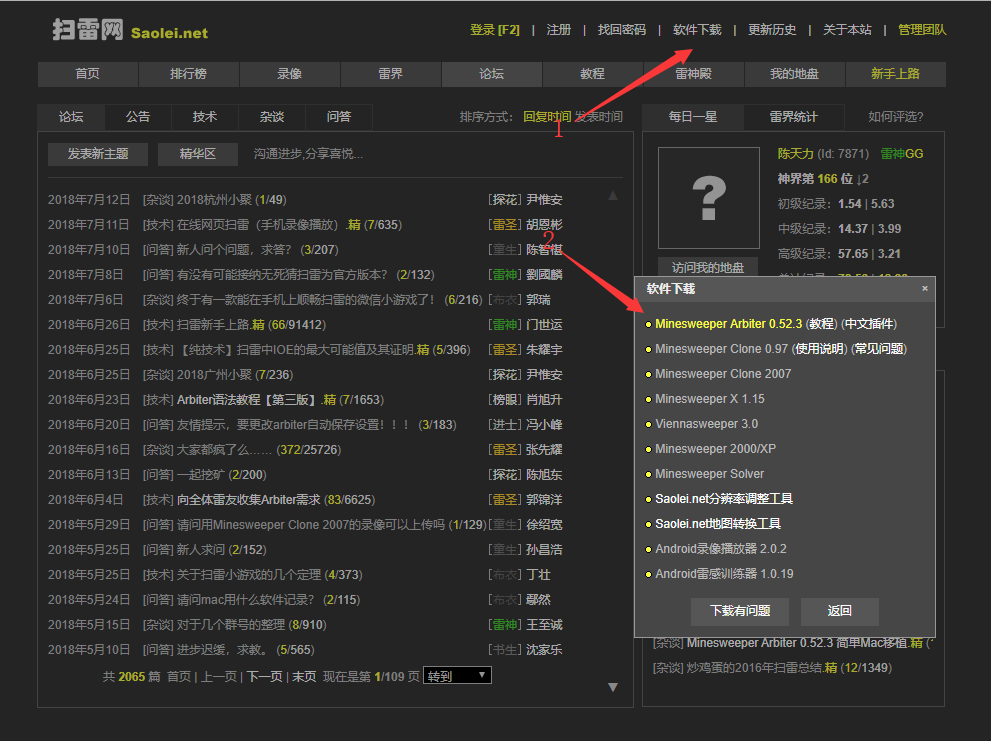
我是win10,没有默认的扫雷,所以去扫雷网下载
http://www.saolei.net/BBS/
2.python 3
我的版本是 python 3.6.1
3.python的第三方库
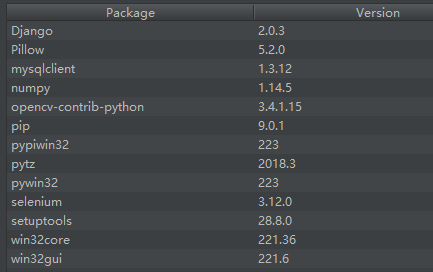
win32api,win32gui,win32con,Pillow,numpy,opencv
可通过 pip install --upgrade SomePackage 来进行安装
注意:有的版本是下载pywin32,但是有的要把pywin32升级到最高并自动下载了pypiwin32,具体情况每个python版本可能都略有不同
我给出我的第三方库和版本仅供参考
二、关键代码组成
1.找到游戏窗口与坐标
#扫雷游戏窗口class_name = "TMain"title_name = "Minesweeper Arbiter "hwnd = win32gui.FindWindow(class_name, title_name)#窗口坐标left = 0top = 0right = 0bottom = 0if hwnd: print("找到窗口") left, top, right, bottom = win32gui.GetWindowRect(hwnd) #win32gui.SetForegroundWindow(hwnd) print("窗口坐标:") print(str(left)+' '+str(right)+' '+str(top)+' '+str(bottom))else: print("未找到窗口")
2.锁定并抓取雷区图像
#锁定雷区坐标
#去除周围功能按钮以及多余的界面
#具体的像素值是通过QQ的截图来判断的left += 15top += 101right -= 15bottom -= 42#抓取雷区图像rect = (left, top, right, bottom)img = ImageGrab.grab().crop(rect)
3.各图像的RGBA值
#数字1-8 周围雷数#0 未被打开#ed 被打开 空白#hongqi 红旗#boom 普通雷
#boom_red 踩中的雷
rgba_ed = [(225, (192, 192, 192)), (31, (128, 128, 128))]rgba_hongqi = [(54, (255, 255, 255)), (17, (255, 0, 0)), (109, (192, 192, 192)), (54, (128, 128, 128)), (22, (0, 0, 0))]rgba_0 = [(54, (255, 255, 255)), (148, (192, 192, 192)), (54, (128, 128, 128))]rgba_1 = [(185, (192, 192, 192)), (31, (128, 128, 128)), (40, (0, 0, 255))]rgba_2 = [(160, (192, 192, 192)), (31, (128, 128, 128)), (65, (0, 128, 0))]rgba_3 = [(62, (255, 0, 0)), (163, (192, 192, 192)), (31, (128, 128, 128))]rgba_4 = [(169, (192, 192, 192)), (31, (128, 128, 128)), (56, (0, 0, 128))]rgba_5 = [(70, (128, 0, 0)), (155, (192, 192, 192)), (31, (128, 128, 128))]rgba_6 = [(153, (192, 192, 192)), (31, (128, 128, 128)), (72, (0, 128, 128))]rgba_8 = [(149, (192, 192, 192)), (107, (128, 128, 128))]rgba_boom = [(4, (255, 255, 255)), (144, (192, 192, 192)), (31, (128, 128, 128)), (77, (0, 0, 0))]rgba_boom_red = [(4, (255, 255, 255)), (144, (255, 0, 0)), (31, (128, 128, 128)), (77, (0, 0, 0))]
4.扫描雷区图像保存至一个二维数组map
#扫描雷区图像def showmap(): img = ImageGrab.grab().crop(rect) for y in range(blocks_y): for x in range(blocks_x): this_image = img.crop((x * block_width, y * block_height, (x + 1) * block_width, (y + 1) * block_height)) if this_image.getcolors() == rgba_0: map[y][x] = 0 elif this_image.getcolors() == rgba_1: map[y][x] = 1 elif this_image.getcolors() == rgba_2: map[y][x] = 2 elif this_image.getcolors() == rgba_3: map[y][x] = 3 elif this_image.getcolors() == rgba_4: map[y][x] = 4 elif this_image.getcolors() == rgba_5: map[y][x] = 5 elif this_image.getcolors() == rgba_6: map[y][x] = 6 elif this_image.getcolors() == rgba_8: map[y][x] = 8 elif this_image.getcolors() == rgba_ed: map[y][x] = -1 elif this_image.getcolors() == rgba_hongqi: map[y][x] = -4 elif this_image.getcolors() == rgba_boom or this_image.getcolors() == rgba_boom_red: global gameover gameover = 1 break #sys.exit(0) else: print("无法识别图像") print("坐标") print((y,x)) print("颜色") print(this_image.getcolors()) sys.exit(0) #print(map)
5.扫雷算法
这里我采用的最基础的算法
1.首先点出一个点
2.扫描所有数字,如果周围空白+插旗==数字,则空白均有雷,右键点击空白插旗
3.扫描所有数字,如果周围插旗==数字,则空白均没有雷,左键点击空白
4.循环2、3,如果没有符合条件的,则随机点击一个白块
#插旗def banner(): showmap() for y in range(blocks_y): for x in range(blocks_x): if 1 <= map[y][x] and map[y][x] <= 5: boom_number = map[y][x] block_white = 0 block_qi = 0 for yy in range(y-1,y+2): for xx in range(x-1,x+2): if 0 <= yy and 0 <= xx and yy < blocks_y and xx < blocks_x: if not (yy == y and xx == x):if map[yy][xx] == 0: block_white += 1 elif map[yy][xx] == -4: block_qi += 1if boom_number == block_white + block_qi:for yy in range(y - 1, y + 2): for xx in range(x - 1, x + 2): if 0 <= yy and 0 <= xx and yy < blocks_y and xx < blocks_x: if not (yy == y and xx == x): if map[yy][xx] == 0: win32api.SetCursorPos([left+xx*block_width, top+yy*block_height]) win32api.mouse_event(win32con.MOUSEEVENTF_RIGHTDOWN, 0, 0, 0, 0) win32api.mouse_event(win32con.MOUSEEVENTF_RIGHTUP, 0, 0, 0, 0) showmap()#点击白块def dig(): showmap() iscluck = 0 for y in range(blocks_y): for x in range(blocks_x): if 1 <= map[y][x] and map[y][x] <= 5: boom_number = map[y][x] block_white = 0 block_qi = 0 for yy in range(y - 1, y + 2): for xx in range(x - 1, x + 2): if 0 <= yy and 0 <= xx and yy < blocks_y and xx < blocks_x: if not (yy == y and xx == x): if map[yy][xx] == 0: block_white += 1 elif map[yy][xx] == -4: block_qi += 1if boom_number == block_qi and block_white > 0:for yy in range(y - 1, y + 2): for xx in range(x - 1, x + 2): if 0 <= yy and 0 <= xx and yy < blocks_y and xx < blocks_x: if not(yy == y and xx == x): if map[yy][xx] == 0: win32api.SetCursorPos([left + xx * block_width, top + yy * block_height]) win32api.mouse_event(win32con.MOUSEEVENTF_LEFTDOWN, 0, 0, 0, 0) win32api.mouse_event(win32con.MOUSEEVENTF_LEFTUP, 0, 0, 0, 0) iscluck = 1 if iscluck == 0: luck()#随机点击def luck(): fl = 1 while(fl): random_x = random.randint(0, blocks_x - 1) random_y = random.randint(0, blocks_y - 1) if(map[random_y][random_x] == 0): win32api.SetCursorPos([left + random_x * block_width, top + random_y * block_height]) win32api.mouse_event(win32con.MOUSEEVENTF_LEFTDOWN, 0, 0, 0, 0) win32api.mouse_event(win32con.MOUSEEVENTF_LEFTUP, 0, 0, 0, 0) fl = 0
def gogo():
    win32api.SetCursorPos([left, top])
    win32api.mouse_event(win32con.MOUSEEVENTF_LEFTDOWN, 0, 0, 0, 0)
    win32api.mouse_event(win32con.MOUSEEVENTF_LEFTUP, 0, 0, 0, 0)
    showmap()
    global gameover
    while(1):
        if(gameover == 0):
            banner()
            banner()
            dig()
        else:
            gameover = 0
            win32api.keybd_event(113, 0, 0, 0)
            win32api.SetCursorPos([left, top])
            win32api.mouse_event(win32con.MOUSEEVENTF_LEFTDOWN, 0, 0, 0, 0)
            win32api.mouse_event(win32con.MOUSEEVENTF_LEFTUP, 0, 0, 0, 0)
            showmap()
这个算法在初级和中级通过率都不错,但是在高级成功率惨不忍睹,主要是没有考虑逻辑组合以及白块是雷的概率问题,可以对这两个点进行改进,提高成功率
版权声明
本文仅代表作者观点,不代表百度立场。
本文系作者授权百度百家发表,未经许可,不得转载。