
初始化一些文件和依赖
新建一个testwebpack的文件夹。
然后在该文件夹下:
npm init- 1
这时候会出现一个pack.json文件。
npm i webpack vue vue-loader- 1
这时候警告如下:
npm WARN vue-loader@15.2.4 requires a peer of css-loader@* but None is installed. You must install peer dependencies yourself.
npm WARN vue-loader@15.2.4 requires a peer of vue-template-compiler@^2.0.0 but none is installed. You must install peer dependencies yourself.
需要安装css-loader 和vue-template-compiler。
npm i css-loader vue-template-compiler- 1
新建文件夹:
- src > app.vue(根文件)
<template> <div id="app"> {{text}} </div></template><script>export default { name: 'App', data () { return { text: 'this is test' } }}</script><style scoped> #app { color: red; }</style>- 1
- 2
- 3
- 4
- 5
- 6
- 7
- 8
- 9
- 10
- 11
- 12
- 13
- 14
- 15
- 16
- 17
- 18
- 19
- 20
- 21
- 22
- src > index.js (主入口)
import Vue from 'vue'import App from './app.vue'const root = document.createElement('div')document.body.appendChild(root)new Vue({ render: (h) => h(App)}).$mount(root)- 1
- 2
- 3
- 4
- 5
- 6
- 7
- 8
新建webpack.config.js
const path = require('path')module.exports = { entry: path.join(__dirname, 'src/main.js'), output: { filename: 'bundle.js', path: path.join(__dirname, 'dist') }}- 1
- 2
- 3
- 4
- 5
- 6
- 7
- 8
- 9
package.js > script下添加代码如下:
因为只有在这里配置了,才能运行内部的webpack
"build": "webpack --config webpack.config.js"- 1
此时在端口运行npm run build
提示如下:
One CLI for webpack must be installed. These are recommended choices, delivered as separate packages
webpack4需要依赖webpack-cli
webpack-cli- 1
安装好之后报错如下:
1、The ‘mode’ option has not been set,
webpack4里面需要声明mode来判断是生产环境还是开发环境
详见官网:https://webpack.js.org/concepts/mode/
修改build:
"build": "webpack --mode=production --config webpack.config.js"- 1
2、You may need an appropriate loader to handle this file type.
这个报错说明需要配置loader
配置必要的loader:
module: { rules: [ { test: /.vue$/, loader: 'vue-loader' }, { test: /.css$/, use: [ 'style-loader', 'css-loader' ] } ] },- 1
- 2
- 3
- 4
- 5
- 6
- 7
- 8
- 9
- 10
- 11
- 12
- 13
- 14
- 15
此时继续npm run build
报错如下:
vue-loader was used without the corresponding plugin. Make sure to include VueLoaderPlugin in your webpack config.
提示webpack4配置需要包含VueLoaderPlugin
const VueLoaderPlugin = require('vue-loader/lib/plugin')- 1
然后在输出里面配置plugins:
plugins: [ new VueLoaderPlugin()]- 1
- 2
- 3
此时发现还有报错,原因很简单,没有安装style-loader.
npm i style-loader- 1
这时候就可以正常的 run build 了。
配置图片资源的打包、css预处理器等
新建文件src>assets>image&&src>assets>styles
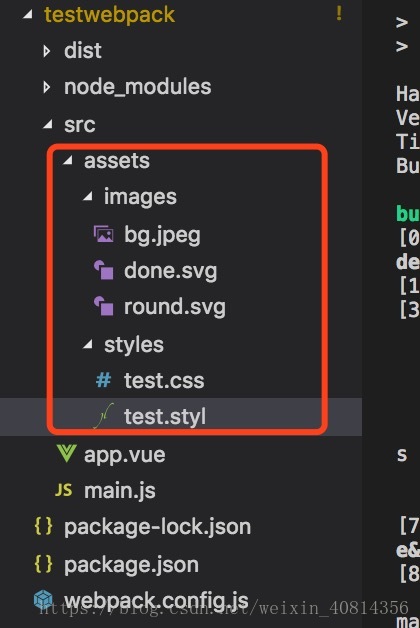
然后配置loader:
, { test: /.(jpg|jpeg|svg|png|gif)$/, use: { loader: 'url-loader', options: { limit: 1024, filename: '[name].[ext]' } } }, { test: /.styl$/, use: [ 'style-loader', 'css-loader', 'stylus-loader' ] }- 1
- 2
- 3
- 4
- 5
- 6
- 7
- 8
- 9
- 10
- 11
- 12
- 13
- 14
- 15
- 16
- 17
- 18
- 19
安装loader:
npm i stylus stylus-loader url-loader file-loader- 1
此时,就基本完成基本配置了。
devServer的使用
package.js俩面的script配置如下:
"dev": "webpack-dev-server --mode=development --config webpack.config.js"- 1
webpack.config.js里面进行一些判断,确定是生产环境还是开发环境:
如何判断呢?安装一个cross-env 的包
npm i cross-env- 1
修改package.js内容如下:
"build": "cross-env NODE_ENV=production webpack --mode=production --config webpack.config.js","dev": "cross-env NODE_ENV=development webpack-dev-server --mode=development --config webpack.config.js"- 1
- 2
然后在weback.config.js定义一个变量:
const isDev = process.env.NODE_ENV === 'development'- 1
如果这个变量为真,则做如下操作:
if (isDev) { config.devtool = '#cheap-module-eval-source-map', config.devServer = { port: 8000, host: '0.0.0.0', overlay: { errors: true //热加载 hot: true }, //下面是不刷新更新内容 config.plugins.push( new webpack.HotModuleReplacementPlugin(),, new webpack.NoEmitOnErrorsPlugin() )}- 1
- 2
- 3
- 4
- 5
- 6
- 7
- 8
- 9
- 10
- 11
- 12
- 13
- 14
- 15
- 16
这时候还需要一个html来展示,
const HTMLPlugin = require('html-webpack-plugin')- 1
plugins: [ new webpack.DefinePlugin({ 'process.env': { NODE_ENV: isDev ? '"development"' : '"production"' } }), new VueLoaderPlugin(), new HTMLPlugin() ],- 1
- 2
- 3
- 4
- 5
- 6
- 7
- 8
- 9
到这里,基本配置就已经完成了。
postCss、babel-loader使用
npm i postcss autoprefixer babel-loader babel-core - 1
- postcss: 后处理css的作用
aotuprefixer
const autoorefixer = require('autoprefixer')module.exports = { plugins: [ autoprefixer() ]}- 1
- 2
- 3
- 4
- 5
- 6
- 7
2.vue中使用jsx
npm i babel-env babel-plugin-transform-vue-jsx- 1
rules添加如下:
{ test: /.jsx$/, loader: 'babel-loader' },- 1
- 2
- 3
- 4
{ test:/.styl$/, use: [ 'style-loader', 'css-loader', { loader: 'postcss-loader', options: { sourceMap: true } //选项的作用使用来提高效率的。 }, 'stylus-loader' ] },- 1
- 2
- 3
- 4
- 5
- 6
- 7
- 8
- 9
- 10
- 11
- 12
- 13
- 14
- 15
这里我遇到一个坑,最后在官方文档找到了。
test:/.styl$/,- 1
使用上面的配置无法解析vue中的stylus,需要向下面这样配置:
test:/.styl(us)?$/,- 1
这样就可以了。
正式打包的时候,如何分离css文件
npm install --save-dev extract-text-webpack-plugin- 1
webpack4升级后,使用这个会有很多坑,如下:
开发环境的rules不变:
if (isDev) { config.module.rules.push( { test: /.styl(us)?$/, use: [ 'style-loader', 'css-loader', { loader: 'postcss-loader', options: { sourceMap: true, } }, 'stylus-loader' ] } ) // 开发环境就这样就可以了- 1
- 2
- 3
- 4
- 5
- 6
- 7
- 8
- 9
- 10
- 11
- 12
- 13
- 14
- 15
- 16
- 17
- 18
如果是生产环境:
else { config.output.filename = '[nams].[chunkhash:8].js' // 生产环境必须是chunkhash config.module.rules.push( { test: /.styl(us)?$/, use: ExtractTextPlugin.extract({ fallback: "style-loader", use: [ 'css-loader', { loader: 'postcss-loader', options: { sourceMap: true, } }, 'stylus-loader' ] }) } ) config.plugins.push( // new ExtractTextPlugin("styles.[ontentHash:8].css") new ExtractTextPlugin('styles.[hash:8].css') // 根据内容得到hash值 )}- 1
- 2
- 3
- 4
- 5
- 6
- 7
- 8
- 9
- 10
- 11
- 12
- 13
- 14
- 15
- 16
- 17
- 18
- 19
- 20
- 21
- 22
- 23
- 24
- 25
- 26
- 27
坑1:
webpack4不支持extract-text-webpack-plugin3.0版本,需要使用4.0-beat版本:
npm i extract-text-webpack-plugin@next- 1
坑2:
config.plugins.push( // new ExtractTextPlugin("styles.[ontentHash:8].css") new ExtractTextPlugin('styles.[hash:8].css') // 根据内容得到hash值 )- 1
- 2
- 3
- 4
- 5
这里不能使用style.[contentHash:8].css
到这里最终编译成功~
单独打包vue代码
config.entry = { app: path.join(__dirname, 'src/index.js'), vendor: ['vue'] }- 1
- 2
- 3
- 4
config.optimization = { splitChunks: { cacheGroups: { commons: { chunks: 'initial', minChunks: 2, maxInitialRequests: 5, minSize: 0 }, vendor: { test: /node_modules/, chunks: 'initial', name: 'vendor', priority: 10, enforce: true } } }, runtimeChunk: true 版权声明
本文仅代表作者观点,不代表百度立场。
本文系作者授权百度百家发表,未经许可,不得转载。





