前段时间写了篇关于Fragment的文章,介绍了基础的概念,用静态和动态的方式加载Fragmen...
前段时间写了篇关于Fragment的文章,介绍了基础的概念,用静态和动态的方式加载Fragment Xamarin Android Fragment的两种加载方式。下面的这个例子介绍xamarin android fragment实现简单的底部导航栏。
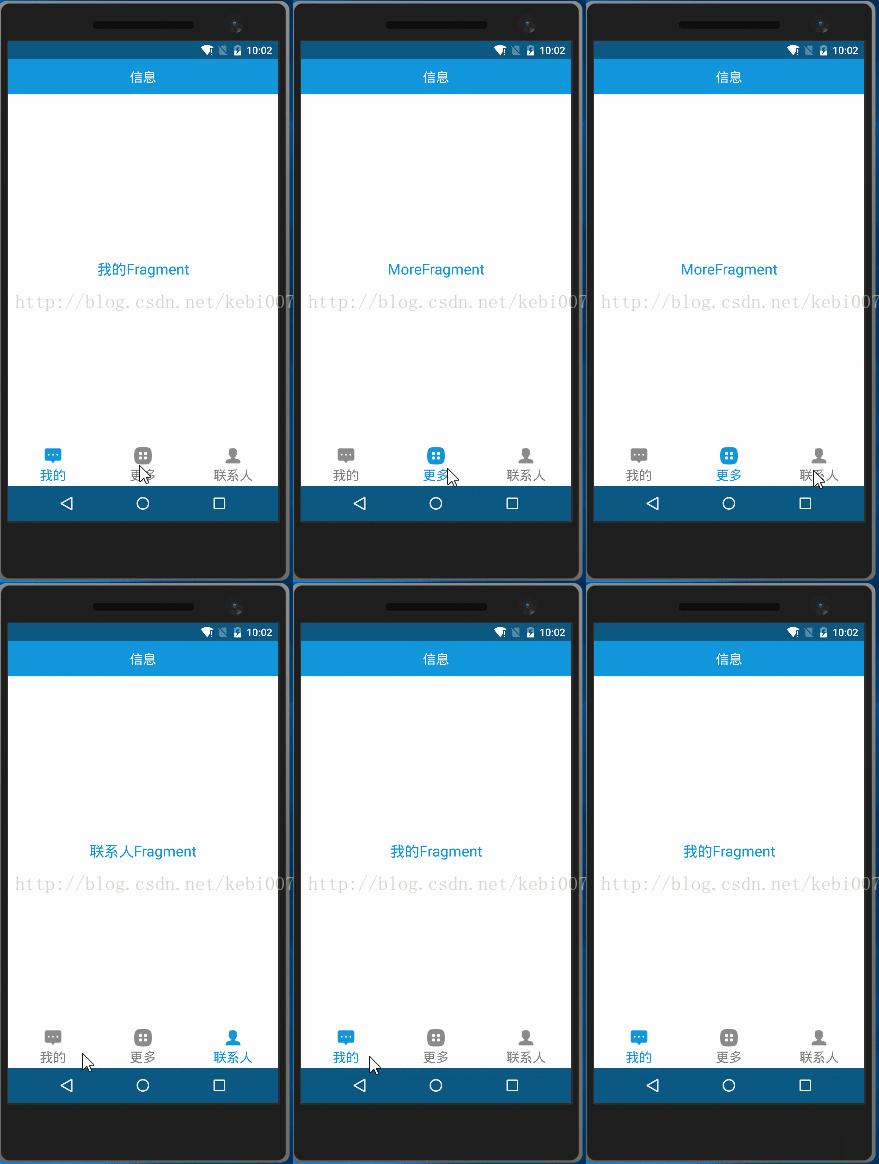
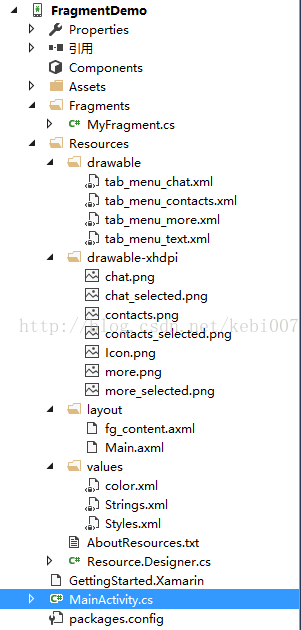
效果图和项目结构
效果图:
项目结构:
实现步骤
主要的流程就是:点击不同的菜单加载对应的fragment出来,同时菜单icon切换和菜单文字颜色也响应变化,是否选中是通过selected来判断的。我们需要写以下几个资源文件,文字颜色的变化,菜单图片的变化。
step1:底部菜单资源文件
文字颜色变化资源: tab__menu_text.xml
<?xml version="1.0" encoding="utf-8" ?><selector xmlns:android="http://schemas.android.com/apk/res/android"> <item android:color="@color/color_primary" android:state_selected="true"></item> <item android:color="@color/color_808080"></item></selector>菜单图片的变化资源:tab_menu_chat.xml 、tab_menu_more.xml、tab_menu_contracts.xml
<?xml version="1.0" encoding="utf-8" ?><selector xmlns:android="http://schemas.android.com/apk/res/android"> <item android:drawable="@drawable/more_selected" android:state_selected="true"></item> <item android:drawable="@drawable/more"></item></selector>三个都是一样的样式。
step2:MainActivity布局文件 Main.axml
<?xml version="1.0" encoding="utf-8"?><RelativeLayout xmlns:android="http://schemas.android.com/apk/res/android" android:layout_width="match_parent" android:layout_height="match_parent" android:id="@+id/relativelayout1" android:background="@color/color_primary" android:fitsSystemWindows="true"> <RelativeLayout android:id="@+id/ly_top_bar" android:layout_width="match_parent" android:layout_height="48dp" android:background="@color/color_primary"> <TextView android:id="@+id/txt_topbar" android:layout_width="match_parent" android:layout_height="match_parent" android:layout_centerInParent="true" android:gravity="center" android:textSize="18sp" android:textColor="@color/color_white" android:text="信息" /> <View android:layout_width="match_parent" android:layout_height="2px" android:background="@color/div_white" android:layout_alignParentBottom="true" /> </RelativeLayout> <LinearLayout android:id="@+id/ly_tab_bar" android:layout_width="match_parent" android:layout_height="58dp" android:layout_alignParentBottom="true" android:background="@color/bg_white" android:orientation="horizontal"> <TextView android:id="@+id/txt_chat" style="@style/tabText" android:drawableTop="@drawable/tab_menu_chat" android:text="我的"/> <TextView android:id="@+id/txt_more" style="@style/tabText" android:drawableTop="@drawable/tab_menu_more" android:text="更多"/> <TextView android:id="@+id/txt_contacts" style="@style/tabText" android:drawableTop="@drawable/tab_menu_contacts" android:text="联系人"/> </LinearLayout> <View android:id="@+id/div_tab_bar" android:layout_width="match_parent" android:layout_height="2px" android:background="@color/div_white" android:layout_above="@id/ly_tab_bar" /> <FrameLayout android:layout_width="match_parent" android:layout_height="match_parent" android:layout_below="@id/ly_top_bar" android:layout_above="@id/div_tab_bar" android:id="@+id/ly_content" /></RelativeLayout>
关于布局采用的相对布局分为三个部分:头部标题、中间Fragment的位置、底部导航栏。关于根布局文件中fitsSystemWindows属性是为了配合透明状态栏使用的,有兴趣的可以看看前几天的写的那篇文章。底部导航栏文字很多属性都是一模一样的,所以提出来,写一个style。使用widget属性让其各占1/3。文字样式tabText如下:
<?xml version="1.0" encoding="utf-8" ?><selector xmlns:android="http://schemas.android.com/apk/res/android"> <item android:color="@color/color_primary" android:state_selected="true"></item> <item android:color="@color/color_808080"></item></selector>
step3:Fragment布局文件继承Fragment的类MyFragment
fg_content.xml:
<?xml version="1.0" encoding="utf-8"?><LinearLayout xmlns:android="http://schemas.android.com/apk/res/android" android:orientation="vertical" android:layout_width="match_parent" android:layout_height="match_parent" android:background="@color/bg_white"> <TextView android:id="@+id/txt_content" android:layout_width="match_parent" android:layout_height="match_parent" android:gravity="center" android:text="呵呵" android:textColor="@color/color_primary" android:textSize="20sp" /></LinearLayout>
MyFragment.cs
public class MyFragment : Fragment { private string content { get; set; } public MyFragment(string content) { this.content = content; } public override View OnCreateView(LayoutInflater inflater, ViewGroup container, Bundle savedInstanceState) { View view = inflater.Inflate(Resource.Layout.fg_content, container, false); TextView txt_content = (TextView)view.FindViewById(Resource.Id.txt_content); txt_content.Text = content; return view; } }step3:MainActivity.cs
[Activity(Label = "FragmentDemo", MainLauncher = true, Icon = "@drawable/icon", Theme = "@android:style/Theme.Light.NoTitleBar")] public class MainActivity : Activity { private TextView txt_chat; private TextView txt_contacts; private TextView txt_more; private FrameLayout ly_content; private MyFragment fg1, fg2, fg3; private FragmentManager fManager; protected override void OnCreate(Bundle bundle) { base.OnCreate(bundle); SetContentView(Resource.Layout.Main); ly_content = (FrameLayout)FindViewById(Resource.Id.ly_content); MyFragment fg = new MyFragment("第一个fragment"); txt_chat = (TextView)FindViewById(Resource.Id.txt_chat); txt_contacts = (TextView)FindViewById(Resource.Id.txt_contacts); txt_more = (TextView)FindViewById(Resource.Id.txt_more); bindViews(); txt_chat.PerformClick(); } //ui组件初始化与事件绑定 private void bindViews() { txt_chat.Click += (s, e) => { onClick(txt_chat); }; txt_contacts.Click += delegate { onClick(txt_contacts); }; txt_more.Click += delegate { onClick(txt_more); }; } //隐藏所有Fragment private void hideAllFragment(FragmentTransaction fragmentTransaction) { if (fg1 != null) fragmentTransaction.Hide(fg1); if (fg2 != null) fragmentTransaction.Hide(fg2); if (fg3 != null) fragmentTransaction.Hide(fg3); } //重置所有文本的选中状态 private void setSelected() { txt_chat.Selected =false; txt_contacts.Selected = false; txt_more.Selected = false; } //单击事件 public void onClick(View v) { FragmentTransaction fTransaction = FragmentManager.BeginTransaction(); hideAllFragment(fTransaction); switch (v.Id) { case Resource.Id.txt_chat: setSelected(); txt_chat.Selected = true; if (fg1 == null) { fg1 = new MyFragment("聊天Fragment"); fTransaction.Add(Resource.Id.ly_content, fg1); } else{fTransaction.Show(fg1);}break; case Resource.Id.txt_contacts: setSelected(); txt_contacts.Selected = true; if (fg2 == null) { fg2 = new MyFragment("联系人Fragment"); fTransaction.Add(Resource.Id.ly_content, fg2); } else{fTransaction.Show(fg2);} break; case Resource.Id.txt_more: setSelected(); txt_more.Selected = true; if (fg3 == null) { fg3 = new MyFragment("MoreFragment"); fTransaction.Add(Resource.Id.ly_content, fg3); }else{fTransaction.Show(fg3);}break; } fTransaction.Commit(); } }关于继承的主题使用的android自带的主题Theme.Light.NoTitle,当然你也可以引入v7兼容包,继承AppcompatActivity,使用兼容包主题step4:沉浸式状态栏
这个随手也实现一下吧,挺简单的。Main.axml中根布局中已经设置了属性fitsSystemWindows,兼容android4.4 和安定肉ID5.* ,我们在用代码设置状态栏透明就可以。有关的介绍可以参考 Xamarin android沉浸式状态栏
if (Build.VERSION.SdkInt >= Build.VERSION_CODES.Kitkat) { //透明状态栏 Window.AddFlags(WindowManagerFlags.TranslucentStatus); //透明导航栏 Window.AddFlags(WindowManagerFlags.TranslucentNavigation); }作者:张林
标题:xamarin android Fragment实现底部导航栏 原文地址:http://blog.csdn.net/kebi007/article/details/70307509
转载随意注明出处版权声明
本文仅代表作者观点,不代表百度立场。
本文系作者授权百度百家发表,未经许可,不得转载。