
本章节主要讲计算后样式和测量的相关知识点。
我们可以通过dom提供的可靠的api,去获取样式计算后最终的值。
计算后样式
获取计算后的样式的方法有以下几种
- window.getComputedStyle("对象").getPropertyValue("属性");//window可以忽略
- getComputedStyle("对象")["属性"];
- 对象.currentStyle.属性;/对象.currentStyle[属性]
我们来分析一下三者的使用区别
-----getComputedStyle("对象").getPropertyValue("属性")
该方法无法兼容到IE6 7 8 ,后面的属性同css样式一样的写法
-----getComputedStyle("对象")["属性"];
该方法同样也无法兼容到IE6 7 8,后面的属性可以用css名字,也可以用到驼峰式。驼峰式如background-color要写成backgroundColor
------对象.currentStyle.属性/对象.currentStyle[属性]
对象.currentStyle.属性/对象.currentStyle[属性]
该方法用于IE6 7 8,后面的属性也需要驼峰式。
-----------------------------------------------------------------
那么有人会问,如果去兼容到IE6 7 8要怎么做?这时候我们就需要进行能力检测。
能力检测
if(window.getComputedStyle){
大于IE8的获取计算后样式的方法
}else{
小于IE6 7 8 获取计算后样式的方法
}
以上就是获取计算后样式兼容性问题的解决方案,if里面的条件就是能力检测,去检测当前浏览器是否有getComputedStyle方法,没有也就是意味着IE版本小于等于8,则使用小于IE6 7 8的方法。下面我们来写一个封装一个能力检测获取计算后样式的方法。
<html lang="en"><head> <meta charset="UTF-8"> <title>Document</title> <style type="text/css"> div { padding: 10px 20px 30px 40px; } </style></head><body> <div></div> <script type="text/javascript"> var div = document.getElementsByTagName("div")[0]; /** obj元素,property属性:可能是css样式的,可能是驼峰式的需要做处理 **/ function isComputedStyle(obj,property){ if (window.getComputedStyle) {//能力检测 return getComputedStyle(obj)[property];//因为css样式或者是驼峰式都可以 }else{ if (property.indexOf("-")) {//非驼峰式需要转成驼峰式 property = property.replace(/-([a-z])/g,function(match,$1){ return $1.toUpperCase(); }) } return obj.currentStyle[property]; } } console.log(isComputedStyle(div,"padding-left")); </script></body></html>透明度
透明度在css样式中有两种设置方法,和js中设置的方法
opacity:0.5; ---->元素.style.opacity = 0.5;
fliter:alpha(opacity=50); ---->元素.style.fliter = "alpha(opactity="+50+");";
所以在通过计算后样式的时候,可能会有顾虑,其实高版本就要高版本的获取方式去获取opacity,低版本就用低版本的获取方法去获取opacity就可以算兼容,前提是opacity的值于fliter的值相等即可
<html lang="en"><head> <meta charset="UTF-8"> <title>Document</title> <style type="text/css"> div { width: 300px; height: 300px; background: #000; opacity: 0.2; filter: alpha(opacity=20); /*为了兼容IE*/ } </style></head><body> <div> </div> <script type="text/javascript"> // 获取div的透明度 var oDiv = document.getElementsByTagName("div")[0]; alert(getComputedStyle(oDiv)["opacity"]); //0.2 高版本浏览器 // alert(oDiv.currentStyle.opacity); // IE6 7 8 .2 </script></body></html>offsetLeft/offsetTop
因为offsetTop同offsetLeft一样,故在此我们就讲解offsetLeft
offsetLeft表示这个元素的左边距的外面到offsetParent的左边距的内侧的距离。
什么是offsetParent?offsetParent表示参照物,那么offsetParent参照的依据是什么呢?这里就是要为不同的浏览器的版本进行分析。
IE9以及chrome等高级浏览器
自己祖先元素中,离自己最近的且设置了定位的元素,若都没有则以body为offsetparent。
IE8
同高级浏览器一样,但是需要多算上一条border的宽度(父亲的边框)
IE6 7
第一种情况,自己有定位的,则offsetParent就是离自己最近的且有定位的元素
第二种情况,自己没有定位的,则offsetParent就是离自己最近的且有width/height的元素
想要去兼容这三种情况要怎么去做?
自己定位,父无边宽,且父设置了定位。
offsetWidth/offsetHeight
表示自己当前元素的宽高。(都兼容)
offsetWidth = 左右border+width+左右padding
offsetHeight = 上下border+height+上下padding
假如没有设置宽度和高度,则width和height有内容撑开。
clientWidth/clientHeight
也是表示自己当前元素的宽高。(都兼容 IE6有点小问题)
clientWidth = width+左右padding
clientHeight = height+上下padding
IE6 假如没有设置宽高的话,clientHeight的高度为0,其他浏览器都是正常的
定时器
1.setInterval(function(){},time)
2.setTimeout(function(){},time)
setInterval
表示每个一段时间去调用方法。对应的清除方法是如下
var timer = setInterval(function() { }, 50); clearInterval(timer)setTimeout
表示延迟多少时间去调用方法,方法只调用一次。
var timer = setTimeout(function(){ console.log("setTimeout"); }, 1000); clearTimeout(timer)那么我们就可以通过定时器,去给修改元素的值,从而变了动画。下面我们来看看demo
<html lang="en"><head> <meta charset="UTF-8"> <title>Document</title> <style type="text/css"> div { width: 100px; height: 100px; background-color: pink; position: absolute; left: 60px; top: 40px; } </style></head><body> <div class="box" id="box"></div> <script type="text/javascript"> // 页面一打开,div运动到702px自动停止 var box = document.getElementById("box"); var num = 60; var timer = setInterval(function() { num+=8; if(num>=702) { // 拉终停表 num = 702; clearInterval(timer); } box.style.left = num + "px"; }, 30); </script></body></html>以上demo就是用过定时器去不断的改变left,当left到了的值大于702的时候,就要去解绑定时器。
可以通过定时器去写一个自动无缝的轮播图,还有点击暂停再点击播放的功能。效果图如下。
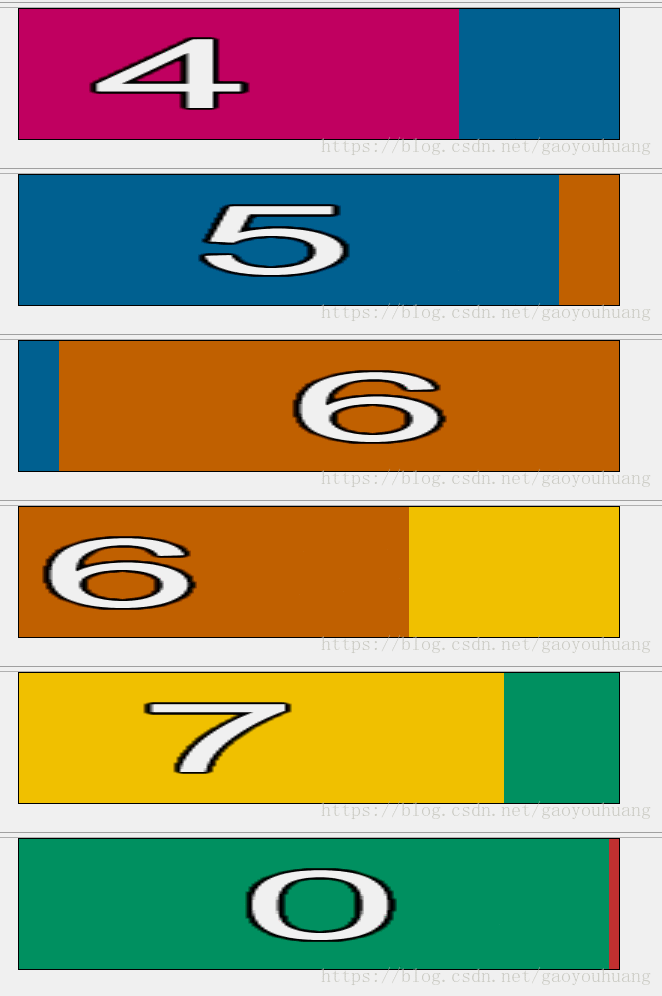
有几个注意点,从最后一张到第一张图片的过渡,每一张图片的无缝。
<html lang="en"><head> <meta charset="UTF-8"> <title>Document</title> <style type="text/css"> *{ margin: 0; padding: 0; } .banner{ width: 600px; height: 130px; overflow:hidden; border: 1px solid black; margin: 0 auto; position: relative; } .banner .content { width: 5400px; height: 130px; position: absolute; } ul{ } .banner .content li{ float: left; } .banner .content li img{ width: 600px; height: 130px; } </style></head><body> <div class="banner" id="banner"> <div class="content" id="content"> <ul> <li><a href=""><img src="img/0.png"></a></li> <li><a href=""><img src="img/1.png"></a></li> <li><a href=""><img src="img/2.png"></a></li> <li><a href=""><img src="img/3.png"></a></li> <li><a href=""><img src="img/4.png"></a></li> <li><a href=""><img src="img/5.png"></a></li> <li><a href=""><img src="img/6.png"></a></li> <li><a href=""><img src="img/7.png"></a></li> <li><a href=""><img src="img/0.png"></a></li> </ul> </div> </div> <script type="text/javascript"> var banner = document.getElementById("banner"); var content = document.getElementById("content"); var img_list = content.getElementsByTagName("li"); var move_num = 0; var timer; move(); for(var i = 0;i<img_list.length;i++){ img_list[i].onclick=function(){ if (timer!=undefined) { clearInterval(timer); timer = undefined; }else{ move(); } } } function move (){ timer = setInterval(function(){ move_num -=5; if (move_num<=-600*(img_list.length-1)) { move_num = 0; // clearInterval(timer); } content.style.left = move_num+"px"; },10); } </script></body></html>Json
与后台的大部分数据交互都是json格式。
var person = {
"name":"heihei",
"age":18,
"sex":"m",
"wife": {
"name": "Angelababy",
"age":16,
"shengao":168
}
};
其中name就是key,heihei就是value,key必须是字符串带着双引号的。
如何去获取key对应的value?如获取name对应的值
person.name / person["name"]这两种方式都可以去获取。
如何去给person添加新的值呢?
person.hobby=["haha","heihei"];直接添加即可
如何去删除某个属性
delete person.age
如何循环的获取person的k,value?
for(var k in person) {
alert(k);// 代表某个属性
alert(person[k]); // 属性值
}
同样json对象还能存放方法
person.myfun=function(){ console.log("hahaha")};直接添加即可
js的dom对象的基本知识已讲完,接下来会来讲自己封装一个动画运动框架,如有表达错的请谅解,并请提出指出,且修改错误,望能共同进步。
版权声明
本文仅代表作者观点,不代表百度立场。
本文系作者授权百度百家发表,未经许可,不得转载。






