最近几天不忙,所以把项目中的顶部导航栏的实现归集一下。android中使用TabLayout+V...
最近几天不忙,所以把项目中的顶部导航栏的实现归集一下。android中使用TabLayout+ViewPager+Fragment制作顶部导航非常常见,代码实现也比较简单。当然我这个导航栏是基于xamarin android的。废话不多说首先我们就来看看效果图

如果对于Fragment不太属性可以看看这篇文章 xamarin android Fragment实现底部导航栏。实现的主要步骤如下:
- Xamarin.Android TabLayout的简单使用
- Demo结构图
- 布局文件的介绍
- 主要Fragment类的介绍和FragmentPageAdapter的介绍
- MainActivity.cs 实现逻辑
1.xamarin android tabLayout的使用介绍
TabLayout是设计兼容包的内容,所以我们在Nuget上先引入XamarinAndroid.Support.Design 兼容包,所实现的效果如上图。布局文件如下:
<LinearLayout android:id="@+id/ly_top_bar" android:layout_width="match_parent" android:layout_height="48dp" android:background="@color/color_primary"> <android.support.design.widget.TabLayout android:id="@+id/tabMain" android:layout_width="match_parent" android:layout_height="56dp" app:tabIndicatorColor="@color/color_white" app:tabSelectedTextColor="@color/color_white" app:tabIndicatorHeight="4dp" app:tabTextColor="#dedede" /> </LinearLayout>tablayout选中tabItem的标签样式的改变主要有这几个属性:
tabIndicator:选中标签提示条的颜色;tabSelectedTextColor:选中标签文本颜色;tabTextColor:默认文本颜色;tabIndicatorHeight:选中标签提示条的高度。不过有点尴尬的是不能直接设置选中标签文本大小。
下面我们就来添加tabItem,一种用代码的方式动态添加TabItem。另一种是在axml文件里面写入tabItem。先来看看第一种用代码添加TabItem(普遍用法)
TabLayout tab = FindViewById<TabLayout>(Resource.Id.tabMain); tab.AddTab(tab.NewTab().SetText("热点")); tab.AddTab(tab.NewTab().SetText("社会")); tab.AddTab(tab.NewTab().SetText("体育"));第一种方法在xml文件中写入TabItem。不过令人遗憾的是,按照java的写法居然报错。布局文件如下:<android.support.design.widget.TabLayout android:id="@+id/tabMain" android:layout_width="match_parent" android:layout_height="56dp" app:tabIndicatorColor="@color/color_white" app:tabSelectedTextColor="@color/color_white" app:tabIndicatorHeight="4dp" app:tabTextColor="#dedede"> <android.support.design.widget.TabItem android:layout_width="wrap_content" android:layout_height="wrap_content" android:id="@+id/tabItem1"/> <android.support.design.widget.TabItem android:layout_width="wrap_content" android:layout_height="wrap_content" android:id="@+id/tabItem1"/> </android.support.design.widget.TabLayout>如果你觉得TabLayout自带的TabItem不符合你的审美,你也可以自定义一个:
2.项目结构图
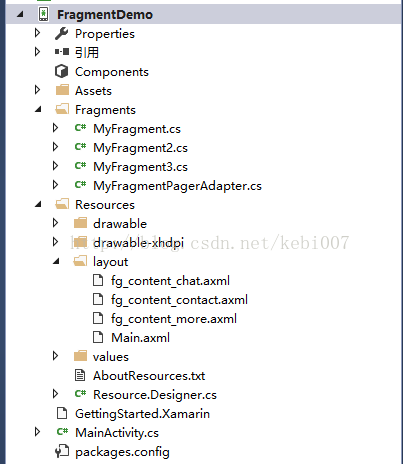
1.布局文件的介绍
首先来看一下Fragment的布局文件,照葫芦画瓢其他两个都是一样的。
<?xml version="1.0" encoding="utf-8"?><LinearLayout xmlns:android="http://schemas.android.com/apk/res/android" android:orientation="vertical" android:layout_width="match_parent" android:layout_height="match_parent" android:background="@color/color_white"> <TextView android:id="@+id/txt_content" android:layout_width="match_parent" android:layout_height="match_parent" android:gravity="center" android:text="呵呵" android:textColor="@color/color_primary" android:textSize="20sp" /></LinearLayout>Main.axml代码如下,用的是相对定位,上方放的是tab,下方是ViewPager里填充Fragment
<?xml version="1.0" encoding="utf-8"?><RelativeLayout xmlns:android="http://schemas.android.com/apk/res/android" xmlns:app="http://schemas.android.com/apk/res-auto" android:layout_width="match_parent" android:layout_height="match_parent" android:id="@+id/relativelayout1" android:background="@color/color_primary" android:fitsSystemWindows="true"> <LinearLayout android:id="@+id/ly_top_bar" android:layout_width="match_parent" android:layout_height="60dp" android:background="@color/color_primary" android:layout_alignParentTop="true"> <android.support.design.widget.TabLayout android:id="@+id/tabMain" android:layout_width="match_parent" android:layout_height="match_parent" app:tabIndicatorColor="@color/color_white" app:tabSelectedTextColor="@color/color_white" app:tabIndicatorHeight="4dp" app:tabTextColor="#dedede" /> </LinearLayout> <LinearLayout android:layout_width="match_parent" android:layout_height="match_parent" android:background="#dedede" android:layout_below="@id/ly_top_bar"> <android.support.v4.view.ViewPager android:id="@+id/ly_content" android:layout_margin="10dp" android:layout_width="match_parent" android:layout_height="match_parent" /> </LinearLayout></RelativeLayout>
3.Fragment类的介绍和Viewpager数据适配器MyFragmentPageAdapter.cs的介绍
先来看一下Fragment类,同样其他两个都是一样的,都是使用V4兼容包下的Fragment。
using Android.Views;using Android.Widget;using Fragment = Android.Support.V4.App.Fragment;namespace FragmentDemo.Fragments{ public class MyFragment2:Fragment { private string content { get; set; } public MyFragment2(string content) { this.content = content; } public override View OnCreateView(LayoutInflater inflate,ViewGroup container,Bundle savedInstanceState) { View view = inflate.Inflate(Resource.Layout.fg_content_more,container,false); TextView txt_content = view.FindViewById<TextView>(Resource.Id.txt_content); txt_content.Text =content; return view; } }}MyFragmentPagerAdapter.cs
using System;using System.Collections.Generic;using Android.Views;using Android.Support.V4.App;using Fragment = Android.Support.V4.App.Fragment;namespace FragmentDemo.Fragments{ public class MyFragmentPagerAdapter :FragmentPagerAdapter { private const int TabItemCount = 3; private MyFragment myFragment = null; private MyFragment2 myFragment2 = null; private MyFragment3 myFragment3 = null; public MainActivity MainActivity { get; set; } private readonly List<Tuple<string, Type>> tabList = new List<Tuple<string,Type>>(); public MyFragmentPagerAdapter(Android.Support.V4.App.FragmentManager fm,int TabItemCount):base(fm) { AddTab<MyFragment>("热点"); AddTab<MyFragment2>("社会"); AddTab<MyFragment3>("体育"); } public void AddTab<T>(string title) { tabList.Add(Tuple.Create(title,typeof(T))); } public override int Count { get { return TabItemCount; } } public new string GetPageTitle(int position) { return tabList[position].Item1; } public override Java.Lang.Object InstantiateItem(ViewGroup container, int position) { return base.InstantiateItem(container, position); } public override void DestroyItem(ViewGroup container, int position, Java.Lang.Object objectValue) { base.DestroyItem(container, position, objectValue); } public override Fragment GetItem(int position) { var type = tabList[position].Item2; var retFragment = Activator.CreateInstance(type) as Android.Support.V4.App.Fragment; return retFragment; } }}MyFragmentPagerAdapter.cs 我这里继承的是FragmentStatePagerAdapter,ViewPager要实现的就是将我们要显示的视图(Fragment)进行绑定,Viewpager有他自己的数据适配器PageAdapter.官方建议我们使用Fragment来填充ViewPager,给我们提供了两个适配器来管理生命周期,分别是FragmentPageAdapter和FragmentStatePagerAdapter
他们都是继承自pagerAdapter。使用区别如下:
FragmentPageAdapter:该类生成的每一个Fragment都会保存在内存之中,因此使用于那些相对静态的页面,页数相对少的那种。
FragmentStatePagerAdapter:如果数据动态较大,占用内存较多应该使用FragmentStatePagerAdapter.该类生存的Fragment不保存内存中。
MainActivity.cs实现逻辑
MainActivity.cs 代码逻辑比较简单,就不多用文字描述
using Android.App;using Android.Views;using Android.OS;using FragmentDemo.Fragments;using Android.Support.V7.App;using Android.Support.V4.View;using Android.Support.Design.Widget;namespace FragmentDemo{ [Activity(Label = "FragmentDemo", MainLauncher = true, Icon = "@drawable/icon", Theme = "@style/AppTheme")] public class MainActivity : AppCompatActivity { //UI objects private ViewPager viewPager; private MyFragmentPagerAdapter mAdapter; //页面的常量 public const int PAGE_ONE = 0; public const int PAGE_TWO = 1; public const int PAGE_THREE = 2; protected override void OnCreate(Bundle bundle) { base.OnCreate(bundle); SetContentView(Resource.Layout.Main); TabLayout tab = FindViewById<TabLayout>(Resource.Id.tabMain); tab.AddTab(tab.NewTab().SetText("热点")); tab.AddTab(tab.NewTab().SetText("社会")); tab.AddTab(tab.NewTab().SetText("体育")); tab.TabGravity = TabLayout.ModeScrollable; if (Build.VERSION.SdkInt >= Build.VERSION_CODES.Kitkat) { //透明状态栏 Window.AddFlags(WindowManagerFlags.TranslucentStatus); //透明导航栏 Window.AddFlags(WindowManagerFlags.TranslucentNavigation); } viewPager = FindViewById<ViewPager>(Resource.Id.ly_content); mAdapter = new MyFragmentPagerAdapter(SupportFragmentManager,tab.TabCount); viewPager.Adapter = mAdapter; viewPager.CurrentItem=0; //txt_chat.Selected = true; //Tab 选择事件 tab.TabSelected += (s, e) => { viewPager.CurrentItem = e.Tab.Position; }; viewPager.AddOnPageChangeListener(new TabLayout.TabLayoutOnPageChangeListener(tab)); } } }在xamarin android中实现这种顶部导航栏方式有很多种,使用非常广泛,实现逻辑并不复杂,下载代码链接:http://download.csdn.net/detail/kebi007/9823577
作者:张林
标题:xamarin Tablayout+Viewpager+Fragment顶部导航栏 原文地址:http://blog.csdn.net/kebi007/article/details/70470754
转载随意注明出处版权声明
本文仅代表作者观点,不代表百度立场。
本文系作者授权百度百家发表,未经许可,不得转载。