
HTML标签分类
1.块级标签 :每个块级标签独自占一行
h1--h6 标题
p 段落
hr : 水平线
ol li 有序列表
ul li : 无序列表
div :
2.行级标签 : 按行逐一显示,不会自动换行
img ,a,b,i,em,strong,small,br,span
img 图片
src:图片地址
alt:提示文字
a:超链接 属性 href : 要连接到的地址
target : '_blank','_self'
b:给文字加粗
i:斜体
em:强调字体,效果跟斜体一样
strong : 强调字体,效果和粗体一样
small : 小号字体
br : 换行
span : 普通的行级标签,没有任何效果
特殊符号 :需要进行转义
< : < (less than)
> : > (great than)
"" : "
空格:
版权号:©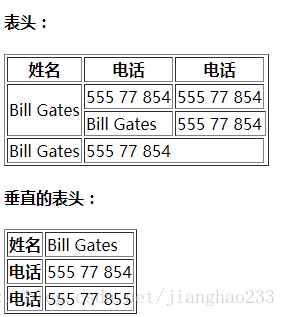
表单
form
属性
action : 要处理该表单的url地址(提交到的服务端地址)
method : 请求的方式
1:post,在地址栏不显示表单数据;
属性:
type:
text : 文本输入框
password : 密码输入框
radio : 单选框
checkbox : 复选框
button :按钮
name : 表单元素的名字
value : 表单的值
checked : 是否选中,只能用于 radio 和checkbox
1.块级标签 :每个块级标签独自占一行
h1--h6 标题
p 段落
hr : 水平线
ol li 有序列表
ul li : 无序列表
div :
2.行级标签 : 按行逐一显示,不会自动换行
img ,a,b,i,em,strong,small,br,span
img 图片
src:图片地址
alt:提示文字
a:超链接 属性 href : 要连接到的地址
target : '_blank','_self'
b:给文字加粗
i:斜体
em:强调字体,效果跟斜体一样
strong : 强调字体,效果和粗体一样
small : 小号字体
br : 换行
span : 普通的行级标签,没有任何效果
特殊符号 :需要进行转义
< : < (less than)
> : > (great than)
"" : "
空格:
版权号:©
<img src="img/goodsDetails11.jpg" alt="图片"/> <a href="http://www.baidu.com" target="_blank">百度</a> <b>加粗文字</b> <i>斜体文字</i> <b><i>加粗斜体文字</i></b> <br /> <strong>强调文字</strong><br /> <small>2小号文字</small>外部文字<br /> H<small>2</small>O<br /> <em>强调效果和斜体一样</em><br /> <span> 这是一个 span标签,没有任何样式 小于号是:< <br /> 大于号是: > 双引号是:" 版权号是:© </span>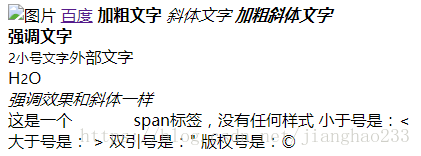
表格
table : 表格
tr : 行
th : 定义表格的页眉单元格
td :定义普通单元格
colspan:夸列
rowspan : 跨行
thead:表格头部信息
tbody:表格主体部分
tfoot:表格脚
caption: 表格标题
rowspan:合并行 colspan:行并列
<h4>表头:</h4> <table border="1"> <thead> <th>姓名</th> <th>电话</th> <th>电话</th> </thead> <tr> <td rowspan="2">Bill Gates</td> <td>555 77 854</td> <td>555 77 854</td> </tr> <tr> <td>Bill Gates</td> <td colspan="2">555 77 854</td> </tr> <tfoot> <td rowspan="3">Bill Gates</td> <td colspan="2">555 77 854</td> </tfoot></table> <h4>垂直的表头:</h4> <table border="1"> <thead> <th>姓名</th> <td>Bill Gates</td> </thead> <tr> <th>电话</th> <td>555 77 854</td> </tr> <tr> <th>电话</th> <td>555 77 855</td></tr></table>表单
form
属性
action : 要处理该表单的url地址(提交到的服务端地址)
method : 请求的方式
1:post,在地址栏不显示表单数据;
2:get:表单数据在地址栏显示
name:标识 autocomplete:浏览器是否可以自动填充
enctype:指定表单内容编码 (默认 utf-8)
input属性:
type:
text : 文本输入框
password : 密码输入框
radio : 单选框
checkbox : 复选框
button :按钮
name : 表单元素的名字
value : 表单的值
checked : 是否选中,只能用于 radio 和checkbox
disabled : 设置表单元素不可用
【在form表单中如果属性的值和属性名相同,可以省略属性值如checked和disabled】
maxlength : 最大字符数
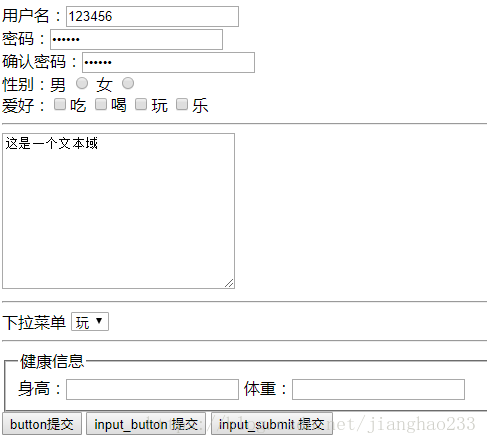
<form action="http://www.baidu.com" method="get"> 用户名:<input type="text" name="username" value="123456" /><br /> 密码:<input type="password" name="password" value="123456"/><br /> 确认密码:<input type="password" name="repassword" value="123456" /><br /> 性别:男 <input type="radio" name="sex" value="nan" /> 女 <input type="radio" name="sex" value="nv" /><br /> 爱好:<input type="checkbox" name="love" value="1" />吃 <input type="checkbox" name="love" value="2" />喝 <input type="checkbox" name="love" value="3" />玩 <input type="checkbox" name="love" value="4" />乐 <br /> <hr /><textarea rows="10" cols="30">这是一个文本域</textarea><hr />下拉菜单<select name="爱好"><option value="chi" value="1">吃</option><option value="he" value="2">喝</option><option value="wan" value="3" selected="selected">玩</option><option value="le" value="4">乐</option></select><hr /> <fieldset> <legend>健康信息</legend> 身高:<input type="text" /> 体重:<input type="text" /> </fieldset> <button>button提交</button> <input type="button" value="input_button 提交"/> <input type="submit" value="input_submit 提交" /></form>点击input_button不会提交,点击button 提交 和 input_submit 提交 可以提交,地址栏结果如下:

(www.baidu.com 只是示例,没有实际用途)
继续阅读与本文标签相同的文章
-
初识 Vue(07)---(Vue 实例的生命周期钩子)
2026-05-26栏目: 教程
-
初识 Vue(06)---(Vue 实例)
2026-05-26栏目: 教程
-
初识 Vue(05)---(组件间传值)
2026-05-26栏目: 教程
-
Java 学习(18)--列表(List)/ 集合 (Set)/ 泛型 / Map
2026-05-26栏目: 教程
-
Java 学习(19)--集合(collection)/ 学生管理系统
2026-05-26栏目: 教程